Notifications
Overview
Highnote supports notifications that let you monitor and respond to events in your Highnote integration. Common use cases are:
- Interacting with asynchronous onboarding flows
- Monitoring changes and alerts
- Transferring data into third-party systems
Key concepts
Understanding the notification architecture helps you implement an efficient event monitoring system. Here's a breakdown of the key concepts:
-
Event Types: Categories of events that occur within your Highnote integration. Examples include authorization events, card issuance events, and system notifications like webhook activation.
-
Notification Targets: Destinations that receive notifications, primarily webhook endpoints in Highnote's implementation. These are HTTP endpoints that receive event data when specific events occur.
-
Subscriptions: Relationships between event types and notification targets. When you "subscribe" a target to an event type, you're configuring that target to receive notifications when events of that type occur.
Change management
Notification schemas can change over time. When new attributes are added, Highnote will notify you seven days before release. When a breaking change occurs, Highnote will notify you 90 days before release to ensure ample time for any necessary updates.
To maintain uninterrupted service, we recommend building robust and resilient integrations that can adapt to these changes.
Webhooks
Highnote notifications use webhooks to deliver events to your system. Refer to the following guidelines for using webhooks:
- Webhooks can be managed using the Highnote API or the dashboard
- You can have up to 50 active webhooks at a time
- You can configure specific events to be delivered to each webhook
Notification events are sent as POST requests with JSON bodies. Highnote will send the following headers on each request:
user-agent:HighnotePlatform/1.0.0highnote-signature: The result of computing an HMAC 256 signature of the request bodyhighnote-replay: This will be sent in cases where the event is being manually re-deliveredcontent-type:application/json
Best practices
We recommend using the following best practices to ensure your webhooks remain secure and maintain functionality with your integration.
Rotate signing keys
The signing key used to verify payloads is modifiable using the rotateNotificationTargetSigningKey mutation.
Refer to the following guidelines for rotating signing keys:
- We recommend rotating signing keys periodically or when you suspect a compromise to keep them secure.
- When rotating signing keys, multiple keys become active for the notification endpoint. The old key expires in 24 hours after rotating a signing key.
- Before the old key expires, signatures for all keys are sent in the notification payload.
- A notification target can have a maximum of five active keys at a time.
Use the following mutation to rotate a signing secret:
RotateNotificationTargetSigningKey
Query
mutation rotateNotificationTargetSigningKey(
  $input: RotateNotificationTargetSigningKeyInput!
) {
  rotateNotificationTargetSigningKey(input: $input) {
    ... on WebhookNotificationTarget {
      id
      status
      signingKeys {
        id
        secret
        createdAt
        expiresAt
      }
    }
  }
}
Variables
{
  "input": {
    "id": "<NOTIFICATION_TARGET_ID>"
  }
}
Result
{
  "data": {
    "rotateNotificationTargetSigningKey": {
      "id": "<NOTIFICATION_TARGET_ID>"
    }
  }
}
Verify payloads
You can ensure events pushed to your webhook are coming from Highnote by inspecting the highnote-signature HTTP header.
The header contains a comma-separated list of signatures.
Usually, the list will only contain one item unless you are rolling your signing key.
To verify the signature with the payload you received refer to the following steps:
- Sign the received payload using your language-specific HMAC signing library and the signing key secret for your notification target.
- Once you have a local signature, extract the value of the
highnote-signatureand compare the two using a timing-safe equals operation.
The following code sample displays how this process would look in node.js:
import { createHmac, timingSafeEqual } from "crypto";

function verifySignature(
  secret: string,
  payload: string,
  remoteSignature: string,
): boolean {
  const localSignature = createHmac("sha256", secret)
    .update(payload)
    .digest("hex");

  return timingSafeEqual(
    Buffer.from(remoteSignature),
    Buffer.from(localSignature),
  );
}
If there is equality between the signatures, verify the timestamp of the event is within a certain threshold. The signature timestamp can be found in the payload at $.extensions.signatureTimestamp, with the value being the number of milliseconds since Unix epoch.
function within15minutes(payload: string): boolean {
  const jsonPayload = JSON.parse(payload);
  const { signatureTimestamp } = jsonPayload.extensions;
  return Date.now() - signatureTimestamp <= 15 * 60 * 1000;
}
Handle out-of-order delivery
Webhook notifications can arrive out of order. See Out-of-order delivery for the failure mode and how to handle money movement and reconciliation.
Handle duplicate events
Webhook endpoints may receive duplicate events. To prevent processing duplicate events, you should implement idempotent event handling. This can be done by maintaining a log of all processed events and not processing events that have already been logged.
Process events asynchronously
Asynchronous queues help you handle multiple events at a pace that fits your system's capacity.
Set up your event handler to use an asynchronous queue for managing incoming notification events. Processing events synchronously can lead to scalability problems and overloading of your webhook endpoints, especially during high-traffic time periods.
Out-of-order delivery
Highnote webhook notifications signal that something happened on the platform. They are not authoritative — notifications are not guaranteed to arrive in the order events occurred, and webhook timestamps are not reliable enough to reconstruct event order from the payload. Do not use webhook arrival order to drive money movement (refunds, credits, debits) or financial reconciliation.
For ordering-sensitive and money-critical logic, use one of these authoritative sources instead:
- Data Share — near-real-time replication of your Highnote data into Snowflake. Query the canonical state on whatever cadence you need.
- Reports — batch financial reports for daily reconciliation and end-of-period truth.
Webhook notifications are still the right pattern for event-driven UX (for example, refreshing a transaction list the moment a notification fires). They are the wrong pattern for moving money based on what events have or haven't fired.
Worked example
Consider a card transaction:
- Cardholder buys for $300. Highnote sends an authorization webhook.
- The merchant clears the transaction. Highnote sends a clearing webhook for $300. The cardholder's account is debited.
- The merchant issues a refund after clearing (a post-clearing reversal). Highnote sends a reversal webhook for $300. The cardholder should be credited back.
If your endpoint receives these notifications out of order:
| Order arrived | Event | Wrong response | Correct response |
|---|---|---|---|
| 1st | Reversal $300 | Treat as an authorization release; release the hold | Treat as a refund — check the settlementImpact field, or wait for the clearing |
| 2nd | Clearing $300 | Debit the cardholder's account | Debit the cardholder's account |
The cardholder is now debited $300 with no refund credit, because the reversal was processed as an authorization release.
The fix is not to reconstruct order from webhooks (which has its own race conditions). Use Data Share or Reports to read the authoritative state of the transaction, and drive money movement from that.
Fallback on reversal events
If you must process webhooks for money movement and cannot use Data Share or Reports, check the settlementImpact field on reversal events:
settlementImpact: true— clearing has already happened. Process the reversal as a refund (credit the cardholder).settlementImpact: false— no clearing yet. Process as a standard authorization release (release the hold).
This handles the reversal-after-clearing race but does not solve the broader class of ordering issues. For everything else, use Data Share or Reports.
Adding a webhook
Adding an email to a webhook target is only supported in the Live environment. If you attempt to add an email to a webhook in the Test environment, you will get an AccessDeniedError.
You can add webhooks using the addWebhookNotificationTarget mutation. For more information on this mutation, see addWebhookNotificationTarget in the API reference.
The requirements for an HTTP webhook are:
- The endpoint must be served via HTTPS
- Must return a
2XXstatus code. All other status codes will be considered a delivery failure and the request will be retried
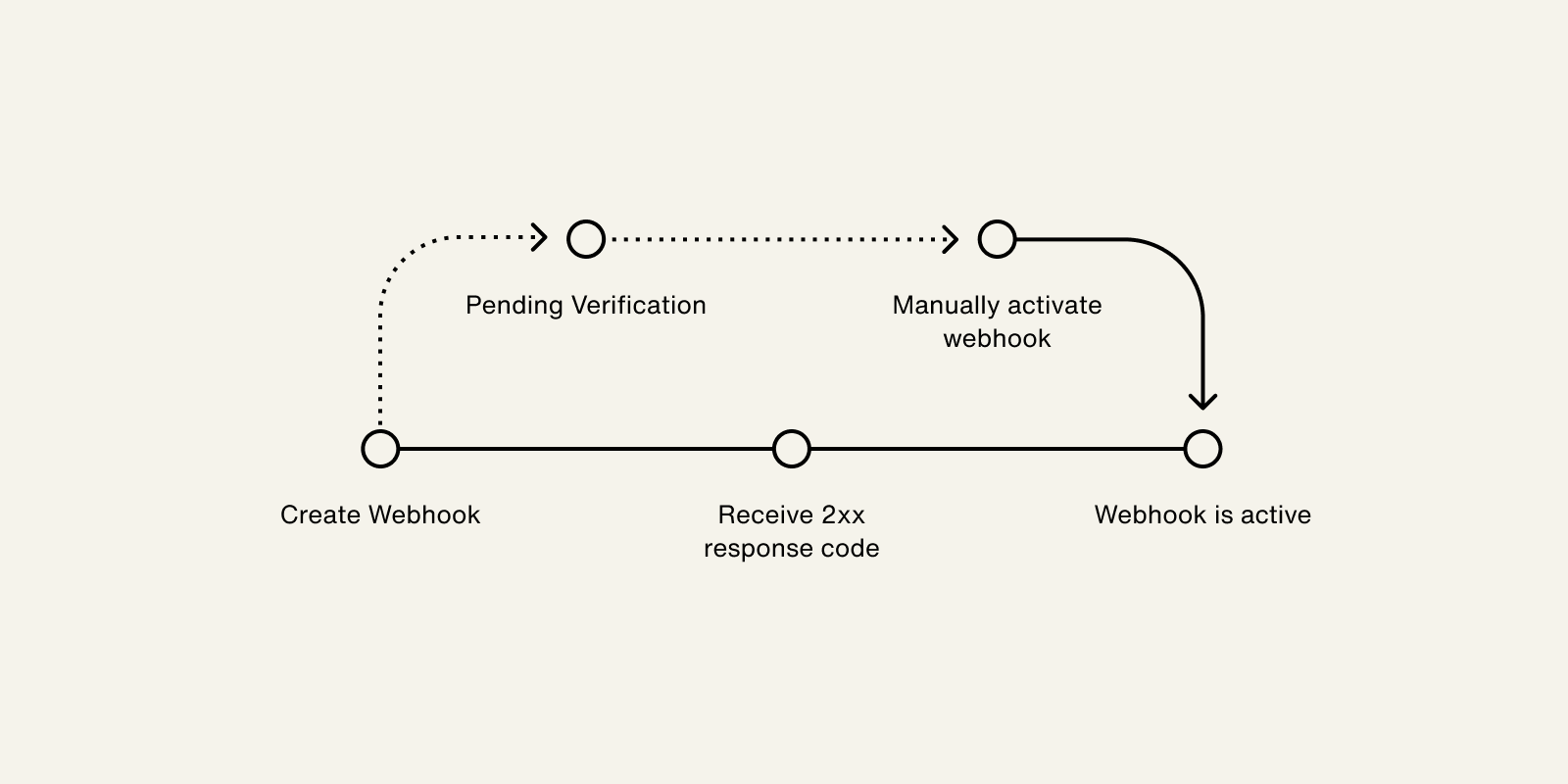
The following process outlines how a webhook is verified and activated:
- When a webhook is created, the status updates to
PENDING_VERIFICATION. - Highnote delivers a
NOTIFICATION_ACTIVATIONevent to your webhook, which is a test event. - Upon receiving a
2XXresponse to the test event, the status updates toACTIVE. - If the webhook does not return a
2XXresponse, the status remains inPENDING_VERIFICATION. You can attempt to activate the webhook using theactivateNotificationTargetmutation.
This process is outlined in the following graphic:
For testing, if you do not have a server, you can use webhook.site, requestbin, or pipedream. Do not use these services for your production webhooks.
Use the following mutation to add a webhook.
You can choose to add an email to your webhook target to receive deactivation emails by including the email field in your query.
Adding an email to a webhook target is optional and only supported in the Live environment:
AddWebhookNotificationTarget
Query
mutation AddWebhookNotificationTarget(
  $input: AddWebhookNotificationTargetInput!
) {
  addWebhookNotificationTarget(input: $input) {
    __typename
    ... on WebhookNotificationTarget {
      id
      name
      uri
      subscriptions
      email
      createdAt
      status
      signingKeys {
        id
        secret
      }
    }
    ... on UserError {
      errors {
        errorPath
        code
        description
      }
    }
  }
}
Variables
{
  "input": {
    "name": "My Webhook",
    "uri": "https://webhook.site",
    "subscriptions": [
      "CARD_PRODUCT_APPLICATION_APPROVED"
    ],
    "email": "notifications-alerts@mycompany.com"
  }
}
Result
{
  "data": {
    "addWebhookNotificationTarget": {
      "__typename": "WebhookNotificationTarget",
      "id": "<TARGET_ID>",
      "name": "My Webhook",
      "uri": "https://webhook.site",
      "subscriptions": [
        "CARD_PRODUCT_APPLICATION_APPROVED"
      ],
      "email": "notifications-alerts@mycompany.com",
      "createdAt": "2021-11-19T19:16:23.477Z",
      "status": "PENDING_VERIFICATION",
      "signingKeys": [
        {
          "id": "some-id",
          "secret": "some_secret"
        }
      ]
    }
  }
}
Updating a subscription
Subscriptions are established when you create a webhook, but you can update an existing webhook with the following mutations:
addSubscriptionsToNotificationTargetlets you add new event type subscriptions to an existing notification target.removeSubscriptionsFromNotificationTargetlets you remove event type subscriptions from an existing notification target.
Add Subscriptions to Notification
Use the following mutation to add one or more subscriptions to an existing webhook or other application notification target:
AddSubscriptionsToNotificationTarget
Query
mutation AddSubscriptionsToNotificationTarget(
  $input: AddSubscriptionsToNotificationTargetInput!
) {
  addSubscriptionsToNotificationTarget(input: $input) {
    ... on WebhookNotificationTarget {
      id
      name
      subscriptions
      status
    }
    ... on UserError {
      errors {
        errorPath
        code
        description
      }
    }
  }
}
Variables
{
  "input": {
    "targetId": "<NOTIFICATION_TARGET_ID>",
    "subscriptions": [
      "PAYMENT_CARD_AUTHORIZATION_DECLINED",
      "PAYMENT_CARD_AUTHORIZATION_REVERSED"
    ]
  }
}
Result
{
  "data": {
    "addSubscriptionsToNotificationTarget": {
      "id": "<NOTIFICATION_TARGET_ID>",
      "name": "My Webhook",
      "subscriptions": [
        "CARD_PRODUCT_APPLICATION_APPROVED",
        "PAYMENT_CARD_AUTHORIZATION_DECLINED",
        "PAYMENT_CARD_AUTHORIZATION_REVERSED"
      ],
      "status": "ACTIVE"
    }
  }
}
Remove Subscriptions from Notification
Use the following mutation to remove one or more subscriptions from an existing webhook or other application notification target:
RemoveSubscriptionsFromNotificationTarget
Query
mutation RemoveSubscriptionsFromNotificationTarget(
  $input: RemoveSubscriptionsFromNotificationTargetInput!
) {
  removeSubscriptionsFromNotificationTarget(input: $input) {
    ... on WebhookNotificationTarget {
      id
      name
      subscriptions
      status
    }
    ... on UserError {
      errors {
        errorPath
        code
        description
      }
    }
  }
}
Variables
{
  "input": {
    "targetId": "<NOTIFICATION_TARGET_ID>",
    "subscriptions": [
      "PAYMENT_CARD_AUTHORIZATION_DECLINED"
    ]
  }
}
Result
{
  "data": {
    "removeSubscriptionsFromNotificationTarget": {
      "id": "<NOTIFICATION_TARGET_ID>",
      "name": "My Webhook",
      "subscriptions": [
        "CARD_PRODUCT_APPLICATION_APPROVED",
        "PAYMENT_CARD_AUTHORIZATION_REVERSED"
      ],
      "status": "ACTIVE"
    }
  }
}
Test updating subscriptions
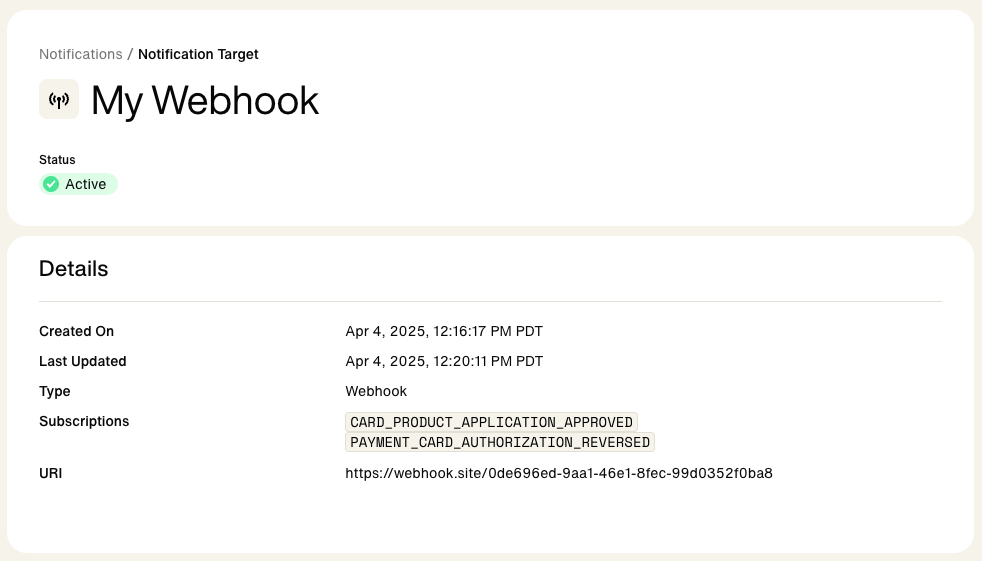
You can test the creation and updating of subscriptions with https://webhook.site:
Create a webhook with default subscription
- Go to https://webhook.site to automatically create a usable webhook URL for testing.
- Click your unique URL to copy it.
- Go to Add a webhook and run the mutation with your webhook URL as the
uriinput. - Copy the target
idfrom the results and temporarily store for safe keeping. - Note the subscription to
CARD_PRODUCT_APPLICATION_APPROVEDevents. - Go to the Dashboard and find your new webhook under Developers > Notifications.
You should see an active webhook that is subscribed to CARD_PRODUCT_APPLICATION_APPROVED.
Add a subscription
- Go to Add subscriptions
- Add you webhook URL
id(prefixed byntt_) as the input for the notificationtargetId. - Note the list of new subscriptions to:
[PAYMENT_CARD_AUTHORIZATION_DECLINED, PAYMENT_CARD_AUTHORIZATION_REVERSED] - Run the mutation and view the dashboard to see the change.
Your webhook should now be subscribed to CARD_PRODUCT_APPLICATION_APPROVED PAYMENT_CARD_AUTHORIZATION_DECLINED, and PAYMENT_CARD_AUTHORIZATION_REVERSED.
Remove a subscription
- Go to Remove subscriptions .
- Add you webhook URL
idas the input fortargetId. - Unsubscribe from existing event,
PAYMENT_CARD_AUTHORIZATION_DECLINED. - Run the mutation and view the dashboard to see the change.
Your webhook should only be subscribed to CARD_PRODUCT_APPLICATION_APPROVED and PAYMENT_CARD_AUTHORIZATION_REVERSED.
Retries and failures
A notification delivery is considered a failure if:
- Highnote does not receive a 2xx HTTP status code in the response
- If there is no response within 10 seconds, which is considered a timeout
Highnote handles notification failures and retries as follows:
| Event | Retries in Live environment | Retries in Test environment |
|---|---|---|
| Notification activation | Two within a minute | Two within a minute |
| All other notifications | Nine times with exponential backoff | Three times |
If a notification fails all attempts, we will disable the webhook target. If you have an email address configured for your webhook, you will receive an email notifying you of the deactivation. You must manually reactivate it through the API or dashboard. If your webhook endpoint is down or if you miss any events, you can retrieve them via the API.
View delivery attempts
Use the following query to view delivery attempts.
If no target is enabled for the event type, the deliveryAttempts value will be null:
WebhookNotificationTarget
Query
query WebhookNotificationTarget($id: ID!) {
  node(id: $id) {
    __typename
    ... on WebhookNotificationTarget {
      status
      id

      deliveryAttempts {
        __typename

        pageInfo {
          hasNextPage
          hasPreviousPage
          startCursor
          endCursor
        }

        edges {
          cursor

          node {
            __typename
            id
            uri
            response {
              httpStatusCode
            }
            deliveryAttemptStatus
            createdAt
            event {
              name
              id
            }
          }
        }
      }
    }
  }
}
Variables
{
  "id": "<APPLICATION_ID>"
}
Result
{
  "data": {
    "node": {
      "__typename": "WebhookNotificationTarget",
      "status": "ACTIVE",
      "id": "<NOTIFICATION_TARGET_ID>",
      "deliveryAttempts": {
        "__typename": "DeliveryAttemptConnection",
        "pageInfo": {
          "hasNextPage": false,
          "hasPreviousPage": false,
          "startCursor": "some-cursor",
          "endCursor": "some-cursor"
        },
        "edges": [
          {
            "cursor": "some-cursor",
            "node": {
              "__typename": "DeliveryAttempt",
              "id": "<DELIVERY_ATTEMPT_ID>",
              "uri": "https://webhook.site/",
              "response": {
                "httpStatusCode": 200
              },
              "deliveryAttemptStatus": "SUCCESS",
              "createdAt": "2021-12-20T18:42:51.805Z",
              "event": {
                "name": "NOTIFICATION_ACTIVATION",
                "id": "<NOTIFICATION_EVENT_ID>"
              }
            }
          }
        ]
      }
    }
  }
}
Retrieve failed notifications
You can use the following query to retrieve failed notifications. This is useful when your webhook endpoint is down and, as a result, deactivated. For more information on retries and failures, see Retries and Failures.
GetUnsuccessfulWebhookNotificationTargetEvents
Query
query GetUnsuccessfulWebhookNotificationTargetEvents(
  $id: ID!
  $filterBy: WebhookNotificationTargetEventFilterInput
) {
  node(id: $id) {
    __typename
    ... on WebhookNotificationTarget {
      webhookNotificationTargetEvents(filterBy: $filterBy) {
        __typename
        pageInfo {
          startCursor
          endCursor
          hasNextPage
          hasPreviousPage
        }
        edges {
          __typename
          cursor
          node {
            __typename
            hasSuccessfulDelivery
            event {
              __typename
              id
              name
            }
          }
        }
      }
    }
  }
}
Variables
{
  "id": "<NOTIFICATION_TARGET_ID>",
  "filterBy": {
    "hasSuccessfulDelivery": false,
    "name": [
      "PAYMENT_CARD_AUTHORIZATION_APPROVED"
    ],
    "eventCreatedAt": {
      "greaterThan": "2024-03-07T00:37:07.175Z"
    }
  }
}
Result
{
  "data": {
    "node": {
      "__typename": "WebhookNotificationTarget",
      "webhookNotificationTargetEvents": {
        "__typename": "WebhookNotificationTargetEventConnection",
        "pageInfo": {
          "startCursor": "start-cursor",
          "endCursor": "end-cursor",
          "hasNextPage": false,
          "hasPreviousPage": false
        },
        "edges": [
          {
            "__typename": "WebhookNotificationTargetEventEdge",
            "cursor": "some-cursor",
            "node": {
              "__typename": "WebhookNotificationTargetEvent",
              "hasSuccessfulDelivery": false,
              "event": {
                "__typename": "NotificationEvent",
                "id": "<NOTIFICATION_EVENT_ID>",
                "name": "PAYMENT_CARD_AUTHORIZATION_APPROVED"
              }
            }
          },
          {
            "__typename": "WebhookNotificationTargetEventEdge",
            "cursor": "some-cursor",
            "node": {
              "__typename": "WebhookNotificationTargetEvent",
              "hasSuccessfulDelivery": false,
              "event": {
                "__typename": "NotificationEvent",
                "id": "<NOTIFICATION_EVENT_ID>",
                "name": "PAYMENT_CARD_AUTHORIZATION_APPROVED"
              }
            }
          }
        ]
      }
    }
  },
  "extensions": {
    "requestId": "<REQUEST_ID>"
  }
}
Replay events
Once you have retrieved any failed notification events, you can use the following mutation to replay them or manually re-deliver events to your webhooks:
ReplayNotificationEvent
Query
mutation ReplayNotificationEvent($input: ReplayNotificationEventInput!) {
  replayNotificationEvent(input: $input) {
    ... on NotificationEvent {
      __typename
      id
      node {
        __typename
        ... on Node {
          id
        }
        ... on AuthorizationEvent {
          id
          approvedAmount {
            value
          }
        }
      }
    }
    ... on UserError {
      errors {
        errorPath
        code
      }
    }
  }
}
Variables
{
  "input": {
    "notificationEventId": "<NOTIFICATION_EVENT_ID>"
  }
}
Result
{
  "data": {
    "replayEvent": {
      "__typename": "NotificationEvent",
      "id": "<NOTIFICATION_EVENT_ID>",
      "node": {
        "__typename": "AuthorizationEvent",
        "id": "<AUTHORIZATION_EVENT_ID>",
        "approvedAmount": {
          "value": 20000
        }
      }
    }
  }
}
Rename a target
You can update the name of a notification target without affecting the delivery of events using the following mutation:
RenameNotificationTarget
Query
mutation RenameNotificationTarget($input: RenameNotificationTargetInput!) {
  renameNotificationTarget(input: $input) {
    ... on WebhookNotificationTarget {
      id
      name
      status
    }
  }
}
Variables
{
  "input": {
    "targetId": "<NOTIFICATION_TARGET_ID>",
    "name": "My Updated Webhook"
  }
}
Result
{
  "data": {
    "renameNotificationTarget": {
      "id": "<NOTIFICATION_TARGET_ID>",
      "name": "My Updated Webhook",
      "status": "ACTIVE"
    }
  }
}
Add email to existing target
Adding an email to a webhook target is only supported in the Live environment. If you attempt to add an email to a webhook in the Test environment, you will get an AccessDeniedError.
Emails are used to receive deactivation emails. You can use the following mutation to add an email to an existing webhook target. Adding an email to a webhook target is optional and only supported in the Live environment:
SetEmailForNotificationTarget
Query
mutation setEmailForNotificationTarget(
  $input: SetEmailForNotificationTargetInput!
) {
  setEmailForNotificationTarget(input: $input) {
    ... on WebhookNotificationTarget {
      id
      name
      uri
      email
      subscriptions
      createdAt
      status
      signingKeys {
        id
        secret
      }
    }
    ... on UserError {
      errors {
        errorPath
        code
        description
      }
    }
    ... on AccessDeniedError {
      __typename
      message
    }
  }
}
Variables
{
  "input": {
    "targetId": "<NOTIFICATION_TARGET_ID>",
    "email": "notification-alerts@mycompany.com"
  }
}
Result
{
  "data": {
    "setEmailForNotificationTarget": {
      "__typename": "WebhookNotificationTarget",
      "id": "<NOTIFICATION_TARGET_ID>",
      "name": "My Target",
      "uri": "URL",
      "subscriptions": [
        "PAYMENT_CARD_ACTIVATED",
        "AUTHORIZED_USER_CARD_PRODUCT_APPLICATION_APPROVED",
        "CARD_PRODUCT_APPLICATION_APPROVED",
        "CARD_PRODUCT_APPLICATION_IN_REVIEW",
        "CARD_PRODUCT_APPLICATION_MANUAL_REVIEW",
        "CARD_PRODUCT_APPLICATION_DENIED",
        "CARD_PRODUCT_APPLICATION_CLOSED",
        "PAYMENT_CARD_TRANSACTION_DISPUTE_CASE_STATUS_INITIATED",
        "PAYMENT_CARD_TRANSACTION_CHARGEBACK_PROVISIONAL_CREDIT_ISSUED"
      ],
      "email": "notification-alerts@mycompany.com"
    }
  }
}
Remove email from existing target
Removing an email to a webhook target is only supported in the Live environment. If you attempt to add an email to a webhook in the Test environment, you will get an AccessDeniedError.
You can use the following mutation to remove an email from a webhook target:
RemoveEmailForNotificationTarget
Query
mutation RemoveEmailForNotificationTarget(
  $input: RemoveEmailFromNotificationTargetInput!
) {
  removeEmailFromNotificationTarget(input: $input) {
    __typename
    ... on WebhookNotificationTarget {
      id
      name
      uri
      subscriptions
      email
    }
    ... on UserError {
      errors {
        errorPath
        code
        description
      }
    }
  }
}
Variables
{
  "input": {
    "targetId": "<NOTIFICATION_TARGET_ID>"
  }
}
Result
{
  "data": {
    "removeEmailFromNotificationTarget": {
      "__typename": "WebhookNotificationTarget",
      "id": "<NOTIFICATION_TARGET_ID>",
      "name": "My Target",
      "uri": "https://webhook.site/2c0910c2-4369-4c4c-b7f4-818017215da9",
      "subscriptions": [
        "PAYMENT_CARD_ACTIVATED",
        "AUTHORIZED_USER_CARD_PRODUCT_APPLICATION_APPROVED",
        "CARD_PRODUCT_APPLICATION_APPROVED",
        "CARD_PRODUCT_APPLICATION_IN_REVIEW",
        "CARD_PRODUCT_APPLICATION_MANUAL_REVIEW",
        "CARD_PRODUCT_APPLICATION_DENIED",
        "CARD_PRODUCT_APPLICATION_CLOSED",
        "PAYMENT_CARD_TRANSACTION_DISPUTE_CASE_STATUS_INITIATED",
        "PAYMENT_CARD_TRANSACTION_CHARGEBACK_PROVISIONAL_CREDIT_ISSUED"
      ],
      "email": null
    }
  }
}
Delete a target
Deleting a notification target may impact the functionality of your Highnote integration and cannot be reversed.
Notification targets may be deleted. Deleting a target will stop the delivery of all events because the notification target will no longer exist. Use the following mutation to remove a notification target:
RemoveNotificationTarget
Query
mutation RemoveNotificationTarget($input: RemoveNotificationTargetInput!) {
  removeNotificationTarget(input: $input) {
    ... on WebhookNotificationTarget {
      id
    }
  }
}
Variables
{
  "input": {
    "targetId": "<NOTIFICATION_TARGET_ID>"
  }
}
Result
{
  "data": {
    "removeNotificationTarget": {
      "id": "<NOTIFICATION_TARGET_ID>"
    }
  }
}
Expiration of deactivated targets
Once a target is deactivated, any attempts to send notifications to the target will return an error status.
A webhook with a DEACTIVATED status for more than 30 days is considered expired. It will be deleted and no longer visible.