Searching the API
Before you start
Highnote launched the Highnote Query Language to improve your ability to search across our API.
All Highnote API entities use the same search and sorting conventions. You can use the following examples to build your queries when filtering for matches. Results will always return as a paginated list you can traverse using cursors.
Search latency
Searching across multiple years of data may introduce minimal additional latency, though this impact is typically imperceptible in normal usage.
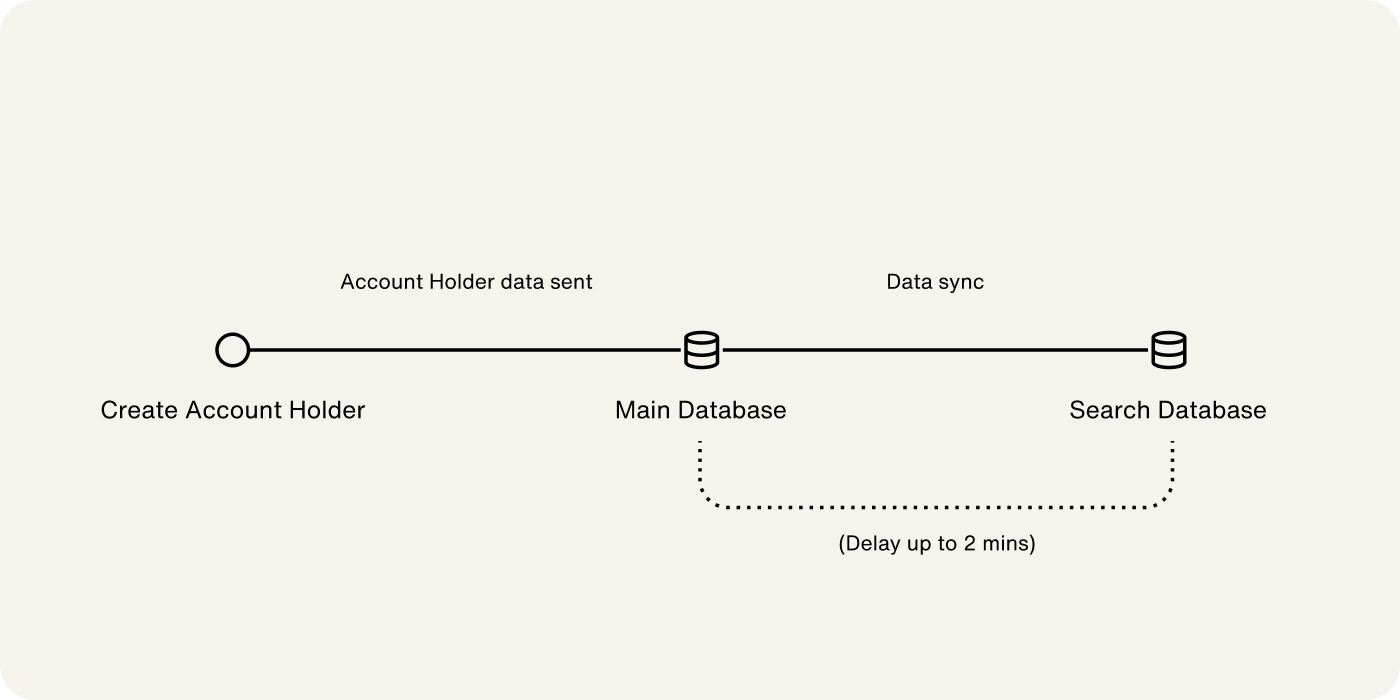
Highnote's Search API experiences a synchronization delay of up to 2 minutes for newly created objects.
When you create a new object (such as an account holder), it's immediately stored in the main database but takes up to 2 minutes to synchronize with the search database. During this period, the new object won't appear in search results. This process is illustrated below:
Highnote's Search API experiences a synchronization delay of up to 2 minutes for newly created objects.
When you create a new object (such as an account holder), it's immediately stored in the main database but takes up to 2 minutes to synchronize with the search database. During this period, the new object won't appear in search results. This process is illustrated below:
Data retention
Highnote maintains the following data retention periods through the standard API:
- Issuing transactions: 4 years
- Acquiring transactions: 2 years
You can fetch issuing and acquiring data beyond the retention period from Highnote Data Share.
Filtering basics
Different fields can filter every entity in our graph. However, all fields of the same type follow similar conventions.
Date filters
To filter by date range, use the following filters:
greaterThanlessThangreaterThanOrEqualTolessThanOrEqualToequalsnotEquals
SearchPersonAccountHolders
Query
query SearchPersonAccountHolders(
  $first: Int
  $filters: PersonAccountHolderFilterInput
) {
  personAccountHolders(first: $first, filterBy: $filters) {
    pageInfo {
      hasNextPage
    }
    edges {
      cursor
      node {
        id
      }
    }
  }
}
Variables
{
  "first": 20,
  "filters": {
    "dateOfBirth": {
      "greaterThan": "2021-06-01T00:00:00Z",
      "lessThan": "2021-07-01T00:00:00Z"
    }
  }
}
Result
{
  "data": {
    "personAccountHolders": {
      "pageInfo": {
        "hasNextPage": false
      },
      "edges": [
        {
          "cursor": "some-cursor",
          "node": {
            "id": "<ACCOUNT_HOLDER_ID>"
          }
        }
      ]
    }
  },
  "extensions": {
    "requestId": "<REQUEST_ID>"
  }
}
Number filters
To filter by numbers, use the following filters:
greaterThanlessThangreaterThanOrEqualTolessThanOrEqualToequalsnotEquals
SearchTransactionEvents
Query
query SearchTransactionEvents(
  $id: ID!
  $first: Int
  $filters: CardProductTransactionEventsFilterInput
) {
  node(id: $id) {
    ... on CardProduct {
      transactionEvents(first: $first, filterBy: $filters) {
        pageInfo {
          hasNextPage
        }
        edges {
          cursor
          node {
            ... on AuthorizationEvent {
              id
            }
          }
        }
      }
    }
  }
}
Variables
{
  "id": "<CARD_PRODUCT_ID>",
  "first": 20,
  "filters": {
    "approvedAmount": {
      "currencyCode": "USD",
      "lessThan": 10000000
    }
  }
}
Result
{
  "data": {
    "node": {
      "transactionEvents": {
        "pageInfo": {
          "hasNextPage": false
        },
        "edges": [
          {
            "cursor": "some-cursor",
            "node": {
              "id": "<CARD_PRODUCT_ID>"
            }
          }
        ]
      }
    }
  },
  "extensions": {
    "requestId": "<REQUEST_ID>"
  }
}
String filters
To filter with common string matching, use the following filters:
containsequalsnotEqualsstartsWithendsWith
SearchPersonAccountHolders
Query
query SearchPersonAccountHolders(
  $first: Int
  $filters: PersonAccountHolderFilterInput
) {
  personAccountHolders(first: $first, filterBy: $filters) {
    pageInfo {
      hasNextPage
    }
    edges {
      cursor
      node {
        id
        email
      }
    }
  }
}
Variables
{
  "first": 20,
  "filters": {
    "email": {
      "endsWith": "com"
    }
  }
}
Result
{
  "data": {
    "personAccountHolders": {
      "pageInfo": {
        "hasNextPage": false
      },
      "edges": [
        {
          "cursor": "some-cursor",
          "node": {
            "id": "<ACCOUNT_HOLDER_ID>",
            "email": "foo@example.com"
          }
        }
      ]
    }
  },
  "extensions": {
    "requestId": "<REQUEST_ID>"
  }
}
List filters
You can filter multiple values by choosing what values to include or exclude from the results. In the following example, the request is filtered to include AUTHORIZATION_EVENT and CLEARING_EVENT:
SearchTransactionEvents
Query
query SearchTransactionEvents(
  $id: ID!
  $first: Int
  $filters: CardProductTransactionEventsFilterInput
) {
  node(id: $id) {
    ... on CardProduct {
      transactionEvents(first: $first, filterBy: $filters) {
        pageInfo {
          hasNextPage
        }
        edges {
          cursor
          node {
            ... on AuthorizationEvent {
              id
            }
            ... on ClearingEvent {
              id
            }
          }
        }
      }
    }
  }
}
Variables
{
  "id": "<CARD_PRODUCT_ID>",
  "first": 20,
  "filters": {
    "eventType": {
      "includes": [
        "AUTHORIZATION_EVENT",
        "CLEARING_EVENT"
      ]
    }
  }
}
Result
{
  "data": {
    "node": {
      "transactionEvents": {
        "pageInfo": {
          "hasNextPage": false
        },
        "edges": [
          {
            "cursor": "some-cursor",
            "node": {
              "id": "<CARD_PRODUCT_ID>"
            }
          },
          {
            "cursor": "some-cursor",
            "node": {
              "id": "<TRANSACTION_EVENT_ID>"
            }
          }
        ]
      }
    }
  },
  "extensions": {
    "requestId": "<REQUEST_ID>"
  }
}
Enum filters
You can filter enums by including the enum values you wish to include, exclude, or match exactly. In the following example, the request is filtered to equal AUTHORIZATION_EVENT:
SearchTransactionEvents
Query
query SearchTransactionEvents(
  $id: ID!
  $first: Int
  $filters: CardProductTransactionEventsFilterInput
) {
  node(id: $id) {
    ... on CardProduct {
      transactionEvents(first: $first, filterBy: $filters) {
        pageInfo {
          hasNextPage
        }
        edges {
          cursor
          node {
            __typename
          }
        }
      }
    }
  }
}
Variables
{
  "id": "<CARD_PRODUCT_ID>",
  "first": 20,
  "filters": {
    "eventType": {
      "equals": "AUTHORIZATION_EVENT"
    }
  }
}
Result
{
  "data": {
    "node": {
      "transactionEvents": {
        "pageInfo": {
          "hasNextPage": false
        },
        "edges": [
          {
            "cursor": "some-cursor",
            "node": {
              "__typename": "AuthorizationEvent"
            }
          },
          {
            "cursor": "<AUTHORIZATION_EVENT_ID>",
            "node": {
              "__typename": "AuthorizationEvent"
            }
          }
        ]
      }
    }
  },
  "extensions": {
    "requestId": "<REQUEST_ID>"
  }
}
Combine filters
You can combine multiple filters to construct more advanced queries. In the following example, an enum, number, and date filter are used:
SearchTransactionEvents
Query
query SearchTransactionEvents(
  $id: ID!
  $first: Int
  $filters: CardProductTransactionEventsFilterInput
) {
  node(id: $id) {
    ... on CardProduct {
      transactionEvents(first: $first, filterBy: $filters) {
        pageInfo {
          hasNextPage
        }
        edges {
          cursor
          node {
            ... on AuthorizationEvent {
              __typename
            }
            ... on ClearingEvent {
              __typename
            }
          }
        }
      }
    }
  }
}
Variables
{
  "id": "<CARD_PRODUCT_ID>",
  "first": 20,
  "filters": {
    "eventType": {
      "includes": [
        "AUTHORIZATION_EVENT",
        "CLEARING_EVENT"
      ]
    }
  }
}
Result
{
  "data": {
    "node": {
      "transactionEvents": {
        "pageInfo": {
          "hasNextPage": false
        },
        "edges": [
          {
            "cursor": "some-cursor",
            "node": {
              "id": "<CARD_PRODUCT_ID>"
            }
          },
          {
            "cursor": "some-cursor",
            "node": {
              "id": "<TRANSACTION_EVENT_ID>"
            }
          }
        ]
      }
    }
  },
  "extensions": {
    "requestId": "<REQUEST_ID>"
  }
}
Application search
You can use the Highnote API to search Account Holder applications based on status, updatedAt, and createdAt search fields.
| Type | Field | Filter |
|---|---|---|
AccountHolderCardProductApplication | status | Enum |
updatedAt | Date | |
createdAt | Date |
The following example query would return the first 20 account holder applications with an APPROVED status:
GetCardProductWithApplications
Query
query GetCardProductWithApplications(
  $id: ID!
  $searchFilter: CardProductApplicationFilterInput
) {
  node(id: $id) {
    ... on CardProduct {
      __typename
      id
      name
      searchCardProductApplications(first: 20, filterBy: $searchFilter) {
        pageInfo {
          hasNextPage
        }
        edges {
          ... on AccountHolderCardProductApplicationEdge {
            cursor
            node {
              __typename
              ... on AccountHolderCardProductApplication {
                id
                applicationState {
                  status
                }

                accountHolderSnapshot {
                  __typename
                  ... on USPersonAccountHolderSnapshot {
                    accountHolderCurrent {
                      id
                      billingAddress {
                        streetAddress
                      }
                    }
                  }
                  ... on USBusinessAccountHolderSnapshot {
                    accountHolderCurrent {
                      businessProfile {
                        name {
                          legalBusinessName
                          doingBusinessAsName
                        }
                        businessType
                      }
                    }
                  }
                }
              }
              createdAt
              updatedAt
            }
          }
        }
      }
    }
  }
}
Variables
{
  "id": "<CARD_PRODUCT_ID>",
  "searchFilter": {
    "id": {
      "equals": "<APPLICATION_ID>"
    }
  }
}
Result
{
  "data": {
    "node": {
      "__typename": "CardProduct",
      "id": "<CARD_PRODUCT_ID>",
      "name": "Account Fee",
      "searchCardProductApplications": {
        "pageInfo": {
          "hasNextPage": false
        },
        "edges": [
          {
            "cursor": "some-cursor",
            "node": {
              "__typename": "AccountHolderCardProductApplication",
              "id": "<APPLICATION_ID>",
              "applicationState": {
                "status": "IN_REVIEW"
              },
              "accountHolderSnapshot": {
                "__typename": "USPersonAccountHolderSnapshot",
                "accountHolderCurrent": {
                  "id": "<ACCOUNT_HOLDER_ID>",
                  "billingAddress": {
                    "streetAddress": "123  St.123"
                  }
                }
              },
              "createdAt": "2023-07-17T14:35:22.870Z",
              "updatedAt": "2023-07-17T14:35:26.984Z"
            }
          }
        ]
      }
    }
  },
  "extensions": {
    "requestId": "<REQUEST_ID>",
    "rateLimit": {
      "limit": 30030,
      "remaining": 29927,
      "cost": 103
    }
  }
}