Create Secured Deposit Offer
Overview
With Highnote’s secured deposit card product feature, you can offer secured card products as an alternative during the card product application process. Secured deposit offers provide an alternative card product offering for account holders who do not meet the creditworthiness requirements for your unsecured card product.
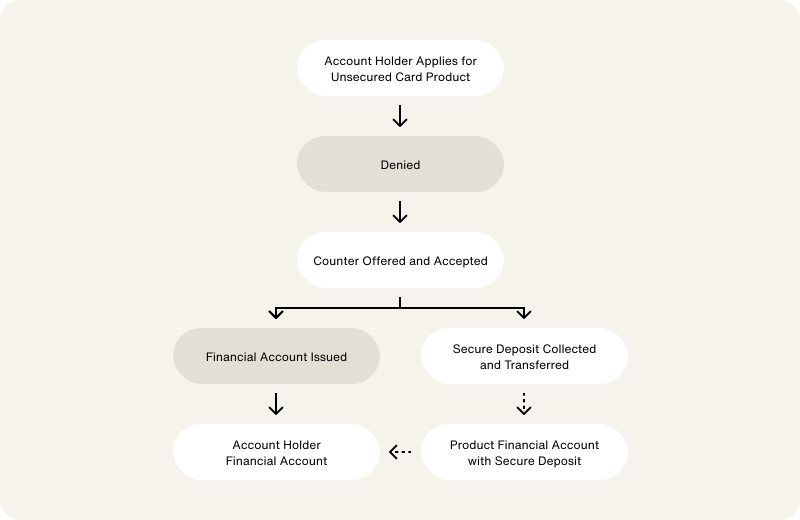
The secured deposit card product feature works as follows:
- An account holder applies for your unsecured card product and is
DENIED. - The account holder receives an alternative offer for your secured card product and accepts the offer.
- When the account holder accepts the alternative offer and their application is approved, an account holder financial account is issued. This financial account has the secured deposit feature attached to it.
- After approving the account holder for the secured card product, you collect the secured deposit in your external payment system.
- You can use a non-originated ACH transfer to move the account holder's secured deposit to your secured deposit product financial account.
- To apply the secured deposit to an account holder's financial account, you can use an internal Highnote transfer to move the funds from your product financial account.
This flow is outlined in the following graphic:
Enable secured deposit feature
The Highnote team must enable the secured deposit feature for your card product. Contact support@highnote.com for assistance with enabling the feature.
View card product with secured deposit feature
Once you have the secured deposit feature enabled for your card product, you can use the following query to view your card product feature settings:
ViewCardProductWithSecuredDepositFeature
Query
query ViewCardProductWithSecuredDepositFeature($id: ID!) {
  node(id: $id) {
    ... on CardProduct {
      features {
        __typename
        ... on SecuredDepositCardProductFeature {
          enabled
        }
      }
    }
  }
}
Variables
{
  "id": "<CARD_PRODUCT_ID>"
}
Result
{
  "node": {
    "features": [
      {
        "__typename": "SecuredDepositCardProductFeature",
        "enabled": "true"
      }
    ]
  }
}
Create card product application
During the application process, you can use the secured deposit feature to offer account holders a secured charge card as an alternative. If you are using collaborative application decisioning, see Manage offers.
For information on opening an application, see Open an application.
Issue a financial account
When an account holder accepts an alternative offer and receives approval, you can create a financial account for the account holder. The financial account includes the secured deposit feature.
Use the following mutation to issue a financial account to the account holder:
IssueFinancialAccountForApplication
Query
mutation IssueFinancialAccountForApplication(
  $input: IssueFinancialAccountForApplicationInput!
) {
  issueFinancialAccountForApplication(input: $input) {
    ... on FinancialAccount {
      id
      features {
        __typename
        enabled
        createdAt
        updatedAt
      }
    }
  }
}
Variables
{
  "input": {
    "applicationId": "<YOUR_APPLICATION_ID>",
    "name": "Financial Account",
    "externalId": "<YOUR_EXTERNAL_ID>"
  }
}
Result
{
  "data": {
    "issueFinancialAccountForApplication": {
      "id": "<ACCOUNT_HOLDER_FINANCIAL_ACCOUNT_ID>",
      "features": [
        {
          "__typename": "SecuredDepositFinancialAccountFeature",
          "enabled": true,
          "createdAt": "2021-12-28T18:20:49.933Z",
          "updatedAt": "2021-12-28T18:20:49.933Z"
        }
      ]
    }
  }
}
Find secured deposit product financial account
When an account holder is approved for a secured deposit card product, you collect funds in your external payment system and deposit them into the secured deposit product financial account. This account is used to send the secured deposit to account holders' financial accounts. In this transfer, the from and to financial accounts are as follows:
from: Secured deposit product financial accountto: Account holder financial account
Use the following query to find the product financial account with the secured deposit feature:
GetSecuredDepositFinancialAccountOnCardProduct
Query
query GetSecuredDepositFinancialAccountOnCardProduct(
  $id: ID!
  $filterBy: AccountHolderFinancialAccountsFilterInput!
) {
  node(id: $id) {
    ... on CardProduct {
      name
      accounts(filterBy: $filterBy) {
        edges {
          node {
            features {
              __typename
              enabled
              createdAt
              updatedAt
            }
          }
        }
      }
    }
  }
}
Variables
{
  "id": "<CARD_PRODUCT_ID>",
  "filterBy": {
    "features": {
      "includes": [
        "PRODUCT_SECURED_DEPOSIT"
      ]
    }
  }
}
Result
{
  "data": {
    "node": {
      "name": "My Product",
      "accounts": {
        "edges": [
          {
            "node": {
              "__typename": "FinancialAccount",
              "id": "<SECURED_DEPOSIT_PRODUCT_FINANCIAL_ACCOUNT_ID>",
              "features": [
                {
                  "__typename": "ProductSecuredDepositFinancialAccountFeature",
                  "enabled": true,
                  "createdAt": "2024-02-02T22:53:23.345Z",
                  "updatedAt": "2024-02-02T22:53:23.345Z"
                }
              ]
            }
          }
        ]
      }
    }
  }
}
Add funds to secured deposit product financial account
In the Live environment, you must initiate the funds transfer to add funds to your secured deposit product financial account. Use the following mutation to simulate funding a product financial account using non-originated ACH in the Test environment:
SimulateExternallyInitiatedACHTransfer
Query
mutation SimulateExternallyInitiatedACHTransfer(
  $input: SimulateExternallyInitiatedACHTransferInput!
) {
  simulateExternallyInitiatedACHTransfer(input: $input) {
    __typename
    ... on Node {
      id
    }
    ... on CreditFunds {
      id
      amount {
        currencyCode
        value
      }
      createdAt
      updatedAt

      ledgers {
        id
        name
        normalBalance
        asOf
        debitBalance {
          value
          currencyCode
        }
        creditBalance {
          value
          currencyCode
        }
      }
      status {
        __typename
        ... on NonFailureExternallyInitiatedACHStatus {
          status
        }
        ... on FailureExternallyInitiatedACHStatus {
          status
          statusReasonCode
        }
      }
      toFinancialAccount {
        __typename
        ... on FinancialAccount {
          id
          name
        }
      }
      companyName
      descriptor {
        companyEntryDescription
        individualIdentificationNumber
        individualName
      }
      companyIdentifier
      settlementDate
    }
    ... on DebitFunds {
      id
      amount {
        currencyCode
        value
      }
      createdAt
      updatedAt

      ledgers {
        id
        name
        normalBalance
        asOf
        debitBalance {
          value
          currencyCode
        }
        creditBalance {
          value
          currencyCode
        }
      }
      status {
        __typename
        ... on NonFailureExternallyInitiatedACHStatus {
          status
        }
        ... on FailureExternallyInitiatedACHStatus {
          status
          statusReasonCode
        }
      }
      fromFinancialAccount {
        __typename
        ... on FinancialAccount {
          id
          name
        }
      }
      companyName
      descriptor {
        companyEntryDescription
        individualIdentificationNumber
        individualName
      }
      companyIdentifier
      settlementDate
    }
    ... on UserError {
      errors {
        errorPath
        code
      }
    }
    ... on AccessDeniedError {
      message
    }
  }
}
Variables
{
  "input": {
    "amount": {
      "value": 10000,
      "currencyCode": "USD"
    },
    "transferType": "CREDIT",
    "financialAccountId": "<SECURED_DEPOSIT_PRODUCT_FINANCIAL_ACCOUNT_ID>"
  }
}
Result
{
  "data": {
    "simulateNonOriginatedACHTransfer": {
      "__typename": "CreditFunds",
      "id": "<SECURED_DEPOSIT_PRODUCT_FINANCIAL_ACCOUNT_ID>",
      "amount": {
        "currencyCode": "USD",
        "value": 10000
      },
      "createdAt": "2022-05-10T01:16:56.652Z",
      "updatedAt": "2022-05-10T01:16:56.669Z",
      "ledgers": [],
      "status": {
        "__typename": "NonFailureExternallyInitiatedACHStatus",
        "status": "PENDING"
      },
      "toFinancialAccount": {
        "__typename": "FinancialAccount",
        "id": "<SECURED_DEPOSIT_PRODUCT_FINANCIAL_ACCOUNT_ID>",
        "name": "Business Prepaid - Product Funding"
      },
      "companyName": "THESAMPLECOMPANY",
      "descriptor": {
        "companyEntryDescription": "ENTRYDSCPT",
        "individualIdentificationNumber": "<RECEIVER_NUMBER>",
        "individualName": "THISISTHERECIEVEROFACH"
      },
      "companyIdentifier": "1234567890",
      "settlementDate": "2022-05-10T01:16:56.491Z"
    }
  },
  "extensions": {
    "requested": "<REQUEST_ID>"
  }
}
Transfer secured deposit to account holder financial account
Use the following mutation to transfer a secured deposit from your product financial account to the account holder’s financial account. In the query, the from and to financial accounts are as follows:
from: Secured deposit product financial accountto: Account holder financial account
Use the purpose input variable field as follows:
- Use the
SECURED_DEPOSITvalue
InitiateTransferBetweenFinancialAccounts
Query
mutation InitiateTransferBetweenFinancialAccounts(
  $input: InitiateTransferBetweenFinancialAccountsInput!
) {
  initiateTransferBetweenFinancialAccounts(input: $input) {
    __typename
    ... on InterFinancialAccountTransfer {
      id
      status
      createdAt
      updatedAt
      memo
      purpose
      amount {
        value
        currencyCode
      }
      fromFinancialAccount {
        id
      }
      toFinancialAccount {
        id
      }
    }
  }
}
Variables
{
  "input": {
    "toFinancialAccountId": "<ACCOUNT_HOLDER_FINANCIAL_ACCOUNT_ID>",
    "fromFinancialAccountId": "<SECURED_DEPOSIT_PRODUCT_FINANCIAL_ACCOUNT_ID>",
    "purpose": "SECURED_DEPOSIT",
    "memo": "Set secured deposit",
    "amount": {
      "value": 10000,
      "currencyCode": "USD"
    }
  }
}
Result
{
  "data": {
    "initiateTransferBetweenFinancialAccounts": {
      "__typename": "InterFinancialAccountTransfer",
      "id": "<SECURED_DEPOSIT_IFA_TRANSFER_ID>",
      "status": "COMPLETED",
      "createdAt": "2024-01-29T03:40:07.230Z",
      "updatedAt": "2024-01-29T03:40:07.230Z",
      "memo": "Set secured deposit",
      "purpose": "SECURED_DEPOSIT",
      "amount": {
        "value": 10000,
        "currencyCode": "USD"
      },
      "fromFinancialAccount": {
        "id": "<SECURED_DEPOSIT_PRODUCT_FINANCIAL_ACCOUNT_ID>"
      },
      "toFinancialAccount": {
        "id": "<ACCOUNT_HOLDER_FINANCIAL_ACCOUNT_ID>"
      }
    }
  }
}
Reverse a secured deposit fund distribution
In the event you need to reverse a secure deposit fund distribution, use the following mutation. Reversing a secured deposit fund distribution is helpful if an error was made during the funds distribution process, or you need to return a deposit to an account holder when they graduate from a secured to unsecured charge card.
In the query, the from and to financial accounts are as follows:
from: Account holder financial accountto: Secured deposit product financial account
Use the purpose input variable field as follows:
- Use the
SECURED_DEPOSIT_REVERSALvalue
InitiateTransferBetweenFinancialAccounts
Query
mutation InitiateTransferBetweenFinancialAccounts(
  $input: InitiateTransferBetweenFinancialAccountsInput!
) {
  initiateTransferBetweenFinancialAccounts(input: $input) {
    __typename
    ... on InterFinancialAccountTransfer {
      id
      status
      createdAt
      updatedAt
      memo
      purpose
      amount {
        value
        currencyCode
      }
      fromFinancialAccount {
        id
      }
      toFinancialAccount {
        id
      }
    }
  }
}
Variables
{
  "input": {
    "fromFinancialAccountId": "<ACCOUNT_HOLDER_FINANCIAL_ACCOUNT_ID>",
    "toFinancialAccountId": "<SECURED_DEPOSIT_PRODUCT_FINANCIAL_ACCOUNT_ID>",
    "purpose": "SECURED_DEPOSIT_REVERSAL",
    "memo": "Returning secured deposit",
    "amount": {
      "value": 10000,
      "currencyCode": "USD"
    }
  }
}
Result
{
  "data": {
    "initiateTransferBetweenFinancialAccounts": {
      "__typename": "InterFinancialAccountTransfer",
      "id": "<SECURED_DEPOSIT_REVERSAL_IFA_TRANSFER_ID>",
      "status": "COMPLETED",
      "createdAt": "2024-01-29T03:40:07.230Z",
      "updatedAt": "2024-01-29T03:40:07.230Z",
      "memo": "Returning secured deposit",
      "purpose": "SECURED_DEPOSIT_REVERSAL",
      "amount": {
        "value": 10000,
        "currencyCode": "USD"
      },
      "fromFinancialAccount": {
        "id": "<ACCOUNT_HOLDER_FINANCIAL_ACCOUNT_ID>"
      },
      "toFinancialAccount": {
        "id": "<SECURED_DEPOSIT_PRODUCT_FINANCIAL_ACCOUNT_ID>"
      }
    }
  }
}