Transaction Lifecycle
Overview
This guide provides an overview of the transaction lifecycle on the Highnote platform, details on how Highnote interprets network messages, and examples of common transaction scenarios.
A Transaction is an electronic message that originates from a cardholder attempting payment online or in-store.
These messages are sent to Highnote based on logic set by merchants and networks.
The Highnote platform interprets them using the TransactionEvent object.
Transactions vs transaction events
One transaction can contain multiple transaction events.
- A Transaction groups related transaction events for a single purchase, refund, or other card activity.
- A TransactionEvent is an individual event within that group, such as an authorization, clearing, or reversal.
When reconciling, use transactionEventId for granularity.
  Transaction (transactionId: tx_abc123)
  ├── AuthorizationEvent (transactionEventId: te_001) — $50.00 DEBIT
  ├── ClearingEvent (transactionEventId: te_002) — $50.00 DEBIT
  └── ReversalEvent (transactionEventId: te_003) — $10.00 CREDIT

  Transaction (transactionId: tx_def456)
  ├── AuthorizationAndClearEvent (transactionEventId: te_004) — $25.00 DEBIT
  └── ClearingEvent (transactionEventId: te_005) — $15.00 CREDIT (refund)
Transactions at the network level
At the network level, the typical transaction lifecycle occurs as follows:
- Authorization: The network checks the card's validity and confirms funds availability. The transaction amount is put on hold.
- Clearing: The network finalizes the hold and posts the transaction on the cardholder's account.
- Settlement: The network transfers funds between the acquiring and issuing banks.
Authorizations fall into two categories:
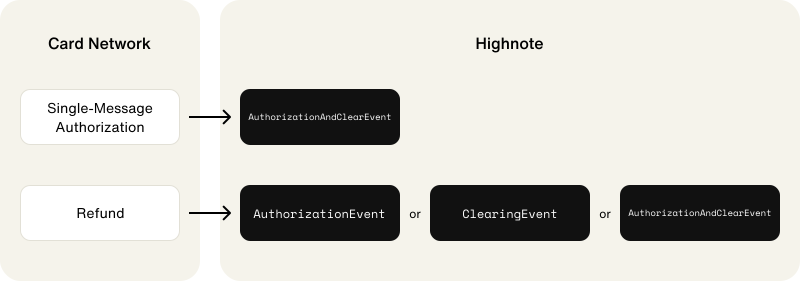
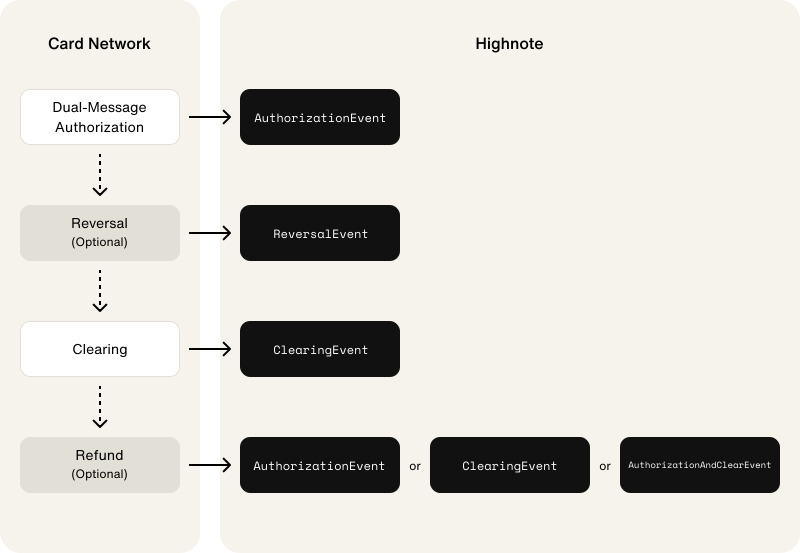
- A single-message transaction: The network sends a single
AUTHORIZE_AND_CLEARmessage to authorize, clear, and settle the transaction. - A dual-message transaction: The network sends an
AUTHORIZEmessage to process an authorization. A separateCLEARmessage is sent for clearing and settlement.
The following graphics outline how Highnote receives and interprets single and dual-message authorizations throughout the transaction lifecycle:
Single-message authorization flow
Dual-message authorization flow
Transaction events on the Highnote platform
The following section provides an overview of transaction events for card products not using collaborative authorization.
For more information on the transaction lifecycle for card programs with collaborative authorization enabled, see Card products with collaborative authorization.
Highnote interprets electronic messages from the network using the TransactionEvent object.
The table below shows how Highnote interprets network transaction messages.
It also shows the related Highnote notification events:
| Network transaction message | Description | Highnote transaction event | Notification event |
|---|---|---|---|
| Verification | The network sends a message to Highnote to validate card details: cardholder name or address, spend rules, zip code, etc. | VerificationEvent | Notification reference |
| Pre-authorization | The network sends a message to Highnote to reserve a specific amount of money on a cardholder's account to ensure funds availability. | AuthorizationEvent | Notification reference |
| Authorization | The network sends a dual-message request to Highnote to decide whether to approve the transaction. Later, the network sends additional information to Highnote to finalize the transaction. | AuthorizationEvent | Notification reference |
| The network sends a single-message request to Highnote with the necessary data to approve and finalize the transaction in one step. | AuthorizationAndClearEvent | Notification reference | |
| Clearing | The network sends the second half of a dual-message request to Highnote to finalize a transaction. | ClearingEvent | Notification reference |
| Settlement | The process of moving money between the merchant's and cardholder's banks. Highnote uses clearing events to represent clearing and settlement. | ClearingEvent | Notification reference |
| Reversals | This type of transaction occurs when a merchant cancels a transaction before a clearing event takes place. Reversals can be for the full transaction amount or a partial amount. | ReversalEvent | N/A |
| Refunds | The network sends an authorization event to Highnote to process a refund. The refund is reflected as a credit to the cardholder's account. | AuthorizationEvent | Notification reference |
| The network sends an authorization and clearing event to Highnote to process a refund. The refund is reflected as a credit to the cardholder's account. | AuthorizationAndClearEvent | Notification reference | |
| The network sends a clearing event to Highnote to process a refund. The refund is reflected as a credit to the cardholder's account. | ClearingEvent | Notification reference |
Card products with collaborative authorization
Collaborative authorization allows you to approve or decline transactions in real-time based on your business logic. In card products that use collaborative authorization, an IssuerPreliminaryAuthorizationEvent precedes AuthorizationEvents.
The following steps represent a common flow for transaction messages sent to Highnote for a card product using collaborative authorization:
- The cardholder makes a purchase.
- The network sends a message to Highnote to approve the transaction.
- Highnote creates an
IssuerPreliminaryAuthorizationEventbefore calling the card product's collaborative authorization endpoint. AnIssuerPreliminaryAuthorizationEventholds funds to cover the amount requested by the network. - Highnote sends an HTTPS POST request to the card product's collaborative authorization endpoint for approval.
- The collaborative authorization endpoint responds with approval.
- The Highnote platform creates an
AuthorizationEvent.
Verification events
Highnote interprets network verifications as VerificationEvents.
Verifications are typically done to prevent fraud and validate a payment card in the following common scenarios:
- A cardholder adds their payment card to a digital wallet
- A cardholder saves their payment card as a payment method online
- A cardholder adds their payment card to a peer-to-peer payments app
Verifications may be declined for several reasons. Examples include, but are not limited to:
- Incorrect name or address provided
- Merchant Category Code (MCC) blocked for card or product
- Wrong zip code provided
When a VerificationEvent is declined, Highnote provides a Response Code explaining why.
Authorization events
Highnote interprets the following types of transaction messages as AuthorizationEvents:
- Pre-authorizations
- Dual-message authorizations
- Single-message authorizations
Authorizations may reflect different requested and approved amounts. When an authorization is approved, the amount reflected on the Highnote ledger is the approved amount. These amounts are defined as follows:
requestedAmount: The amount of funds requested from the network for the transaction.approvedAmount: The amount of funds approved and posted to the Highnote ledger for the transaction.
Approvals
Authorizations are decisioned by Highnote based on your card product logic and settings. They can be approved or denied based on several factors. You can participate in the authorization flow using Collaborative Authorization. Collaborative authorization allows you to approve or decline the transaction before it reaches Highnote for decisioning.
When a transaction is approved, Highnote typically returns an APPROVED response code.
For a full list of transaction response codes, see the TransactionEventResponseCode API Reference.
Declines
Declines occur for several reasons, including but not limited to the following common decline reasons:
- Insufficient funds in the account holder's financial account
- Incorrect PIN or CVV
- Expired payment card
When an authorization is declined, the merchant will receive a response code for the decline reason. These response codes are typically used by the merchant and displayed to the cardholder. For a full list of transaction response codes, see the TransactionEventResponseCode API Reference.
Other types of authorizations
In some scenarios, other types of authorizations may take place. The following table provides examples of other authorization types:
| Type | Description |
|---|---|
| Pre-authorization | An authorization that acts as a hold for a specific amount of funds. |
| Automated Fuel Dispenser (AFD) transactions | Automated fuel dispensers (AFDs) typically have an authorization amount defined by card product or network rules. |
| $0 authorization | Merchants may send an authorization for a zero dollar amount to validate card details. This authorization typically happens when a card is saved for future payments. |
Pending funds
When an authorization is approved, it acts as a hold for the authorized amount. Typically, funds on hold are displayed as "pending" in an application or website.
Note the following about pending authorizations:
- Expiration periods are set by the merchant, card product logic, or network rules; with most authorizations expiring after seven days
- Some authorizations, like hotel stays or car rentals, may have longer expiration periods.
- When an authorization expires, the funds are automatically decreased on the account holder's authorization ledger and increased on their cash available ledger.
If you participate in authorization via Collaborative Authorization, Highnote responds to a transaction event with an IssuerPreliminaryAuthorizationEvent to temporarily fund the requested authorization until your collaborative authorization response is received.
Reversal events
Reversal logic is defined by the card network (not Highnote) and can vary across different merchants.
Once reversal conditions are met—for example, an authorization expires—Highnote executes the appropriate reversal action, ensuring the transaction is canceled in accordance with the established network rules, merchant configurations, and scenario-specific requirements.
Reversals are used when a transaction needs to be canceled. Reversals can be done for the full amount of the transaction or a partial amount.
Reversals typically occur in the following scenarios:
- An authorization expires before clearing
- An item is out of stock
- A transaction is identified as fraud
- The cardholder cancels their order before a clearing event occurs
- The original authorization is no longer valid
- A duplicate transaction occurred
- Disputed transactions
- Merchant error
If a reversal occurs after an authorization-and-clear transaction, the transaction has already cleared and settled. Treat these reversals as refunds in your system; the cardholder receives a credit rather than a release of held funds.
Clearing events
Once an authorization event is confirmed, a clearing event takes place to transfer the funds from the account holder's financial account to the merchant. When the funds are transferred, the account holder's authorization ledger is updated and the cash ledger is decreased.
Note the following about clearing events:
- Most clearing events are associated with an authorization event.
- If a clearing event is received without an authorization event, this is called a "forced post". Highnote monitors these types of clearing events to ensure fraud is not occurring.
How Highnote links clearing events to authorizations
Highnote does not force-link events when the network identifiers do not align.
Highnote links clearing events to their corresponding authorization events using network-provided identifiers, such as the Visa transaction ID and settlement date for Visa transactions, or the Banknet Reference Number and other identifiers for Mastercard and Mastercard Networks Exchange (NEX) transactions.
In rare cases, the network-provided identifiers on the clearing event do not match the authorization event. When this happens, the clearing event is not linked to the authorization and appears as a separate transaction event.
Do not rely solely on network reference IDs to correlate authorization and clearing events. Network identifiers are not guaranteed to be consistent across the lifecycle of a transaction.
Adjustment events
Adjustment events are post-clearing corrections issued by the card network that modify a previously cleared transaction. Unlike reversals, which cancel a pending authorization, adjustments apply after a transaction has fully cleared and settled.
Adjustments can be either debits or credits:
- Adjustment credit (
ADJUSTMENT_CREDIT): Returns funds to the cardholder's account. For example, a network-initiated correction for an overcharge. - Adjustment debit (
ADJUSTMENT_DEBIT): Removes additional funds from the cardholder's account. For example, a correction for an undercharge.
When an adjustment occurs, Highnote sends a PAYMENT_CARD_ADJUSTMENT notification event with a PaymentCardAdjustmentEvent payload. The transactionProcessingType field indicates whether the adjustment is a credit or debit. See Payment card adjustment in the events reference for an example payload.
Refunds
Refunds occur when a merchant refunds a purchase that has already cleared. Refunds are typically sent in the following ways:
- The merchant sends a new authorization event with the refund amount provided as a credit
- The merchant sends a clearing event with no authorization for the amount to be refunded as a credit
- The merchant sends an authorization and clearing event for the amount to be refunded as a credit
Reconciling refunds
Do not assume a one-to-one mapping between refund transactionId values and original purchases.
Transaction IDs do not always map one-to-one with purchases when processing refunds:
- Unlinked refunds: The network may send refund events with different IDs from the original authorization, or without a reference to the original transaction at all. In these cases, the refund appears as a standalone credit on the cardholder's account.
- Grouped refunds: When the card network assigns the same network transaction ID to multiple refund clearing events, Highnote groups them under a single
transactionId. This can happen when refunds for different original purchases are batched together by the network.
Use individual transactionEventId values to reconcile refunds against original charges.
Simulate transactions
Refer to the following guides to simulate transactions using the Highnote API:
- For all card products, except fleet: Simulate Transactions
- For fleet card products: Simulate Fleet Transactions
Common message sequences
In addition to the transaction happy paths:
AUTHORIZE_AND_CLEAR(single)AUTHORIZE→CLEAR(dual)
... there are other paths that a transaction can take.
The following table lists some of the most common transaction message sequences. Sequences are not mutually exclusive and can overlap.
| Message Sequence | Description |
|---|---|
| Single message | |
AUTHORIZE_AND_CLEAR | Debit card transaction, ATM & PIN purchase |
| Dual message | |
AUTHORIZE → CLEAR | Normal purchase transaction |
AUTHORIZE → CLEAR (higher / lower) | Normal purchase transaction (with tips, &c.) |
| Pre-auth / Incremental auth | |
AUTHORIZE → AUTHORIZE (incremental auth) → CLEAR | Pre-authorization and incremental authorization |
| Authorization advice | |
AUTHORIZE → AUTHORIZE (advice) → CLEAR | AFD transaction with optional auth advice |
AUTHORIZE → AUTHORIZE (advice - timeout) → AUTHORIZE (advice – stand-in approved) → CLEAR | Auth timeout → network stand-in approved |
AUTHORIZE → AUTHORIZE (advice - timeout) → AUTHORIZE (advice – stand-in declined) | Auth timeout → network stand-in declined |
AUTHORIZE (approved) → AUTHORIZE (advice - timeout) → AUTHORIZE (advice - stand-in declined) → REVERSAL (stand-in) | Network stand-in declined → auth timeout → stand-in reversal |
| Multiple clearing | |
AUTHORIZE → CLEAR (1st) → CLEAR (final) | Multiple clearing |
AUTHORIZE → CLEAR (final) → CLEAR (1st) | Multiple clearing – out of order |
AUTHORIZE → CLEAR (1st) → REVERSAL (by auth exp job) | Multiple clearing but final clear never received |
| Reversal | |
AUTHORIZE_AND_CLEAR → REVERSAL | Specific use case, such as broken ATM |
AUTHORIZE → REVERSAL | Authorization and reversal authorization |
AUTHORIZE → REVERSAL (partial) → CLEAR | Partial reversal before clearing |
AUTHORIZE → REVERSAL (by auth expiration job) | Auth without clear or reversal - expiration job triggered |
| Credit | |
AUTHORIZE (CREDIT) → CLEAR (CREDIT) | Refund, but with authorize first |
AUTHORIZE (CREDIT) → REVERSAL (CREDIT) | Cancelled refund, but with authorize first and reversal |
AUTHORIZE → CLEAR → AUTHORIZE (CREDIT) | Auth & clear, then refund w/same RRN & STAN (that can be reversed by auth expiration job) |
| Clearing only | |
CLEAR | Force clear |
CLEAR (CREDIT) | Usually refund |
CLEAR (no account found) | Force clear into Highnote force clear account |
| Other | |
BALANCE_INQUIRY | Check current available balance in Financial Account |
VERIFICATION | Verify account, usually with transaction amount $0 |