Configure Spend Rules
Overview
Spend rules apply logic to authorized amounts (not requested amounts). Reversals impact the cumulative authorized amount; but refunds do not.
Spend rule & velocity control results may not be visible for up to 15 seconds after a Transaction Event. See Spend rule latency.
Spend rules let you automate logic on authorizations that permit or restrict transactions. You can configure that logic on merchant category codes (MCC), dollar amount, authorization count, and more.
The following graphic shows how a spend rule is created at the organization level, applied to a card product and to payment cards under that card product:
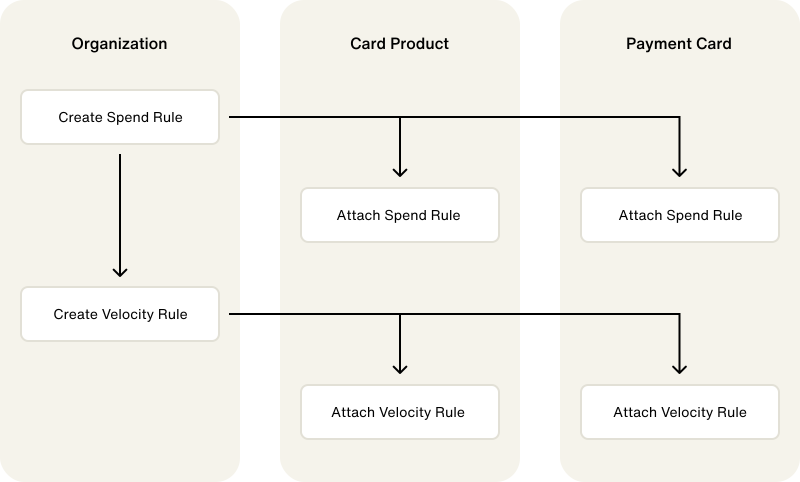
Spend rules can be coupled with velocity controls. Velocity controls let you set time boundary constraints to established spend rules. For more information on velocity controls, see Configure velocity controls.
You can create spend rules from the Highnote Dashboard or by using the Highnote API. This guide provides an overview of creating spend rules using the Highnote API.
Spend rule latency
Spend Rule results are not updated immediately. Due to a synchronization between databases, there may be a 15 second delay after a Transaction Event before changes are visible.
Affected Transaction Events are:
- IssuerPreliminaryAuthorizationEvent
- AuthorizationEvent
- AuthorizationAndClearEvent
- VerificationEvent
- BalanceInquiryEvent
Spend rules for authorized users
Only authorized users with their own dedicated financial account can maintain unique spend rules.
Spend rules and velocity controls can be applied to different user types such as an authorized user.
To configure a spend rule for an authorized user, add the field userType to the mutation and input to "userType": "AUTHORIZED_USER".
For examples, try out this small test using the snippets below:
- Create spend rule for Merchant category code.
- Copy the spendRuleId (
sr_1234...) from the response. - Paste the spendRuleId as input to Update spend rules (which is set to update the MCC rule).
Authorization hold configuration
An authorization hold reserves funds on a card when a transaction is authorized, releasing them if the transaction is not cleared within a set window. At the product level, Highnote can customize how authorization holds behave for specific MCC groupings:
- Hold expiration time: how long a hold persists before it expires and the reserved funds are released.
- Additional hold amount: for card-present authorizations in tip-related merchant categories such as restaurants, an extra percentage held on top of the authorized amount to cover anticipated gratuity, where the cleared amount often exceeds the initial authorization.
To customize your product's authorization hold configuration, contact Highnote Support.
Create spend rules
To create spend rules using the Highnote API, you must call the API using the spend rule's unique mutation and input variables.
Amount limit
We recommend factoring in potential ATM fees when creating an amount spend rule. For example, if you want to create an amount spend rule of $500, we recommend setting the spend rule at $505 or $510 to avoid potential declines due to ATM fees.
Amount limit spend rules are used to set limits on the maximum dollar amount a cardholder can spend in a single transaction. For example, if you create an amount limit spend rule of $100 for business expenses, the cardholder can purchase $100 worth of business expenses per transaction.
Use the following mutation to create amount limit spend rules:
CreateAmountLimitSpendRule
Query
mutation CreateAmountLimitSpendRule($input: CreateAmountLimitSpendRuleInput!) {
  createAmountLimitSpendRule(input: $input) {
    __typename
    ... on AmountLimitSpendRule {
      id
      name
      version
      maximumAmount {
        value
        currencyCode
      }
      createdAt
      updatedAt
      userType
    }
    ... on UserError {
      errors {
        code
        errorPath
      }
    }
    ... on AccessDeniedError {
      message
    }
  }
}
Variables
{
  "input": {
    "name": "My amount Rule",
    "maximumAmount": {
      "value": 1000,
      "currencyCode": "USD"
    },
    "userType": "AUTHORIZED_USER"
  }
}
Result
{
  "data": {
    "createAmountLimitSpendRule": {
      "__typename": "AmountLimitSpendRule",
      "id": "<SPEND_RULE_ID>",
      "name": "My amount Rule",
      "version": "0",
      "maximumAmount": {
        "value": 10000,
        "currencyCode": "USD"
      },
      "createdAt": "2022-08-19T21:07:32.121Z",
      "updatedAt": "2022-08-19T21:07:32.121Z",
      "userType": "AUTHORIZED_USER"
    }
  },
  "extensions": {
    "requestId": "<REQUEST_ID>"
  }
}
Maximum amount variance on credit limit
The maximum amount variance spend rule allows cumulative spend up to a fixed amount over a credit financial account's credit limit.
This rule requires the CreditLimitVarianceCardProductFeature and a Cardholder Agreement that discloses how cardholders opt in to over-limit transactions.
See Over-Limit Transactions for prerequisites, configuration, and MaximumAmountVarianceOnCreditLimitSpendRule examples.
Maximum percent variance on credit limit
The maximum percent variance spend rule allows cumulative spend up to a whole-number percentage of a credit financial account's credit limit.
A value of 50 permits cumulative spend up to 150% of the limit.
This rule requires the CreditLimitVarianceCardProductFeature and a Cardholder Agreement that discloses how cardholders opt in to over-limit transactions.
See Over-Limit Transactions for prerequisites, configuration, and MaximumPercentVarianceOnCreditLimitSpendRule examples.
Authorization count limit
You must attach authorization count spend rules to a velocity control. For more information on creating velocity controls, see Configure Velocity Controls.
Authorization count limit spend rules set the maximum number of transactions a cardholder can authorize within a given period. Authorization count limit spend rules must be used with velocity controls to create the desired time restriction.
For example, you may want to limit cardholders to three transactions per week. To create this limit, you must create an authorization count limit spend rule for three and attach the spend rule to a velocity control with a weekly window.
Use the following mutation to create an authorization count limit spend rule:
CreateCountLimitSpendRule
Query
mutation createCountLimitSpendRule($input: CreateCountLimitSpendRuleInput!) {
  createCountLimitSpendRule(input: $input) {
    __typename
    ... on CountLimitSpendRule {
      id
      name
      maximumCount
      version
      createdAt
      updatedAt
      userType
    }
    ... on UserError {
      errors {
        code
        description
        errorPath
      }
    }
    ... on AccessDeniedError {
      message
    }
  }
}
Variables
{
  "input": {
    "name": "My Count Rule",
    "maximumCount": 3
  }
}
Result
{
  "data": {
    "createCountSpendRule": {
      "__typename": "CountLimitSpendRule",
      "id": "<SPEND_RULE_ID>",
      "name": "My Count Rule",
      "version": "0",
      "maximumCount": 3,
      "createdAt": "2022-08-19T21:07:32.121Z",
      "updatedAt": "2022-08-19T21:07:32.121Z",
      "userType": null
    }
  },
  "extensions": {
    "requestId": "<REQUEST_ID>"
  }
}
Card data input capability
Card data input capability spend rules restrict or block payments based on how a point of service (POS) accepts payments.
For example, you can block all payments where a POS terminal only supports MAGNETIC_STRIPE.
For a full list of card data input capabilities, see the API reference.
The following mutation is an example of a spend rule that blocks POS terminals that only accept MAGNETIC_STRIPE payments:
CreateCardDataInputCapabilitySpendRule
Query
mutation CreateCardDataInputCapabilitySpendRule(
  $input: CreateCardDataInputCapabilitySpendRuleInput!
) {
  createCardDataInputCapabilitySpendRule(input: $input) {
    __typename
    ... on CardDataInputCapabilitySpendRule {
      id
      name
      allowed
      blocked
      version
      createdAt
      updatedAt
      userType
    }
    ... on UserError {
      errors {
        errorPath
        code
        description
      }
    }
    ... on AccessDeniedError {
      message
    }
  }
}
Variables
{
  "input": {
    "name": "My CardDataInputCapability Spend Rule",
    "allowed": [
      "MAG_STRIPE_READER_AND_EMV_ICC"
    ],
    "blocked": [
      "MAGNETIC_STRIPE"
    ]
  }
}
Result
{
  "data": {
    "createCardDataInputCapabilitySpendRule": {
      "__typename": "CardDataInputCapabilitySpendRule",
      "id": "<CARD_DATA_INPUT_CAPABILITY_SPEND_RULE_ID>",
      "name": "My CardDataInputCapability Spend Rule",
      "allowed": [
        "MAG_STRIPE_READER_AND_EMV_ICC"
      ],
      "blocked": [
        "MAGNETIC_STRIPE"
      ],
      "version": "0",
      "createdAt": "2024-07-19T21:08:13.423Z",
      "updatedAt": "2024-07-19T21:08:13.423Z",
      "userType": null
    }
  },
  "extensions": {
    "requestId": "8ac2df8d-a976-907f-a940-f2f9d7b1e698",
    "rateLimit": {
      "cost": 11,
      "limit": 60060,
      "remaining": 60049
    }
  }
}
Card transaction processing type
A card transaction processing type refers to the method used to process a card event, such as a purchase or withdrawal. A card transaction processing type rule is a spend rule that allows or blocks card transaction processing types. For a full list of card transaction processing types, see the CardTransactionProcessingType enum in the API Reference.
Use the following mutation to create a card transaction processing type rule:
CreateCardTransactionProcessingTypeConditionSpendRule
Query
mutation CreateCardTransactionProcessingTypeConditionSpendRule(
  $input: CreateCardTransactionProcessingTypeConditionSpendRuleInput!
) {
  createCardTransactionProcessingTypeConditionSpendRule(input: $input) {
    __typename
    ... on CardTransactionProcessingTypeConditionSpendRule {
      id
      name
      allowed
      blocked
      version
      createdAt
      updatedAt
      userType
      revisions {
        edges {
          node {
            id
          }
        }
      }
    }
  }
}
Variables
{
  "input": {
    "name": "My Rule",
    "allowed": "CASH",
    "blocked": "PIN_CHANGE"
  }
}
Result
{
  "data": {
    "createCardTransactionProcessingTypeConditionSpendRule": {
      "__typename": "CardTransactionProcessingTypeConditionSpendRule",
      "id": "<SPEND_RULE_ID>",
      "name": "My Rule",
      "allowed": "CASH",
      "blocked": "GOODS_AND_SERVICES",
      "version": "0",
      "createdAt": "2024-01-03T19:38:02.998Z",
      "updatedAt": "2024-01-03T19:38:02.998Z",
      "userType": null,
      "revisions": {
        "edges": []
      }
    }
  },
  "extensions": {
    "requestId": "<REQUEST_ID>",
    "rateLimit": {
      "cost": 32,
      "limit": 100,
      "remaining": 99968
    }
  }
}
Card verification value (CVV)
Card verification value (CVV) spend rules require cardholders to enter their payment card's CVV at the point of purchase to reduce the risk of fraudulent transactions. When a mismatched CVV is entered at checkout, this spend rule blocks authorizations.
Use the following mutation to create a card verification value spend rule:
CreateCVVSpendRule
Query
mutation CreateCardVerificationValueRule($input: CreateCVVSpendRuleInput!) {
  createCVVSpendRule(input: $input) {
    __typename
    ... on CVVSpendRule {
      id
      name
      version
      allowed
      blocked
      createdAt
      updatedAt
      userType
    }
    ... on UserError {
      errors {
        code
        errorPath
      }
    }
    ... on AccessDeniedError {
      message
    }
  }
}
Variables
{
  "input": {
    "name": "My CVV Rule",
    "allowed": [
      "MATCH"
    ]
  }
}
Result
{
  "data": {
    "createCVVSpendRule": {
      "__typename": "CVVSpendRule",
      "id": "<SPEND_RULE_ID>",
      "name": "My CVV Rule",
      "version": "0",
      "allowed": [
        "MATCH"
      ],
      "blocked": [],
      "createdAt": "2022-08-23T14:11:16.882Z",
      "updatedAt": "2022-08-23T14:11:16.882Z",
      "userType": null
    }
  },
  "extensions": {
    "requestId": "<REQUEST_ID>"
  }
}
Conditional rule
You must pair conditional rules with a velocity control. For more information on creating velocity controls, see Configuring Velocity Controls.
A conditional rule is a spend rule that combines multiple spend rules together in an all-or-nothing approach. Conditional rules are always paired with velocity rules. For a conditional rule to pass, it must meet the following requirements:
- All rules contained within the velocity control must pass
- All rules contained within the velocity control must fail
Use the following mutation to create a conditional rule:
CreateConditionalRuleSetSpendRule
Query
mutation CreateConditionalRuleSetSpendRule(
  $input: CreateConditionalRuleSetSpendRuleInput!
) {
  createConditionalRuleSetSpendRule(input: $input) {
    __typename
    ... on ConditionalRuleSetSpendRule {
      id
      name
      allow
      version
      createdAt
      updatedAt
      userType
      revisions {
        edges {
          node {
            id
          }
        }
      }
    }
  }
}
Variables
{
  "input": {
    "name": "My Rule",
    "allow": true
  }
}
Result
{
  "data": {
    "createConditionalRuleSetSpendRule": {
      "__typename": "ConditionalRuleSetSpendRule",
      "id": "<SPEND_RULE_ID>",
      "name": "My Rule",
      "allow": true,
      "version": "0",
      "createdAt": "2024-01-03T19:38:02.998Z",
      "updatedAt": "2024-01-03T19:38:02.998Z",
      "userType": null,
      "revisions": {
        "edges": []
      }
    }
  },
  "extensions": {
    "requestId": "<REQUEST_ID>",
    "rateLimit": {
      "cost": 32,
      "limit": 100,
      "remaining": 99968
    }
  }
}
Deposit amount
A deposit amount spend rule limits the dollar amount that an account holder can deposit in their Highnote financial account. Use the following mutation to create a deposit amount spend rule:
CreateDepositAmountLimitSpendRule
Query
mutation CreateDepositAmountLimitSpendRule(
  $input: CreateDepositAmountLimitSpendRuleInput!
) {
  createDepositAmountLimitSpendRule(input: $input) {
    __typename
    ... on DepositAmountLimitSpendRule {
      id
      name
      maximumAmount {
        value
        currencyCode
      }
      version
      createdAt
      updatedAt
      userType
    }
    ... on UserError {
      errors {
        code
        errorPath
      }
    }
    ... on AccessDeniedError {
      message
    }
  }
}
Variables
{
  "input": {
    "name": "My Rule",
    "maximumAmount": {
      "value": 1000,
      "currencyCode": "USD"
    }
  }
}
Result
{
  "data": {
    "createDepositAmountLimitSpendRule": {
      "__typename": "DepositAmountLimitSpendRule",
      "id": "<SPEND_RULE_ID>",
      "name": "My Rule",
      "maximumAmount": {
        "value": 1000,
        "currencyCode": "USD"
      },
      "version": "0",
      "createdAt": "2024-01-03T18:29:48.309Z",
      "updatedAt": "2024-01-03T18:29:48.310Z",
      "userType": null
    }
  },
  "extensions": {
    "requestId": "<REQUEST_ID>",
    "rateLimit": {
      "cost": 33,
      "limit": 100,
      "remaining": 99967
    }
  }
}
Deposit count
You must pair deposit count spend rules with a velocity control. For more information on creating velocity controls, see Configuring Velocity Controls.
A deposit count spend rule limits the numbers of times a cash deposit can be made within a set period. Deposit count spend rules must be combined with a velocity control. Use the following mutation to create a deposit count spend rule:
CreateDepositCountLimitSpendRule
Query
mutation CreateDepositCountLimitSpendRule(
  $input: CreateDepositCountLimitSpendRuleInput!
) {
  createDepositCountLimitSpendRule(input: $input) {
    __typename
    ... on DepositCountLimitSpendRule {
      id
      name
      maximumCount
      version
      createdAt
      updatedAt
      userType
      revisions {
        edges {
          node {
            id
          }
        }
      }
    }
  }
}
Variables
{
  "input": {
    "name": "My Rule",
    "maximumCount": 10
  }
}
Result
{
  "data": {
    "createDepositCountLimitSpendRule": {
      "__typename": "DepositCountLimitSpendRule",
      "id": "<SPEND_RULE_ID>",
      "name": "My Rule",
      "maximumCount": 10,
      "version": "0",
      "createdAt": "2024-01-03T18:42:41.555Z",
      "updatedAt": "2024-01-03T18:42:41.556Z",
      "userType": null,
      "revisions": {
        "edges": []
      }
    }
  },
  "extensions": {
    "requestId": "<REQUEST_ID>",
    "rateLimit": {
      "cost": 32,
      "limit": 100,
      "remaining": 99968
    }
  }
}
Deposit processing network
A deposit processing network spend rule limits which deposit processing networks can be used to make a deposit. For a full list of deposit processing networks, see the DepositProcessingNetwork enum in the API Reference.
Use the following example to create a deposit processing network spend rule:
CreateDepositProcessingNetworkSpendRule
Query
mutation CreateDepositProcessingNetworkSpendRule(
  $input: CreateDepositProcessingNetworkSpendRuleInput!
) {
  createDepositProcessingNetworkSpendRule(input: $input) {
    __typename
    ... on DepositProcessingNetworkSpendRule {
      id
      name
      allowed
      blocked
      version
      createdAt
      updatedAt
      userType
      revisions {
        edges {
          node {
            id
          }
        }
      }
    }
    ... on UserError {
      errors {
        code
        errorPath
      }
    }
    ... on AccessDeniedError {
      message
    }
  }
}
Variables
{
  "input": {
    "name": "My Rule",
    "allowed": "MAESTRO",
    "blocked": "UNKNOWN"
  }
}
Result
{
  "data": {
    "createDepositProcessingNetworkSpendRule": {
      "__typename": "DepositProcessingNetworkSpendRule",
      "id": "<SPEND_RULE_ID>",
      "name": "My Rule",
      "allowed": [
        "MAESTRO"
      ],
      "blocked": [
        "UNKNOWN"
      ],
      "version": "0",
      "createdAt": "2024-01-03T18:36:57.388Z",
      "updatedAt": "2024-01-03T18:36:57.388Z",
      "userType": null,
      "revisions": {
        "edges": []
      }
    }
  },
  "extensions": {
    "requestId": "<REQUEST_ID>",
    "rateLimit": {
      "cost": 32,
      "limit": 100,
      "remaining": 99968
    }
  }
}
Merchant category code (MCC)
Merchant category code (MCC) spend rules limit spending based on the type of merchant a cardholder transacts with, identified by the merchant's four-digit MCC. You can allow or block spending by MCC code using allowedMcc/blockedMcc, or by the higher-level MerchantCategory grouping using allowed/blocked.
For a full list of merchant categories, see the MerchantCategory enum in the API Reference.
Use the following mutation to create a merchant category spend rule:
CreateMerchantCategorySpendRule
Query
mutation CreateMerchantCategorySpendRule(
  $input: CreateMerchantCategorySpendRuleInput!
) {
  createMerchantCategorySpendRule(input: $input) {
    __typename
    ... on MerchantCategorySpendRule {
      id
      name
      version
      allowed
      blocked
      createdAt
      updatedAt
      userType
    }
    ... on UserError {
      errors {
        code
        errorPath
      }
    }
    ... on AccessDeniedError {
      message
    }
  }
}
Variables
{
  "input": {
    "name": "My Rule",
    "allowed": [
      "AUTOMATED_FUEL_DISPENSERS"
    ],
    "blocked": [],
    "userType": "AUTHORIZED_USER"
  }
}
Result
{
  "data": {
    "createMerchantCategorySpendRule": {
      "__typename": "MerchantCategorySpendRule",
      "id": "<SPEND_RULE_ID>",
      "name": "My Rule",
      "version": "0",
      "allowed": [
        "AUTOMATED_FUEL_DISPENSERS"
      ],
      "blocked": [],
      "createdAt": "2021-08-12T21:15:32.551Z",
      "updatedAt": "2021-08-12T21:15:32.551Z",
      "userType": "AUTHORIZED_USER"
    }
  }
}
Merchant identifier (MID)
You can add up to 200 MIDs to a MerchantIdentifierSpendRule object.
When processing transactions, some merchants supply an identifier called the merchant identifier (MID). In the Highnote API, the merchant identifier field accepts the input of merchant or card acceptor identifiers.
A merchant identifier spend rule allows you to limit transactions for specific merchant identifiers. For example, you can restrict cardholders from using their payment cards at a particular online retailer.
Use the following mutation to create a merchant identifier spend rule:
CreateMerchantIdentifierSpendRule
Query
mutation CreateMerchantIdentifierSpendRule(
  $input: CreateMerchantIdentifierSpendRuleInput!
) {
  createMerchantIdentifierSpendRule(input: $input) {
    __typename
    ... on MerchantIdentifierSpendRule {
      id
      name
      version
      allowed
      blocked
      createdAt
      updatedAt
      userType
    }
    ... on UserError {
      errors {
        code
        errorPath
      }
    }
    ... on AccessDeniedError {
      message
    }
  }
}
Variables
{
  "input": {
    "name": "Enabled Merchant IDs",
    "allowed": [
      "1234567898765432",
      "1234567898765433"
    ]
  }
}
Result
{
  "data": {
    "createMerchantIdentifierSpendRule": {
      "__typename": "MerchantIdentifierSpendRule",
      "id": "<SPEND_RULE_ID>",
      "name": "Enabled Merchant IDs",
      "version": "0",
      "allowed": [
        "1234567898765432",
        "1234567898765433"
      ],
      "blocked": [],
      "createdAt": "2022-08-23T14:13:30.989Z",
      "updatedAt": "2022-08-23T14:13:30.989Z",
      "userType": null
    }
  },
  "extensions": {
    "requestId": "<REQUEST_ID>"
  }
}
Merchant country
Merchant country spend rules limit spending based on merchants' geographical locations. For example, you can create a merchant country spend rule that blocks cardholders from using their payment cards at merchants located in a specific country that your business has deemed high risk.
For a full list of countries that can be blocked using spend rules, see the ISO3166Alpha3Country enum in the API Reference.
Use the following mutation to create a merchant country spend rule:
CreateMerchantCountrySpendRule
Query
mutation CreateMerchantCountryRule(
  $input: CreateMerchantCountrySpendRuleInput!
) {
  createMerchantCountrySpendRule(input: $input) {
    __typename
    ... on MerchantCountrySpendRule {
      id
      name
      version
      allowed
      blocked
      createdAt
      updatedAt
      userType
    }
    ... on UserError {
      errors {
        code
        errorPath
      }
    }
    ... on AccessDeniedError {
      message
    }
  }
}
Variables
{
  "input": {
    "name": "My Merchant Country Rule",
    "allowed": [
      "USA"
    ]
  }
}
Result
{
  "data": {
    "createMerchantCountrySpendRule": {
      "__typename": "MerchantCountrySpendRule",
      "id": "<SPEND_RULE_ID>",
      "name": "My Merchant Country Rule",
      "version": "0",
      "allowed": [
        "USA"
      ],
      "blocked": [],
      "createdAt": "2022-08-23T14:09:17.165Z",
      "updatedAt": "2022-08-23T14:09:17.165Z",
      "userType": null
    }
  },
  "extensions": {
    "requestId": "<REQUEST_ID>"
  }
}
PAN entry mode
A PAN entry mode spend rule can restrict or block payments based on the method the cardholder used to enter their card information.
For example, you can block payments for manual entries, or MANUAL_KEY_ENTERED.
For a full list of PAN entry modes, see the API reference.
The following mutation is an example of a PAN entry spend rule that blocks mag stripe transactions:
CreatePanEntryModeSpendRule
Query
mutation CreatePanEntryModeSpendRule(
  $input: CreatePanEntryModeSpendRuleInput!
) {
  createPanEntryModeSpendRule(input: $input) {
    __typename
    ... on PanEntryModeSpendRule {
      id
      name
      allowed
      blocked
      version
      createdAt
      updatedAt
      userType
    }
    ... on UserError {
      errors {
        errorPath
        code
        description
      }
    }
    ... on AccessDeniedError {
      message
    }
  }
}
Variables
{
  "input": {
    "name": "My Pan Entry Mode Spend Rule",
    "allowed": [
      "INTEGRATED_CIRCUIT_CARD"
    ],
    "blocked": [
      "MAGNETIC_STRIPE"
    ]
  }
}
Result
{
  "data": {
    "createPanEntryModeSpendRule": {
      "__typename": "PanEntryModeSpendRule",
      "id": "<PAN_ENTRY_MODE_SPEND_RULE_ID>",
      "name": "My Pan Entry Mode Spend Rule",
      "allowed": [
        "INTEGRATED_CIRCUIT_CARD"
      ],
      "blocked": [
        "MAGNETIC_STRIPE"
      ],
      "version": "0",
      "createdAt": "2024-07-19T21:04:24.549Z",
      "updatedAt": "2024-07-19T21:04:24.549Z",
      "userType": null
    }
  },
  "extensions": {
    "requestId": "62384733-2e27-98bb-8fa1-af92a7bff8fb",
    "rateLimit": {
      "cost": 11,
      "limit": 60060,
      "remaining": 60049
    }
  }
}
Point of service category
Point of service category spend rules can permit or restrict purchases at certain types of payment terminals, such as ATMs or gas station fuel dispensers.
For a full list of point of service categories, see the PointOfServiceCategory enum in the API Reference.
Use the following mutation to create a point of service category spend rule:
CreatePointOfServiceCategorySpendRule
Query
mutation CreatePointOfServiceCategorySpendRule(
  $input: CreatePointOfServiceCategorySpendRuleInput!
) {
  createPointOfServiceCategorySpendRule(input: $input) {
    __typename
    ... on PointOfServiceCategorySpendRule {
      id
      name
      version
      allowed
      blocked
      createdAt
      updatedAt
      userType
    }
    ... on UserError {
      errors {
        code
        errorPath
      }
    }
    ... on AccessDeniedError {
      message
    }
  }
}
Variables
{
  "input": {
    "name": "Allow Automated Fuel Device and ATMs only",
    "allowed": [
      "AUTOMATED_TELLER_MACHINE",
      "AUTOMATED_FUEL_DISPENSER"
    ]
  }
}
Result
{
  "data": {
    "createPointOfServiceCategorySpendRule": {
      "__typename": "PointOfServiceCategorySpendRule",
      "id": "<SPEND_RULE_ID>",
      "name": "Allow Automated Fuel Device and ATMs only",
      "version": "0",
      "allowed": [
        "AUTOMATED_TELLER_MACHINE",
        "AUTOMATED_FUEL_DISPENSER"
      ],
      "blocked": [],
      "createdAt": "2022-08-23T14:13:30.989Z",
      "updatedAt": "2022-08-23T14:13:30.989Z",
      "userType": null
    }
  },
  "extensions": {
    "requestId": "<REQUEST_ID>"
  }
}
Postal code verification
Postal code verification spend rules specify which zip codes are allowed or blocked during address verification services (AVS).
Use the following mutation to create a postal code verification spend rule:
CreatePostalCodeVerificationSpendRule
Query
mutation createPostalCodeVerificationSpendRule(
  $input: CreatePostalCodeVerificationSpendRuleInput!
) {
  createPostalCodeVerificationSpendRule(input: $input) {
    __typename
    ... on PostalCodeVerificationSpendRule {
      name
      allowed
      blocked
    }
    ... on UserError {
      errors {
        code
        errorPath
      }
    }
    ... on AccessDeniedError {
      message
    }
  }
}
Variables
{
  "input": {
    "name": "My spend rule",
    "allowed": [
      "MATCH"
    ],
    "blocked": [
      "NO_MATCH"
    ]
  }
}
Result
{
  "data": {
    "createPostalCodeVerificationSpendRule": {
      "__typename": "PostalCodeVerificationSpendRule",
      "name": "My spend rule",
      "allowed": [
        "MATCH"
      ],
      "blocked": [
        "NO_MATCH"
      ]
    }
  },
  "extensions": {
    "requestId": "<REQUEST_ID>",
    "rateLimit": {
      "cost": 11,
      "limit": 100,
      "remaining": 99989
    }
  }
}
Street address
Street address spend rules require cardholders to enter their payment card's associated address at the point of checkout for address validation service (AVS). AVS reduces the risk of fraud for card-not-present transactions, such as online transactions. When an address mismatch is entered at checkout, this spend rule blocks authorizations.
Use the following mutation to create a street address spend rule:
CreateStreetAddressSpendRule
Query
mutation CreateStreetAddressRule($input: CreateStreetAddressSpendRuleInput!) {
  createStreetAddressSpendRule(input: $input) {
    __typename
    ... on StreetAddressSpendRule {
      id
      name
      version
      allowed
      blocked
      createdAt
      updatedAt
      userType
    }
    ... on UserError {
      errors {
        code
        errorPath
      }
    }
    ... on AccessDeniedError {
      message
    }
  }
}
Variables
{
  "input": {
    "name": "My Street Address Rule",
    "allowed": [
      "MATCH"
    ]
  }
}
Result
{
  "data": {
    "createStreetAddressSpendRule": {
      "__typename": "StreetAddressSpendRule",
      "id": "<SPEND_RULE_ID>",
      "name": "My Street Address Rule",
      "version": "0",
      "allowed": [
        "MATCH"
      ],
      "blocked": [],
      "createdAt": "2022-08-23T14:13:30.989Z",
      "updatedAt": "2022-08-23T14:13:30.989Z",
      "userType": null
    }
  },
  "extensions": {
    "requestId": "<REQUEST_ID>"
  }
}
Attach spend rule to a card product
Once you have created a spend rule, you can attach it to a card product. Spend rules attached to card products apply to all payment cards issued to the card product.
Use the following mutation to attach a spend rule to a card product:
AttachSpendRuleToCardProduct
Query
mutation AttachSpendRuleToCardProduct(
  $input: AttachSpendRuleToCardProductInput!
) {
  attachSpendRuleToCardProduct(input: $input) {
    ... on CardProduct {
      id
      attachedSpendRules {
        edges {
          node {
            ... on SpendRule {
              id
              name
            }
          }
        }
      }
    }
    ... on UserError {
      errors {
        code
      }
    }
  }
}
Variables
{
  "input": {
    "cardProductId": "<CARD_PRODUCT_ID>",
    "spendRule": {
      "id": "<SPEND_RULE_ID>",
      "version": "0"
    }
  }
}
Result
{
  "data": {
    "attachSpendRuleToCardProduct": {
      "id": "<CARD_PRODUCT_ID>",
      "attachedSpendRules": {
        "edges": [
          {
            "node": {
              "id": "<SPEND_RULE_ID>",
              "name": "My Rule"
            }
          }
        ]
      }
    }
  }
}
Attach spend rule to a payment card
Once you have created a spend rule, you can attach it to a payment card. Spend rules attached to payment cards apply to only that specific payment card.
Use the following mutation to attach a spend rule to a payment card:
AttachSpendRuleToPaymentCard
Query
mutation AttachSpendRuleToPaymentCard(
  $input: AttachSpendRuleToPaymentCardInput!
) {
  attachSpendRuleToPaymentCard(input: $input) {
    ... on PaymentCard {
      id
      attachedSpendRules {
        edges {
          node {
            ... on SpendRule {
              id
              name
            }
          }
        }
      }
    }
    ... on UserError {
      errors {
        code
      }
    }
  }
}
Variables
{
  "input": {
    "paymentCardId": "<PAYMENT_CARD_ID>",
    "spendRule": {
      "id": "<SPEND_RULE_ID>",
      "version": "0"
    }
  }
}
Result
{
  "data": {
    "attachSpendRuleToPaymentCard": {
      "id": "<PAYMENT_CARD_ID>",
      "attachedSpendRules": {
        "edges": [
          {
            "node": {
              "id": "<SPEND_RULE_ID>",
              "name": "My Rule"
            }
          }
        ]
      }
    }
  }
}
Attach spend rule to a financial account
Once you have created a spend rule, you can attach it to a financial account. Spend rules attached to financial accounts apply to all payment cards linked to the financial account.
Use the following mutation to attach a spend rule to a financial account:
AttachSpendRuleToFinancialAccount
Query
mutation AttachSpendRuleToFinancialAccount(
  $input: AttachSpendRuleToFinancialAccountInput!
) {
  attachSpendRuleToFinancialAccount(input: $input) {
    __typename
    ... on FinancialAccount {
      id
    }
    ... on UserError {
      errors {
        code
        path
      }
    }
    ... on AccessDeniedError {
      message
    }
  }
}
Variables
{
  "input": {
    "financialAccountId": "<FINANCIAL_ACCOUNT_ID>",
    "spendRule": {
      "id": "<SPEND_RULE_ID>",
      "version": "LATEST"
    }
  }
}
Result
{
  "data": {
    "attachSpendRuleToFinancialAccount": {
      "__typename": "FinancialAccount",
      "id": "<FINANCIAL_ACCOUNT_ID>"
    }
  },
  "extensions": {
    "requestId": "<REQUEST_ID>"
  }
}
Attach new spend rule version
You can create different versions of spend rules. For example, you may want to update a spend rule without affecting existing card products, payment cards, or financial accounts. By creating a new version of a spend rule, you can attach the new version to new card products, payment cards, or financial accounts without affecting the already applied spend rules on existing ones.
To create and attach different versions of spend rules, refer to the following steps:
- Use the unique mutation for each spend rule to create a spend rule.
- In the input variable field, add the
versioninput field and provide a version number. - Run the mutation.
- Use the
AttachSpendRuleToCardProduct,AttachSpendRuleToPaymentCard, orAttachSpendRuleToFinancialAccountmutations to attach a spend rule to your card product, payment card, or financial account. - In the input variable field, add the
versioninput field and provide the version number of your new spend rule. - Optional - Use
LATESTinstead of the version number to ensure the card product, payment card, or financial account always uses the latest version. - Run the mutation.
Detach spend rule from a card product
Use the following mutation to detach a spend rule from a card product:
DetachSpendRuleFromCardProduct
Query
mutation DetachSpendRuleFromCardProduct(
  $input: DetachSpendRuleFromCardProductInput!
) {
  detachSpendRuleFromCardProduct(input: $input) {
    __typename
    ... on UserError {
      errors {
        code
        errorPath
        description
        __typename
      }
      __typename
    }
  }
}
Variables
{
  "input": {
    "cardProductId": "<CARD_PRODUCT_ID>",
    "spendRule": {
      "id": "<SPEND_RULE_ID>"
    }
  }
}
Result
{
  "data": {
    "detachSpendRuleFromCardProduct": {
      "__typename": "CardProduct"
    }
  },
  "extensions": {
    "requestId": "<REQUEST_ID>"
  }
}
Detach spend rule from a payment card
Use the following mutation to detach a spend rule from a payment card:
DetachSpendRuleFromPaymentCard
Query
mutation DetachSpendRuleFromPaymentCard(
  $input: DetachSpendRuleFromPaymentCardInput!
) {
  detachSpendRuleFromPaymentCard(input: $input) {
    __typename
    ... on UserError {
      errors {
        code
        errorPath
        description
        __typename
      }
      __typename
    }
  }
}
Variables
{
  "input": {
    "paymentCardId": "<PAYMENT_CARD_ID>",
    "spendRule": {
      "id": "<SPEND_RULE_ID>"
    }
  }
}
Result
{
  "data": {
    "detachSpendRuleFromPaymentCard": {
      "__typename": "PaymentCard"
    }
  },
  "extensions": {
    "requestId": "<REQUEST_ID>"
  }
}
Detach spend rule from a financial account
Use the following mutation to detach a spend rule from a financial account:
DetachSpendRuleFromFinancialAccount
Query
mutation DetachSpendRuleFromFinancialAccount(
  $input: DetachSpendRuleFromFinancialAccountInput!
) {
  detachSpendRuleFromFinancialAccount(input: $input) {
    __typename
    ... on FinancialAccount {
      id
    }
    ... on UserError {
      errors {
        code
        path
      }
    }
    ... on AccessDeniedError {
      message
    }
  }
}
Variables
{
  "input": {
    "financialAccountId": "<FINANCIAL_ACCOUNT_ID>",
    "spendRule": {
      "id": "<SPEND_RULE_ID>"
    }
  }
}
Result
{
  "data": {
    "detachSpendRuleFromFinancialAccount": {
      "__typename": "FinancialAccount",
      "id": "<FINANCIAL_ACCOUNT_ID>"
    }
  },
  "extensions": {
    "requestId": "<REQUEST_ID>"
  }
}
View spend rule results
You can query TransactionEventIds to view the results of an authorization decision and any associated spend rules associated with an authorization.
Use the following query to view spend rule results:
NodeAuthorizationEventWithSpendRuleResults
Query
query nodeAuthorizationEventWithSpendRuleResults($id: ID!) {
  node(id: $id) {
    __typename
    ... on AuthorizationEvent {
      id
      transaction {
        ... on Node {
          id
        }
      }
      spendRuleResults {
        edges {
          node {
            __typename
            ... on SpendRuleResult {
              recommendation
              message
            }
            ... on VelocityRuleResult {
              recommendation
              message
              velocityRule {
                __typename
                id
                version
              }
            }
          }
        }
      }
    }
  }
}
Variables
{
  "id": "<TRANSACTION_EVENT_ID>"
}
Result
{
  "node": {
    "__typename": "AuthorizationEvent",
    "id": "<TRANSACTION_EVENT_ID>",
    "transaction": {
      "node": {
        "id": "<TRANSACTION_ID>"
      }
    },
    "spendRuleResults": {
      "edges": {
        "node": {
          "__typename": "VelocityRuleResult",
          "recommendation": "ALLOW",
          "message": "",
          "velocityRule": {
            "__typename": "VelocityRule",
            "id": "<VELOCITY_RULE_ID>",
            "version": "0"
          }
        }
      }
    }
  }
}
Update spend rules
To update a spend rule:
- Use the spend rule's unique
UpdateSpendRulemutation. - Assign the updated spend rule a new version number.
- Attach the new version to any card products or payment cards using the original spend rule.
For a full list of available UpdateSpendRule mutations, refer to the following API Reference links:
- updateConditionalRuleSetSpendRule
- updateCountLimitSpendRule
- updateCVVSpendRule
- updateDepositAmountLimitSpendRule
- updateDepositCountLimitSpendRule
- updateDepositProcessingNetworkSpendRule
- updateMerchantCategorySpendRule
- updateMerchantCountrySpendRule
- updateMerchantIdentifierSpendRule
- updatePointOfServiceCategorySpendRule
- updateStreetAddressSpendRule
The following code snippet provides an example of how you would update a merchant category spend rule:
UpdateMerchantCategorySpendRule
Query
mutation UpdateMerchantCategorySpendRule(
  $input: UpdateMerchantCategorySpendRuleInput!
) {
  updateMerchantCategorySpendRule(input: $input) {
    __typename
    ... on MerchantCategorySpendRule {
      id
      name
      version
      allowed
      blocked
      createdAt
      updatedAt
      userType
    }
    ... on UserError {
      errors {
        code
        errorPath
      }
    }
    ... on AccessDeniedError {
      message
    }
  }
}
Variables
{
  "input": {
    "spendRuleId": "<SPEND_RULE_ID>",
    "allowed": [
      "AUTOMATED_FUEL_DISPENSERS"
    ],
    "blocked": [],
    "userType": "AUTHORIZED_USER"
  }
}
Result
{
  "data": {
    "updateMerchantCategorySpendRule": {
      "__typename": "MerchantCategorySpendRule",
      "id": "<SPEND_RULE_ID>",
      "name": "My Rule",
      "version": "1",
      "allowed": [
        "AUTOMATED_FUEL_DISPENSERS"
      ],
      "blocked": [],
      "createdAt": "2021-08-12T21:15:32.551Z",
      "updatedAt": "2021-08-12T21:42:22.412Z",
      "userType": "AUTHORIZED_USER"
    }
  }
}