Configure Velocity Controls
Overview
Spend rule & velocity control results may not be visible for up to 15 seconds after a Transaction Event. See Spend rule latency.
Velocity controls allow time boundary constraints to be applied to a spend rule. The following example explains the difference between velocity controls and spend rules:
The following example explains the difference between velocity controls and spend rules:
- A payment card has a spend rule to decline all authorizations over $1,000.
- For the same payment card, a velocity control is added to decline any authorizations that exceed $1,000 within a calendar week.
- This creates a velocity control that enforces a weekly spending limit of $1,000.
The following graphic shows how a velocity control is created and applied at the card product and payment card levels:
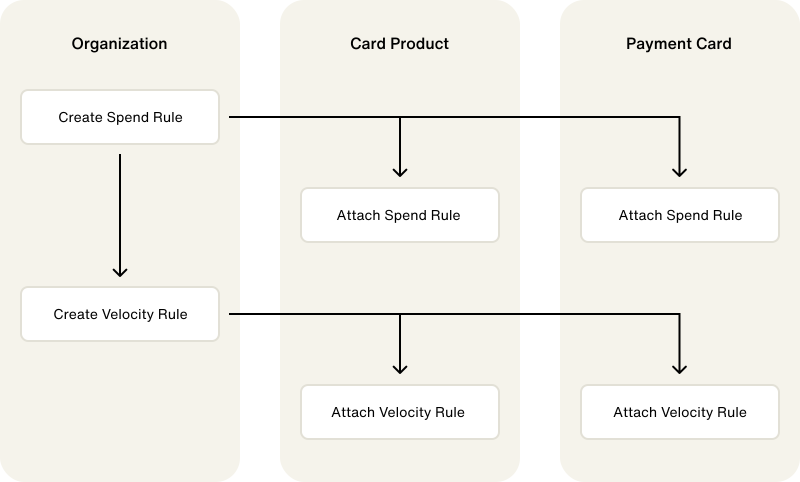
Velocity control windows
You can set velocity control time frames using several time windows. The following table describes available velocity control windows:
| Velocity Rule Window | Description |
|---|---|
| DAILY | One calendar day, 00:00:00 UTC to 11:59.59:00 UTC |
| WEEKLY | One calendar week, UTC start of week (Monday) to UTC end of week (Sunday) |
| MONTHLY | One calendar month, UTC start of month to UTC end of month |
| NINETY_DAYS | 90 calendar days moving window. One calendar day is from 00:00:00 UTC to 11:59.59:00 UTC |
| QUARTERLY | One calendar quarter, UTC start of quarter to UTC end of quarter |
| Q1: Jan - March, Q2: April - June, Q3: July - September, Q4: October - December | |
| YEARLY | One calendar year, UTC start of year to UTC end of year |
| PER_TRANSACTION | Velocity Rule is evaluated on every transaction individually |
| COOLDOWN_MINUTE | Cooldown period of one minute, e.g., with count rule of 1, cardholder must wait one minute between transactions |
| COOLDOWN_HOUR | Cooldown period of one hour, e.g., with count rule of 1, cardholder must wait one hour between transactions |
Limits
You can add three spend rules to a velocity control. Additionally, velocity controls have limits at the card product, financial account, and payment card levels:
- Card product: Limit of 10 velocity controls per card product
- Financial account: Limit of 10 velocity controls per financial account
- Payment card: Limit of 10 velocity controls per payment card
Velocity controls for authorized users
To create velocity controls for an authorized user, ensure that the spend rules for that authorized user were created with "userType": "AUTHORIZED_USER". Other than that, there is no difference from the standard velocity control.
Create velocity control
An amount spend rule, or cumulative rule, is required to create a velocity control.
To create a velocity control, you must first create spend rules, one of which must be an amount rule. You can add up to three spend rules to a velocity control. Create the velocity rule with the spend rule IDs. Velocity controls authorize transactions based on whether the associated spend rule's conditions are met within the velocity control window.
The following example uses multiple spend rules to create a velocity control for airline purchases:
- Create an amount limit spend rule for $1000.
- Create a MCC spend rule for airline purchases.
- Add both spend rules to a monthly velocity control.
- Your velocity control will limit only airline purchases to $1000 a month.
Use the following mutation to create a velocity control:
CreateVelocityRule
Query
mutation CreateVelocityRule($input: CreateVelocityRuleInput!) {
  createVelocityRule(input: $input) {
    __typename
    ... on VelocityRule {
      id
      name
      version
      velocityRuleWindow
      cumulativeRule {
        id
      }
      spendRules {
        id
      }
      createdAt
      updatedAt
    }
    ... on UserError {
      errors {
        code
        errorPath
      }
    }
    ... on AccessDeniedError {
      message
    }
  }
}
Variables
{
  "input": {
    "name": "My Rule",
    "velocityRuleWindow": "DAILY",
    "cumulativeRule": {
      "id": "<CUMULATIVE_RULE_ID>",
      "version": "0"
    },
    "spendRules": [
      {
        "id": "<SPEND_RULE_ID>",
        "version": "0"
      }
    ]
  }
}
Result
{
  "data": {
    "createVelocityRule": {
      "__typename": "VelocityRule",
      "id": "<VELOCITY_RULE_ID>",
      "name": "My Rule",
      "version": "0",
      "cumulativeRule": {
        "id": "<CUMULATIVE_RULE_ID>",
        "name": "dollar amount rule",
        "version": "0"
      },
      "spendRules": [
        {
          "id": "<SPEND_RULE_ID>",
          "name": "Merchant Rule",
          "version": "0"
        }
      ],
      "createdAt": "2021-08-12T21:09:25.475Z",
      "updatedAt": "2021-08-12T21:09:25.476Z"
    }
  }
}
Attach velocity control to a card product
Velocity controls can be attached to a card product, a financial account, or an individual payment card. Attaching a velocity control to a card product applies the spend rules and velocity control to all financial accounts and payment cards for your card product.
Use the following mutation to create a velocity control for a card product:
AttachCardProductVelocityRule
Query
mutation AttachCardProductVelocityRule(
  $input: AttachCardProductVelocityRuleInput!
) {
  attachCardProductVelocityRule(input: $input) {
    __typename
    ... on VelocityRuleAssociation {
      velocityRule {
        id
        name
        version
        cumulativeRule {
          id
          name
          version
        }
        createdAt
        updatedAt
      }
      associatedTo {
        ... on Node {
          id
        }
        ... on CardProduct {
          id
        }
      }
    }
    ... on UserError {
      errors {
        code
        errorPath
      }
    }
    ... on AccessDeniedError {
      message
    }
  }
}
Variables
{
  "input": {
    "cardProductId": "<CARD_PRODUCT_ID>",
    "velocityRule": {
      "velocityRuleId": "<VELOCITY_RULE_ID>"
    }
  }
}
Result
{
  "data": {
    "attachCardProductVelocityRule": {
      "__typename": "VelocityRuleAssociation",
      "velocityRule": {
        "id": "<VELOCITY_RULE_ID>",
        "name": "My Rule",
        "version": "0",
        "cumulativeRule": {
          "id": "<CUMULATIVE_RULE_ID>",
          "name": "dollar amount rule",
          "version": "0"
        },
        "createdAt": "2021-08-12T21:09:25.475Z",
        "updatedAt": "2021-08-12T21:09:25.476Z"
      },
      "associatedTo": {
        "__typename": "CardProduct",
        "id": "<CARD_PRODUCT_ID>"
      }
    }
  }
}
Attach velocity control to a payment card
Velocity controls can be attached to a card product, a financial account, or an individual payment card. Velocity controls attached to a payment card only apply to that specific payment card.
Use the following mutation to attach a velocity control to a payment card:
AttachPaymentCardVelocityRule
Query
mutation AttachPaymentCardVelocityRule(
  $input: AttachPaymentCardVelocityRuleInput!
) {
  attachPaymentCardVelocityRule(input: $input) {
    __typename
    ... on VelocityRuleAssociation {
      velocityRule {
        id
        name
        version
        cumulativeRule {
          id
          name
          version
        }
        createdAt
        updatedAt
      }
      associatedTo {
        ... on Node {
          id
        }
        ... on PaymentCard {
          id
        }
      }
    }
    ... on UserError {
      errors {
        code
        errorPath
      }
    }
    ... on AccessDeniedError {
      message
    }
  }
}
Variables
{
  "input": {
    "paymentCardId": "<PAYMENT_CARD_ID>",
    "velocityRule": {
      "velocityRuleId": "<VELOCITY_RULE_ID>"
    }
  }
}
Result
{
  "data": {
    "attachPaymentCardVelocityRule": {
      "__typename": "VelocityRuleAssociation",
      "velocityRule": {
        "id": "<VELOCITY_RULE_ID>",
        "name": "My Rule",
        "version": "0",
        "cumulativeRule": {
          "id": "<CUMULATIVE_RULE_ID>",
          "name": "dollar amount rule",
          "version": "0"
        },
        "createdAt": "2021-08-12T21:09:25.475Z",
        "updatedAt": "2021-08-12T21:09:25.476Z"
      },
      "associatedTo": {
        "__typename": "PaymentCard",
        "id": "<PAYMENT_CARD_ID>"
      }
    }
  }
}
Attach velocity control to a financial account
Velocity controls can be attached to a card product, a financial account, or an individual payment card. Velocity controls attached to a financial account apply to all payment cards linked to the financial account.
Use the following mutation to attach a velocity control to a financial account:
AttachVelocityRuleToFinancialAccount
Query
mutation AttachVelocityRuleToFinancialAccount(
  $input: AttachVelocityRuleToFinancialAccountInput!
) {
  attachVelocityRuleToFinancialAccount(input: $input) {
    __typename
    ... on FinancialAccount {
      id
      attachedVelocityRules {
        edges {
          node {
            id
            name
            version
          }
        }
      }
    }
    ... on UserError {
      errors {
        code
        path
      }
    }
    ... on AccessDeniedError {
      message
    }
  }
}
Variables
{
  "input": {
    "financialAccountId": "<FINANCIAL_ACCOUNT_ID>",
    "velocityRule": {
      "velocityRuleId": "<VELOCITY_RULE_ID>"
    }
  }
}
Result
{
  "data": {
    "attachVelocityRuleToFinancialAccount": {
      "__typename": "FinancialAccount",
      "id": "<FINANCIAL_ACCOUNT_ID>",
      "attachedVelocityRules": {
        "edges": [
          {
            "node": {
              "id": "<VELOCITY_RULE_ID>",
              "name": "My Rule",
              "version": "0"
            }
          }
        ]
      }
    }
  },
  "extensions": {
    "requestId": "<REQUEST_ID>"
  }
}
Detach velocity control from a card product
If you detach and re-attach a velocity, the balance on the "count" and "windows" of the velocity control will reset.
Use the following mutation to detach a velocity control from a card product:
DetachCardProductVelocityRule
Query
mutation DetachCardProductVelocityRule(
  $input: DetachCardProductVelocityRuleInput!
) {
  detachCardProductVelocityRule(input: $input) {
    __typename
    ... on VelocityRuleAssociation {
      velocityRule {
        id
        name
        version
        cumulativeRule {
          id
          name
          version
        }
        createdAt
        updatedAt
      }
      associatedTo {
        ... on Node {
          id
        }
        ... on CardProduct {
          id
        }
      }
    }
    ... on UserError {
      errors {
        code
        errorPath
      }
    }
    ... on AccessDeniedError {
      message
    }
  }
}
Variables
{
  "input": {
    "cardProductId": "<CARD_PRODUCT_ID>",
    "velocityRule": {
      "velocityRuleId": "<VELOCITY_RULE_ID>"
    }
  }
}
Result
{
  "data": {
    "detachCardProductVelocityRule": {
      "__typename": "VelocityRuleAssociation",
      "velocityRule": {
        "id": "<VELOCITY_RULE_ID>",
        "name": "My Rule",
        "version": "0",
        "cumulativeRule": {
          "id": "<CUMULATIVE_RULE_ID>",
          "name": "dollar amount rule",
          "version": "0"
        },
        "createdAt": "2021-08-12T21:09:25.475Z",
        "updatedAt": "2021-08-12T21:09:25.476Z"
      },
      "associatedTo": {
        "__typename": "CardProduct",
        "id": "<CARD_PRODUCT_ID>"
      }
    }
  }
}
Detach velocity control from a payment card
If you detach and re-attach a velocity, the balance on the "count" and "windows" of the velocity control will reset.
Use the following mutation to detach a velocity control from a payment card:
DetachPaymentCardVelocityRule
Query
mutation DetachPaymentCardVelocityRule(
  $input: DetachPaymentCardVelocityRuleInput!
) {
  detachPaymentCardVelocityRule(input: $input) {
    __typename
    ... on VelocityRuleAssociation {
      velocityRule {
        id
        name
        version
        cumulativeRule {
          id
          name
          version
        }
        createdAt
        updatedAt
      }
      associatedTo {
        ... on Node {
          id
        }
        ... on PaymentCard {
          id
        }
      }
    }
    ... on UserError {
      errors {
        code
        errorPath
      }
    }
    ... on AccessDeniedError {
      message
    }
  }
}
Variables
{
  "input": {
    "paymentCardId": "<PAYMENT_CARD_ID>",
    "velocityRule": {
      "velocityRuleId": "<VELOCITY_RULE_ID>"
    }
  }
}
Result
{
  "data": {
    "detachPaymentCardVelocityRule": {
      "__typename": "VelocityRuleAssociation",
      "velocityRule": {
        "id": "<VELOCITY_RULE_ID>",
        "name": "My Rule",
        "version": "0",
        "cumulativeRule": {
          "id": "<CUMULATIVE_RULE_ID>",
          "name": "dollar amount rule",
          "version": "0"
        },
        "createdAt": "2021-08-12T21:09:25.475Z",
        "updatedAt": "2021-08-12T21:09:25.476Z"
      },
      "associatedTo": {
        "__typename": "PaymentCard",
        "id": "<PAYMENT_CARD_ID>"
      }
    }
  }
}
Detach velocity control from a financial account
If you detach and re-attach a velocity, the balance on the "count" and "windows" of the velocity control will reset.
Use the following mutation to detach a velocity control from a financial account:
DetachVelocityRuleFromFinancialAccount
Query
mutation DetachVelocityRuleFromFinancialAccount(
  $input: DetachVelocityRuleFromFinancialAccountInput!
) {
  detachVelocityRuleFromFinancialAccount(input: $input) {
    __typename
    ... on FinancialAccount {
      id
      attachedVelocityRules {
        edges {
          node {
            id
            name
            version
          }
        }
      }
    }
    ... on UserError {
      errors {
        code
        path
      }
    }
    ... on AccessDeniedError {
      message
    }
  }
}
Variables
{
  "input": {
    "financialAccountId": "<FINANCIAL_ACCOUNT_ID>",
    "velocityRule": {
      "velocityRuleId": "<VELOCITY_RULE_ID>"
    }
  }
}
Result
{
  "data": {
    "detachVelocityRuleFromFinancialAccount": {
      "__typename": "FinancialAccount",
      "id": "<FINANCIAL_ACCOUNT_ID>",
      "attachedVelocityRules": {
        "edges": []
      }
    }
  },
  "extensions": {
    "requestId": "<REQUEST_ID>"
  }
}
Edit a velocity control
Editing a velocity control resets its balance, the same as detaching and re-attaching it. This includes changing the limit on one of its spend rules and renaming the velocity control itself — both trigger the reset, even a name-only change with no limit change. Spend already counted in the current window does not carry over.
Use updateAmountLimitSpendRule or updateCountLimitSpendRule to change the limit on a spend rule's cumulative rule. Use updateVelocityRule to rename a velocity control or change its user type; it does not accept a limit, but it still resets the balance.
The reset takes effect on the next authorization that evaluates the velocity control, not immediately. A velocity control balance query made right after the edit can still return the pre-edit accumulated amount until that next transaction runs.
List velocity controls
Use the following query to find all velocity controls for your organization:
NodeOrganizationWithVelocityRules
Query
query nodeOrganizationWithVelocityRules($id: ID!, $velocityRulesFirst: Int) {
  node(id: $id) {
    __typename
    ... on Organization {
      id
      velocityRules(first: $velocityRulesFirst) {
        pageInfo {
          hasNextPage
          hasPreviousPage
        }
        edges {
          node {
            __typename
            ... on VelocityRule {
              id
              name
            }
          }
        }
      }
    }
  }
}
Variables
{
  "id": "<ORGANIZATION_ID>",
  "velocityRulesFirst": 1
}
Result
{
  "node": {
    "id": "<ORGANIZATION_ID>",
    "velocityRules": {
      "pageInfo": {
        "hasNextPage": false
      },
      "edges": [
        {
          "node": {
            "__typename": "VelocityRule",
            "id": "<VELOCITY_RULE_ID>",
            "name": "My Velocity Rule"
          }
        }
      ]
    }
  }
}
Find velocity control balance
Velocity controls track how much money has been spent within a certain window to help troubleshoot declined transactions. You can check the "balance" of a velocity control for a payment card or financial account. The balance reflects the total amount spent.
Use the following query to find the velocity control balance on a financial account:
NodeFinancialAccountWithVelocityBalance
Query
query nodeFinancialAccountWithVelocityBalance($id: ID!) {
  node(id: $id) {
    __typename
    ... on FinancialAccount {
      id
      velocitySpendRuleBalances {
        ... on VelocitySpendRuleAmountBalance {
          __typename
          currentBalance {
            currencyCode
            value
          }
          remainingBalance {
            currencyCode
            value
          }
          velocityRule {
            id
            version
            name
          }
        }
      }
    }
  }
}
Variables
{
  "id": "<FINANCIAL_ACCOUNT_ID>"
}
Result
{
  "node": {
    "id": "<FINANCIAL_ACCOUNT_ID>",
    "velocitySpendRuleBalances": {
      "currentBalance": {
        "value": "200",
        "currencyCode": "USD"
      },
      "remainingBalance": {
        "value": "400",
        "currencyCode": "USD"
      },
      "velocityRule": {
        "id": "<VELOCITY_RULE_ID>",
        "name": "My Rule",
        "version": "0"
      }
    }
  }
}