Simulate Transactions
Overview
Do not enter production data in the Highnote Test environment, which is for exploring features and training. Use only dummy or test data.
You can use the Highnote API to simulate transactions in the Test environment. Simulating transactions helps test the following use cases and card product settings:
- Transactions at different merchant types
- Different transaction amounts
- International transactions
- Spend rules and velocity controls
- Collaborative authorization flow
This guide provides steps for simulating transactions using the Highnote API. For steps on simulating transactions in the dashboard, see Simulate authorizations.
Prerequisites
This guide can be used for any card product, except fleet card products. To simulate transactions for fleet card products, see Simulate Fleet Transactions.
- A Highnote account
- An API Key or the API Explorer
- A card product, financial account, and payment card
Simulate an authorization
Simulated authorizations use the same logic as real authorizations from card networks such as Mastercard and Visa. In the Test environment, authorizations are approved or declined based on your card product logic and authorization controls.
Use the following mutation to simulate an authorization in your Test environment:
SimulateAuthorization
Query
mutation SimulateAuthorization($input: SimulateAuthorizationInput!) {
  simulateAuthorization(input: $input) {
    ... on AuthorizationEvent {
      id
      responseCode
      postalCodeResponseCode
      cvvResponseCode
      merchantDetails {
        countryCodeAlpha3
        category
        name
        description
        merchantId
        categoryCode
        address {
          postalCode
          region
          locality
          countryCodeAlpha3
        }
      }
      pointOfServiceDetails {
        category
        cardDataInputCapability
        panEntryMode
        pinEntryMode
        terminalAttendance
        isCardHolderPresent
        isCardPresent
        terminalSupportsPartialApproval
        isRecurring
      }
      additionalNetworkData {
        __typename
        ... on VisaData {
          transactionIdentifier
        }
      }
      transactionProcessingType
      transaction {
        ... on Node {
          id
        }
      }
      currentFinancialAccountAvailableToSpendAmount {
        currencyCode
        value
      }
      currentFinancialAccountMaximumBalanceAmount {
        currencyCode
        value
      }
    }
  }
}
Variables
{
  "input": {
    "amount": {
      "value": 1000,
      "currencyCode": "USD"
    },
    "merchantDetails": {
      "merchantId": "000000000011111",
      "name": "Safeway",
      "description": "Safeway - SF",
      "category": "MISCELLANEOUS_SPECIALTY_RETAIL",
      "address": {
        "postalCode": "94105",
        "region": "CA",
        "locality": "San Francisco",
        "countryCodeAlpha3": "USA"
      }
    },
    "pointOfServiceDetails": {
      "category": "AUTOMATED_FUEL_DISPENSER",
      "cardDataInputCapability": "MAG_STRIPE_READER_AND_EMV_ICC",
      "panEntryMode": "MAGNETIC_STRIPE",
      "pinEntryMode": "PIN_VERIFIED_BY_TERMINAL_DEVICE",
      "terminalAttendance": "ATTENDED",
      "isCardHolderPresent": true,
      "isCardPresent": true,
      "terminalSupportsPartialApproval": true,
      "isRecurring": false
    },
    "transactionProcessingType": "PAYMENT_DEBIT",
    "cardId": "<PAYMENT_CARD_ID>"
  }
}
Result
{
  "data": {
    "simulateAuthorization": {
      "id": "<TRANSACTION_EVENT_ID>",
      "responseCode": "APPROVED",
      "postalCodeResponseCode": "NOT_PROVIDED",
      "cvvResponseCode": "MATCH",
      "networkResponseCode": "00",
      "merchantDetails": {
        "merchantId": "000000000011111",
        "name": "Safeway",
        "description": "Safeway - SF",
        "category": "MISCELLANEOUS_SPECIALTY_RETAIL",
        "categoryCode": "5514",
        "address": {
          "postalCode": "94105",
          "region": "CA",
          "locality": "San Francisco",
          "countryCodeAlpha3": "USA"
        }
      },
      "pointOfServiceDetails": {
        "category": "AUTOMATED_FUEL_DISPENSER",
        "cardDataInputCapability": "MAG_STRIPE_READER_AND_EMV_ICC",
        "panEntryMode": "MAGNETIC_STRIPE",
        "pinEntryMode": "PIN_VERIFIED_BY_TERMINAL_DEVICE",
        "terminalAttendance": "ATTENDED",
        "isCardHolderPresent": true,
        "isCardPresent": true,
        "terminalSupportsPartialApproval": true,
        "isRecurring": false
      },
      "additionalNetworkData": {
        "__typename": "VisaData",
        "transactionIdentifier": "123456"
      },
      "transactionProcessingType": "PAYMENT_DEBIT",
      "transaction": {
        "id": "<TRANSACTION_ID>"
      },
      "currentFinancialAccountAvailableToSpendAmount": {
        "currencyCode": "USD",
        "value": 500
      },
      "currentFinancialAccountMaximumBalanceAmount": {
        "currencyCode": "USD",
        "value": 30000
      }
    }
  },
  "extensions": {
    "requestId": "<REQUEST_ID>"
  }
}
Simulate a 3DS verification
You can simulate a 3-D Secure (3DS) verification preceding an authorization by including the additionalNetworkData object in the SimulateAuthorization input. The additionalNetworkData object contains network-specific sub-objects for Visa and Mastercard, each with three fields relevant to 3DS.
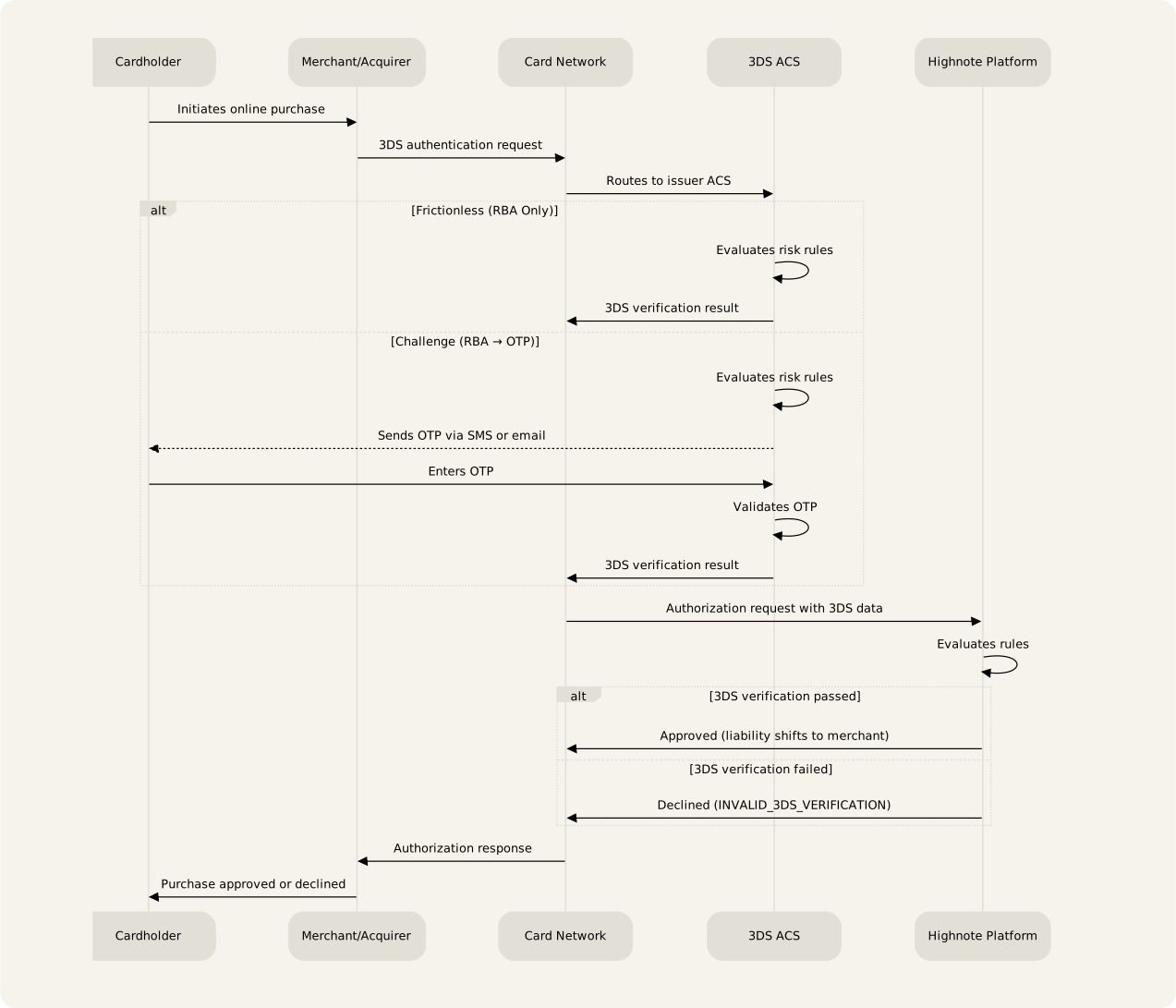
The 3DS field values are echoed on the authorization response. To simulate a failed 3DS verification, set the first field to the failed value — the authorization will be declined with INVALID_3DS_VERIFICATION.
Visa
To simulate a passed 3DS verification for a Visa card, include the following in your SimulateAuthorization input:
"additionalNetworkData": {
  "visa": {
    "cavvResultCode": "PASSED",
    "motoAndElectronicCommerceIndicator": "SECURE_ELECTRONIC_COMMERCE_TRANSACTION",
    "threeDSecureIndicator": "FRICTIONLESS"
  }
}
To simulate a failed 3DS verification, set cavvResultCode to FAILED:
"additionalNetworkData": {
  "visa": {
    "cavvResultCode": "FAILED",
    "motoAndElectronicCommerceIndicator": "SECURE_ELECTRONIC_COMMERCE_TRANSACTION",
    "threeDSecureIndicator": "FRICTIONLESS"
  }
}
Mastercard
To simulate a passed 3DS verification for a Mastercard card, include the following in your SimulateAuthorization input:
"additionalNetworkData": {
  "mastercard": {
    "aavResultCode": "AAV_PASSED_VALIDATION",
    "threeDSecureCardholderAuthentication": "CARDHOLDER_CERTIFICATE_NOT_USED",
    "ucafCollectionIndicator": "UCAF_DATA_SUPPORTED"
  }
}
To simulate a failed 3DS verification, set aavResultCode to AAV_FAILED_VALIDATION:
"additionalNetworkData": {
  "mastercard": {
    "aavResultCode": "AAV_FAILED_VALIDATION",
    "threeDSecureCardholderAuthentication": "CARDHOLDER_CERTIFICATE_NOT_USED",
    "ucafCollectionIndicator": "UCAF_DATA_SUPPORTED"
  }
}
3DS verification flow
The following diagram shows the 3DS verification and authorization flow, including both frictionless and step-up challenge paths. The Access Control Server (ACS) performs the 3DS authentication on behalf of the issuer using Risk-Based Authentication (RBA) to determine whether to approve frictionlessly or require a one-time password (OTP) challenge.
Simulate a clearing event
Once a transaction clears, funds are transferred to the merchant from the account holder's financial account. Clearing occurs in one of the following ways:
- With an authorization, immediately after
- In batches after authorizations are approved
Use the following mutation to simulate clearing. For partial clearings, set the value input variable to an amount less than the original transaction, for example:
"amount": { "currencyCode": "USD", "value": "100" }
SimulateClearing
Query
mutation SimulateClearing($input: SimulateClearingInput!) {
  simulateClearing(input: $input) {
    ... on ClearingEvent {
      id
      responseCode
      merchantDetails {
        countryCodeAlpha3
        category
        name
        description
        merchantId
        categoryCode
        address {
          postalCode
          region
          locality
          countryCodeAlpha3
        }
      }
      pointOfServiceDetails {
        category
        cardDataInputCapability
        panEntryMode
        pinEntryMode
        terminalAttendance
        isCardHolderPresent
        isCardPresent
        terminalSupportsPartialApproval
        isRecurring
      }
      additionalNetworkData {
        __typename
        ... on VisaData {
          transactionIdentifier
        }
      }
      transactionProcessingType
      transaction {
        ... on Node {
          id
        }
      }
      currentFinancialAccountAvailableToSpendAmount {
        currencyCode
        value
      }
      currentFinancialAccountMaximumBalanceAmount {
        currencyCode
        value
      }
    }
  }
}
Variables
{
  "input": {
    "transactionId": "<TRANSACTION_ID>",
    "merchantDetails": {
      "merchantId": "000000000011111",
      "name": "Safeway",
      "description": "Safeway - SF",
      "category": "MISCELLANEOUS_SPECIALTY_RETAIL",
      "address": {
        "postalCode": "94105",
        "region": "CA",
        "locality": "San Francisco",
        "countryCodeAlpha3": "USA"
      }
    },
    "pointOfServiceDetails": {
      "category": "AUTOMATED_FUEL_DISPENSER",
      "cardDataInputCapability": "MAG_STRIPE_READER_AND_EMV_ICC",
      "panEntryMode": "MAGNETIC_STRIPE",
      "pinEntryMode": "PIN_VERIFIED_BY_TERMINAL_DEVICE",
      "terminalAttendance": "ATTENDED",
      "isCardHolderPresent": true,
      "isCardPresent": true,
      "terminalSupportsPartialApproval": true,
      "isRecurring": false
    },
    "transactionProcessingType": "PAYMENT_DEBIT"
  }
}
Result
{
  "data": {
    "simulateClearing": {
      "id": "<TRANSACTION_EVENT_ID>",
      "responseCode": "APPROVED",
      "merchantDetails": {
        "merchantId": "000000000011111",
        "name": "Safeway",
        "description": "Safeway - SF",
        "category": "MISCELLANEOUS_SPECIALTY_RETAIL",
        "categoryCode": "5514",
        "address": {
          "postalCode": "94105",
          "region": "CA",
          "locality": "San Francisco",
          "countryCodeAlpha3": "USA"
        }
      },
      "pointOfServiceDetails": {
        "category": "AUTOMATED_FUEL_DISPENSER",
        "cardDataInputCapability": "MAG_STRIPE_READER_AND_EMV_ICC",
        "panEntryMode": "MAGNETIC_STRIPE",
        "pinEntryMode": "PIN_VERIFIED_BY_TERMINAL_DEVICE",
        "terminalAttendance": "ATTENDED",
        "isCardHolderPresent": true,
        "isCardPresent": true,
        "terminalSupportsPartialApproval": true,
        "isRecurring": false
      },
      "additionalNetworkData": {
        "__typename": "VisaData",
        "transactionIdentifier": "123456"
      },
      "transactionProcessingType": "PAYMENT_DEBIT",
      "transaction": {
        "id": "<TRANSACTION_ID>"
      },
      "currentFinancialAccountAvailableToSpendAmount": {
        "currencyCode": "USD",
        "value": 500
      },
      "currentFinancialAccountMaximumBalanceAmount": {
        "currencyCode": "USD",
        "value": 30000
      }
    }
  }
}
Simulate an authorization and clear
Some transactions send authorization and clearing events in a single message. Use the following mutation to simulate an authorization and clearing event:
SimulateSingleStepAuthAndClear
Query
mutation SimulateSingleStepAuthAndClear(
  $input: SimulateSingleStepAuthAndClearInput!
) {
  simulateSingleStepAuthAndClear(input: $input) {
    ... on AuthorizationAndClearEvent {
      id
      transaction {
        ... on Node {
          __typename
          id
        }
      }
      originalAmount {
        value
        currencyCode
      }
      requestedAmount {
        value
        currencyCode
      }
      approvedAmount {
        value
        currencyCode
      }
      responseCode
      partial
      merchantDetails {
        address {
          locality
          region
          countryCodeAlpha3
          postalCode
        }
        countryCodeAlpha3
        category
        categoryCode
        name
        merchantId
        description
      }
      currentFinancialAccountMaximumBalanceAmount {
        value
        currencyCode
      }
      currentFinancialAccountAvailableToSpendAmount {
        value
        currencyCode
      }
      transactionProcessingType
      pointOfServiceDetails {
        category
        panEntryMode
        pinEntryMode
        terminalAttendance
        isCardHolderPresent
        isCardPresent
        isRecurring
        terminalSupportsPartialApproval
      }
      additionalNetworkData {
        __typename
        ... on VisaData {
          transactionIdentifier
        }
      }
      paymentCardSnapshot {
        createdAt
        status
        paymentCardCurrent {
          id
          expirationDate
          last4
        }
      }
    }
    ... on UserError {
      errors {
        errorPath
        code
        description
      }
    }
  }
}
Variables
{
  "input": {
    "amount": {
      "value": 1000,
      "currencyCode": "USD"
    },
    "cardId": "<PAYMENT_CARD_ID>",
    "merchantDetails": {
      "address": {
        "locality": "Redmond",
        "region": "WA",
        "postalCode": "98053",
        "countryCodeAlpha3": "USA"
      },
      "name": "HIGHNOTE_PLATFORM 1234",
      "merchantId": "1234567890",
      "description": "HIGHNOTE SF CA US 1234",
      "category": "AUTOMATED_CASH_DISBURSE",
      "countryCodeAlpha3": "USA"
    },
    "transactionProcessingType": "CASH",
    "pointOfServiceDetails": {
      "category": "AUTOMATED_TELLER_MACHINE",
      "panEntryMode": "INTEGRATED_CIRCUIT_CARD",
      "pinEntryMode": "PIN_VERIFIED_BY_TERMINAL_DEVICE",
      "terminalAttendance": "UNATTENDED",
      "isCardHolderPresent": true,
      "isCardPresent": true,
      "isRecurring": false,
      "terminalSupportsPartialApproval": false
    }
  }
}
Result
{
  "data": {
    "simulateSingleStepAuthAndClear": {
      "id": "<TRANSACTION_EVENT_ID>",
      "transaction": {
        "__typename": "DebitTransaction",
        "id": "<TRANSACTION_ID>"
      },
      "originalAmount": null,
      "requestedAmount": {
        "value": 1000,
        "currencyCode": "USD"
      },
      "approvedAmount": {
        "value": 1000,
        "currencyCode": "USD"
      },
      "responseCode": "APPROVED",
      "partial": false,
      "merchantDetails": {
        "address": {
          "locality": "Redmond",
          "region": "WA",
          "countryCodeAlpha3": "USA",
          "postalCode": "98053"
        },
        "countryCodeAlpha3": "USA",
        "category": "AUTOMATED_CASH_DISBURSE",
        "categoryCode": "6011",
        "name": "HIGHNOTE_PLATFORM 1234",
        "merchantId": "1234567890",
        "description": "HIGHNOTE SF CA US 1234"
      },
      "currentFinancialAccountMaximumBalanceAmount": {
        "value": 50000000,
        "currencyCode": "USD"
      },
      "currentFinancialAccountAvailableToSpendAmount": {
        "value": 49930000,
        "currencyCode": "USD"
      },
      "transactionProcessingType": "CASH",
      "pointOfServiceDetails": {
        "category": "AUTOMATED_TELLER_MACHINE",
        "panEntryMode": "INTEGRATED_CIRCUIT_CARD",
        "pinEntryMode": "PIN_VERIFIED_BY_TERMINAL_DEVICE",
        "terminalAttendance": "UNATTENDED",
        "isCardHolderPresent": true,
        "isCardPresent": true,
        "isRecurring": false,
        "terminalSupportsPartialApproval": false
      },
      "additionalNetworkData": {
        "__typename": "VisaData",
        "transactionIdentifier": "a72be1cc26ea444697b8fa171f6bab6f"
      },
      "paymentCardSnapshot": {
        "createdAt": "2024-02-14T19:45:04.386Z",
        "status": "ACTIVE",
        "paymentCardCurrent": {
          "id": "<PAYMENT_CARD_ID>",
          "expirationDate": "2025-01-01T23:59:59Z",
          "last4": "9662"
        }
      }
    }
  },
  "extensions": {
    "requestId": "<REQUEST_ID>",
    "rateLimit": {
      "cost": 22
    }
  }
}
Simulate a reversal
An authorization can be reversed if it has not cleared. Reversing an authorization releases funds from "pending" status and returns the funds to the account holder.
Specifically:
- You can do a full or partial reversal.
- You cannot reverse after a partial clearing, nor clear after a partial reversal.
Use the following mutation to simulate a reversal. Full reversals are the default. For partial reversals, set the value input variable to an amount less than the original authorization, for example:
"amount": { "currencyCode": "USD", "value": "100" }
SimulateReversal
Query
mutation SimulateReversal($input: SimulateReversalInput!) {
  simulateReversal(input: $input) {
    ... on ReversalEvent {
      id
      responseCode
      merchantDetails {
        countryCodeAlpha3
        category
        name
        description
        merchantId
        categoryCode
        address {
          postalCode
          region
          locality
          countryCodeAlpha3
        }
      }
      pointOfServiceDetails {
        category
        cardDataInputCapability
        panEntryMode
        pinEntryMode
        terminalAttendance
        isCardHolderPresent
        isCardPresent
        terminalSupportsPartialApproval
        isRecurring
      }
      additionalNetworkData {
        __typename
        ... on VisaData {
          transactionIdentifier
        }
      }
      transactionProcessingType
      transaction {
        ... on Node {
          id
        }
      }
      currentFinancialAccountAvailableToSpendAmount {
        currencyCode
        value
      }
      currentFinancialAccountMaximumBalanceAmount {
        currencyCode
        value
      }
    }
  }
}
Variables
{
  "input": {
    "transactionId": "<TRANSACTION_ID>",
    "merchantDetails": {
      "merchantId": "000000000011111",
      "name": "Safeway",
      "description": "Safeway - SF",
      "category": "MISCELLANEOUS_SPECIALTY_RETAIL",
      "address": {
        "postalCode": "94105",
        "region": "CA",
        "locality": "San Francisco",
        "countryCodeAlpha3": "USA"
      }
    },
    "pointOfServiceDetails": {
      "category": "AUTOMATED_FUEL_DISPENSER",
      "cardDataInputCapability": "MAG_STRIPE_READER_AND_EMV_ICC",
      "panEntryMode": "MAGNETIC_STRIPE",
      "pinEntryMode": "PIN_VERIFIED_BY_TERMINAL_DEVICE",
      "terminalAttendance": "ATTENDED",
      "isCardHolderPresent": true,
      "isCardPresent": true,
      "terminalSupportsPartialApproval": true,
      "isRecurring": false
    },
    "transactionProcessingType": "PAYMENT_DEBIT"
  }
}
Result
{
  "data": {
    "simulateAuthorizationReversal": {
      "id": "<TRANSACTION_EVENT_ID>",
      "responseCode": "APPROVED",
      "merchantDetails": {
        "merchantId": "000000000011111",
        "name": "Safeway",
        "description": "Safeway - SF",
        "category": "MISCELLANEOUS_SPECIALTY_RETAIL",
        "categoryCode": "5514",
        "address": {
          "postalCode": "94105",
          "region": "CA",
          "locality": "San Francisco",
          "countryCodeAlpha3": "USA"
        }
      },
      "pointofServiceDetails": {
        "category": "AUTOMATED_FUEL_DISPENSER",
        "cardDataInputCapability": "MAG_STRIPE_READER_AND_EMV_ICC",
        "panEntryMode": "MAGNETIC_STRIPE",
        "pinEntryMode": "PIN_VERIFIED_BY_TERMINAL_DEVICE",
        "terminalAttendance": "ATTENDED",
        "isCardHolderPresent": true,
        "isCardPresent": true,
        "terminalSupportsPartialApproval": true,
        "isRecurring": false
      },
      "additionalNetworkData": {
        "__typename": "VisaData",
        "transactionIdentifier": "123456"
      },
      "transactionProcessingType": "PAYMENT_DEBIT",
      "transaction": {
        "id": "<TRANSACTION_ID>"
      },
      "currentFinancialAccountAvailableToSpendAmount": {
        "currencyCode": "USD",
        "value": 500
      },
      "currentFinancialAccountMaximumBalanceAmount": {
        "currencyCode": "USD",
        "value": 30000
      }
    }
  }
}
Simulate a refund
You cannot simulate refunds linked to a previous transaction. Simulating a refund results in a new transaction with its own id and transactionEvent.
Refunds can be simulated for cleared transactions. When simulating a refund, you can refund the total or partial amount of the original transaction.
When you use the simulateRefund mutation, you will receive a ClearingEvent in response. Use the following mutation to simulate a refund:
SimulateRefund
Query
mutation SimulateRefund($input: SimulateRefundInput!) {
  simulateRefund(input: $input) {
    ... on ClearingEvent {
      id
      responseCode
      merchantDetails {
        countryCodeAlpha3
        category
        name
        description
        merchantId
        categoryCode
        address {
          postalCode
          region
          locality
          countryCodeAlpha3
        }
      }
      pointOfServiceDetails {
        category
        cardDataInputCapability
        panEntryMode
        pinEntryMode
        terminalAttendance
        isCardHolderPresent
        isCardPresent
        terminalSupportsPartialApproval
        isRecurring
      }
      additionalNetworkData {
        __typename
        ... on VisaData {
          transactionIdentifier
        }
      }
      transactionProcessingType
      transaction {
        ... on Node {
          id
        }
      }
      currentFinancialAccountAvailableToSpendAmount {
        currencyCode
        value
      }
      currentFinancialAccountMaximumBalanceAmount {
        currencyCode
        value
      }
    }
  }
}
Variables
{
  "input": {
    "transactionId": "<TRANSACTION_ID>",
    "merchantDetails": {
      "merchantId": "000000000011111",
      "name": "Safeway",
      "description": "Safeway - SF",
      "category": "MISCELLANEOUS_SPECIALTY_RETAIL",
      "address": {
        "postalCode": "94105",
        "region": "CA",
        "locality": "San Francisco",
        "countryCodeAlpha3": "USA"
      }
    },
    "pointOfServiceDetails": {
      "category": "AUTOMATED_FUEL_DISPENSER",
      "cardDataInputCapability": "MAG_STRIPE_READER_AND_EMV_ICC",
      "panEntryMode": "MAGNETIC_STRIPE",
      "pinEntryMode": "PIN_VERIFIED_BY_TERMINAL_DEVICE",
      "terminalAttendance": "ATTENDED",
      "isCardHolderPresent": true,
      "isCardPresent": true,
      "terminalSupportsPartialApproval": true,
      "isRecurring": false
    },
    "transactionProcessingType": "RETURNS"
  }
}
Result
{
  "data": {
    "simulateRefund": {
      "id": "<TRANSACTION_EVENT_ID>",
      "responseCode": "APPROVED",
      "merchantDetails": {
        "merchantId": "000000000011111",
        "name": "Safeway",
        "description": "Safeway - SF",
        "category": "MISCELLANEOUS_SPECIALTY_RETAIL",
        "categoryCode": "5514",
        "address": {
          "postalCode": "94105",
          "region": "CA",
          "locality": "San Francisco",
          "countryCodeAlpha3": "USA"
        }
      },
      "pointofServiceDetails": {
        "category": "AUTOMATED_FUEL_DISPENSER",
        "cardDataInputCapability": "MAG_STRIPE_READER_AND_EMV_ICC",
        "panEntryMode": "MAGNETIC_STRIPE",
        "pinEntryMode": "PIN_VERIFIED_BY_TERMINAL_DEVICE",
        "terminalAttendance": "ATTENDED",
        "isCardHolderPresent": true,
        "isCardPresent": true,
        "terminalSupportsPartialApproval": true,
        "isRecurring": false
      },
      "visaData": {
        "transactionIdentifier": 123456
      },
      "transactionProcessingType": "RETURNS",
      "transaction": {
        "id": "<TRANSACTION_ID>"
      },
      "currentFinancialAccountAvailableToSpendAmount": {
        "currencyCode": "USD",
        "value": 500
      },
      "currentFinancialAccountMaximumBalanceAmount": {
        "currencyCode": "USD",
        "value": 30000
      }
    }
  }
}
Simulate an adjustment event
You can simulate Adjustment events from the payment networks using the SimulateAdjustment mutation.
SimulateAdjustment
Query
mutation SimulateAdjustment($input: SimulateAdjustmentInput!) {
  simulateAdjustment(input: $input) {
    ... on AdjustmentEvent {
      __typename
      id
      transaction {
        ... on Node {
          __typename
          id
        }
      }
      responseCode
      merchantDetails {
        address {
          locality
          region
          countryCodeAlpha3
          postalCode
        }
        countryCodeAlpha3
        category
        categoryCode
        name
        merchantId
        description
      }
      transactionProcessingType
      pointOfServiceDetails {
        category
        panEntryMode
        pinEntryMode
        terminalAttendance
        isCardHolderPresent
        isCardPresent
        isRecurring
        terminalSupportsPartialApproval
        cardDataInputCapability
      }
      additionalNetworkData {
        __typename
        ... on VisaData {
          transactionIdentifier
          authorizationCode
          acquiringInstitutionIdentificationCode
          retrievalReferenceNumber
          systemTraceAuditNumber
          networkTransmissionDateAndTime
        }
        ... on MastercardData {
          banknetReferenceNumber
          authorizationCode
          acquiringInstitutionIdentificationCode
          retrievalReferenceNumber
          systemTraceAuditNumber
          networkTransmissionDateAndTime
        }
      }
      paymentCardSnapshot {
        __typename
        createdAt
        status
        paymentCardCurrent {
          id
          last4
          formFactor
          network
          status
        }
      }
    }

    ... on UserError {
      errors {
        errorPath
        code
        description
      }
    }
  }
}
Variables
{
  "input": {
    "transactionId": "<DEBIT_TRANSACTION_ID>",
    "amount": {
      "value": 500,
      "currencyCode": "USD"
    },
    "transactionProcessingType": "ADJUSTMENT_DEBIT"
  }
}
Result
{
  "data": {
    "simulateAdjustment": {
      "__typename": "AdjustmentEvent",
      "id": "<ADJUSTMENT_EVENT_ID>",
      "transaction": {
        "__typename": "DebitTransaction",
        "id": "<DEBIT_TRANSACTION_ID>"
      },
      "responseCode": "APPROVED",
      "merchantDetails": {
        "address": {
          "locality": "San Francisco",
          "region": "CA",
          "countryCodeAlpha3": "USA",
          "postalCode": ""
        },
        "countryCodeAlpha3": "USA",
        "category": "BAKERIES",
        "categoryCode": "5462",
        "name": "Some merchant name",
        "merchantId": "12345678",
        "description": "HIGHNOTE SF CA US"
      },
      "transactionProcessingType": "ADJUSTMENT_DEBIT",
      "pointOfServiceDetails": {
        "category": null,
        "panEntryMode": null,
        "pinEntryMode": null,
        "terminalAttendance": null,
        "isCardHolderPresent": false,
        "isCardPresent": false,
        "isRecurring": false,
        "terminalSupportsPartialApproval": false,
        "cardDataInputCapability": null
      },
      "additionalNetworkData": null,
      "paymentCardSnapshot": {
        "__typename": "PaymentCardSnapshot",
        "createdAt": "2024-11-25T19:00:18.570Z",
        "status": "ACTIVE",
        "paymentCardCurrent": {
          "id": "<PAYMENT_CARD_ID>",
          "last4": "9803",
          "formFactor": "VIRTUAL",
          "network": "MASTERCARD",
          "status": "ACTIVE"
        }
      }
    }
  },
  "extensions": {
    "requestId": "6896af4c-0b38-9f0d-8a75-085a8d5be838",
    "rateLimit": {
      "cost": 17
    }
  }
}
Automate your integration
To automate your integration, subscribe to the following notification events:
The details provided in the payloads from these events can be used for the following use cases:
- Automate your application or website's transaction processing workflows
- Create account holder notifications and alerts