Add Cards to Digital Wallets
Overview
Digital wallets enable your customers to store a card's primary account number (PAN) as a tokenized digital account number. This token is presented to the merchant in place of the PAN, so the merchant cannot see or retain the payment card's information.
You can provision payment cards to digital wallets such as Apple Pay, Google Wallet, and Samsung Pay. Payment cards are added to digital wallets in four ways:
- Manual entry: An account holder opens a digital wallet app on their phone and manually enters their card details.
- In-app push provisioning: An account holder taps a software button — such as "Add to Apple Wallet" or "Add to Google Wallet" — inside your iOS or Android app, which triggers a provisioning flow native to the device. Works for virtual or physical cards.
- Apple Pay Web Push Provisioning (WPP): An account holder selects a card on your website and provisions it to one or more Apple devices linked to their Apple ID.
- Tap to Add: An account holder physically taps their card to the back of an NFC-enabled phone, which prompts the digital wallet to add it. Requires a physical Visa or Mastercard card.
The four methods differ in where the action happens, what your team needs to build, and what kind of card the cardholder uses:
| Method | Cardholder start | What you build | Card constraint |
|---|---|---|---|
| Manual entry | Their wallet app | Nothing | None |
| In-app push provisioning | Your iOS or Android app | An app integration with the wallet vendor's SDK plus the matching Highnote push provisioning mutation | None |
| Apple Pay Web Push Provisioning | Your website | A web frontend plus a backend call to generateAppleWebPushProvisioningToken | Apple Pay only |
| Tap to Add | Their wallet's "Add Card" screen | Nothing | Physical Visa or Mastercard |
Prerequisites
- A Highnote account
- An API key or the API Explorer
- An approved tokenized card design
Wallet provider enums
The Highnote API has two wallet-related enums that serve different purposes:
| Enum | Values | Purpose |
|---|---|---|
DigitalWalletProvider | APPLE_PAY, GOOGLE_PAY, SAMSUNG_PAY | Specifies which digital wallets your card art is designed for. Used when creating or updating a digital card profile. |
WalletProviderType | GOOGLE_PAY, SAMSUNG_PAY | Identifies wallet provider during push provisioning. Used in mutation addPaymentCardToGooglePay... |
Apple Pay has a dedicated push provisioning protocol and mutation, addPaymentCardToApplePay.... Google Pay and Samsung Pay share a provisioning path, and use WalletProviderType to distinguish them.
Apple Pay prerequisites
You must complete the following steps before developing a push provisioning project. The Highnote team will assist with each step as you prepare for your push provisioning implementation:
- Your program must be in implementation or launched with a partner bank. During this process, your program undergoes due diligence with the partner bank, a BIN is assigned, and the tokenization request is prepared to be submitted to the network. You must complete this step before providing Apple Pay with your card program details.
- All Digital Wallet assets should be submitted and approved. You can find the list of assets here: Digital Wallet Designs
- Sign the Apple Pay Terms and Conditions and list Highnote as your program manager.
- Email applepayentitlements@apple.com and implementation-team@highnote.com with the following information:
- A request to enable Apple Pay push provisioning in your app
- Your App name as it appears on AppStore Connect
- Your Developer team ID
- Your ADAM ID (Example: 13254705253)
- Your Bundle ID (Example: com.company.appname)
- Application Launch URL (Example: myapp://apple_wallet)
- Whether you already have an app published to the App Store
After receiving a response from the Apple Pay Entitlements team, you can expect the following questions:
- Who is the sponsor bank you work with to offer your debit or credit product?
- How do you plan to use Apple Pay? For example, your application provides users a method to add their card to Apple Pay directly using the Add to Wallet interface.
- Will you offer both physical and virtual cards? Answer yes or no depending on your card product details.
- What are your proposed use cases for in-app (push) provisioning? For example, you are adding the capability to add a card to Apple Pay directly from your application.
- Will you use a third party in the development and/or management of Apple Pay? If yes, provide the third-party company name.
- In what country is your business headquarters located? Provide your headquarters' location.
- What is your Team Name? Provide the name of your company or division.
After completing the previous steps, you can access Apple Pay's Wallet API documentation for more information on building your push provisioning implementation.
Google Wallet prerequisites
Google requires you to complete the following steps before developing a push provisioning project. The Highnote team will assist with each step as you prepare for your push provisioning implementation:
- Apply for Google Wallet documentation access.
- Define package name for Activation Method. For example,
com.grppl.android.shell.TheIssuer. - Define action for Activation Method. For example,
action.open_issuerapp. - Define package name for App Launching. For example,
com.grppl.android.shell.TheIssuer. - Define action for App Launching. For example,
action.open_issuerapp. - Submit Google's Push Provisioning API Access request form.
After submitting the request form, you will receive a response prompting you to provide more information to describe your company. The Highnote team will assist with providing answers to additional information requests. You can expect the following responses:
- Select the option that best describes your company. For example, you might select a financial company or card issuer operating under a BIN Sponsor.
- Does your company have a signed CTA with Google?
- Does your BIN/Sponsor or Program Manager have a signed CTA agreement with Google?
- Name of program manager: For this response, you would provide the answer of Highnote.
- App Package name
- Launch date
- Please select the appropriate network(s): Visa or Mastercard
After completing the previous steps, you can complete Google's Push Provisioning API UX Review Request.
Next steps
After completing the prerequisites for the digital wallets you wish to support, the Highnote team secures payment network push provisioning approval and establishes a kickoff meeting with your development team.
Google provides a standard solution that your development team can utilize. See Google's SDK releases for more information.
Apple Pay in-app push provisioning
The Apple Pay push provisioning process validates the following when an account holder adds a payment card to their Apple Wallet:
- The
paymentCardIdprovided is valid - The payment card has a status of
ACTIVE - The payment card is allowed to be provisioned
If any of the above criteria fails validation, the request is rejected. If all validations pass, the API returns the response required by Apple's SDK for provisioning the card to the Apple Wallet.
AddPaymentCardToApplePayByDevicePushProvisioning
Query
mutation AddPaymentCardToApplePayByDevicePushProvisioning(
  $input: AddPaymentCardToApplePayByDevicePushProvisioningInput!
) {
  addPaymentCardToApplePayByDevicePushProvisioning(input: $input) {
    __typename
    ... on PaymentCardDigitalWalletTokenApplePayDevicePushProvisioning {
      encryptedPassData
      activationData
      ephemeralPublicKey
      createdAt
      paymentCard {
        __typename
        id
        last4
      }
    }
    ... on UserError {
      errors {
        code
        description
      }
    }
    ... on AccessDeniedError {
      message
    }
  }
}
Variables
{
  "input": {
    "paymentCardId": "MC4zOC5kd3RfMTIzNDU2Nzg5MA==",
    "deviceType": "MOBILE",
    "certificates": [
      "MIIH/TCCBeWgAwIBAgIQaBYE3/M08XHYCnNVmcFBcjANBgkqhkiG9w0BAQsFADByMQswCQYDVQQGEwJVUzEOMAwGA1UECAwFVGV4YXMxEDAOBgNVBAcMB0hvdXN0b24xETAPBgNVBAoMCFNTTCBDb3JwMS4wLAYDVQQDDCVTU0wuY29tIEVWIFNTTCBJbnRlcm1lZGlhdGUgQ0EgUlNBIFIzMB4XDTIwMDQwMTAwNTgzM1oXDTIxMDcxNjAwNTgzM1owgb0xCzAJBgNVBAYTAlVTMQ4wDAYDVQQIDAVUZXhhczEQMA4GA1UEBwwHSG91c3RvbjERMA8GA1UECgwIU1NMIENvcnAxFjAUBgNVBAUTDU5WMjAwODE2MTQyNDMxFDASBgNVBAMMC3d3dy5zc2wuY29tMR0wGwYDVQQPDBRQcml2YXRlIE9yZ2FuaXphdGlvbjEXMBUGCysGAQQBgjc8AgECDAZOZXZhZGExEzARBgsrBgEEAYI3PAIBAxMCVVMwggEiMA0GCSqGSIb3DQEBAQUAA4IBDwAwggEKAoIBAQDHheRkbb1FCc7xRKstwK0JIGaKY8t7JbS2bQ2b6YIJDgnHuIYHqBrCUV79oelikkokRkFvcvpaKinFHDQHUpWEI6RUERYmSCg3O8Wi42uOcV2B5ZabmXCkwdxY5Ecl51BbM8UnGdoAGbdNmiRmSmTjcs+lhMxg4fFY6lBpiEVFiGUjGRR+61R67Lz6U4KJeLNcCm07QwFYKBmpi08gdygSvRdUw55Jopredj+VGtjUkB4hFT4GQX/ght69Rlqz/+8u0dEQkhuUuucrqalm",
      "MIIH/TCCBeWgAwIBAgIQaBYE3/M08XHYCnNVmcFBcjANBgkqhkiG9w0BAQsFADByMQswCQYDVQQGEwJVUzEOMAwGA1UECAwFVGV4YXMxEDAOBgNVBAcMB0hvdXN0b24xETAPBgNVBAoMCFNTTCBDb3JwMS4wLAYDVQQDDCVTU0wuY29tIEVWIFNTTCBJbnRlcm1lZGlhdGUgQ0EgUlNBIFIzMB4XDTIwMDQwMTAwNTgzM1oXDTIxMDcxNjAwNTgzM1owgb0xCzAJBgNVBAYTAlVTMQ4wDAYDVQQIDAVUZXhhczEQMA4GA1UEBwwHSG91c3RvbjERMA8GA1UECgwIU1NMIENvcnAxFjAUBgNVBAUTDU5WMjAwODE2MTQyNDMxFDASBgNVBAMMC3d3dy5zc2wuY29tMR0wGwYDVQQPDBRQcml2YXRlIE9yZ2FuaXphdGlvbjEXMBUGCysGAQQBgjc8AgECDAZOZXZhZGExEzARBgsrBgEEAYI3PAIBAxMCVVMwggEiMA0GCSqGSIb3DQEBAQUAA4IBDwAwggEKAoIBAQDHheRkbb1FCc7xRKstwK0JIGaKY8t7JbS2bQ2b6YIJDgnHuIYHqBrCUV79oelikkokRkFvcvpaKinFHDQHUpWEI6RUERYmSCg3O8Wi42uOcV2B5ZabmXCkwdxY5Ecl51BbM8UnGdoAGbdNmiRmSmTjcs+lhMxg4fFY6lBpiEVFiGUjGRR+61R67Lz6U4KJeLNcCm07QwFYKBmpi08gdygSvRdUw55Jopredj+VGtjUkB4hFT4GQX/ght69Rlqz/+8u0dEQkhuUuucrqalm"
    ],
    "nonce": "9c023092",
    "nonceSignature": "4082f883ae62d0700c283e225ee9d286713ef74456ba1f07376cf17d71bf0be013f926d486619394060ced56030f41f84df916eaab5504e456a8530dc9c821f6ed3e3af62b5d8f3e4a22ca2018670fee4e"
  }
}
Result
{
  "data": {
    "addPaymentCardToApplePayByDevicePushProvisioning": {
      "__typename": "CardDigitalWalletTokenApplePayPushProvisioning",
      "encryptedPassData": "IHvigJx0b2tlblVuaXF1ZVJlZmVyZW5jZUluY2x1ZGVkIjoiWFhYWFgiLAogICAgIOKAnHNpZ25hdHVyZUFsZ29yaXRobSI6IlhYWFhYWFhYIiwKICAgICDigJxzaWduYXR1cmUiOiJYWFhYWFhYWFhYWFhYWFhYWFhYWFhYWFhYWFhYWFhYWCIsCiAgICAg4oCcZXhwaXJhdGlvbkRhdGVJbmNsdWRlZCI6IlhYWFgiCn0=",
      "activationData": "ewoicGFuOiAiNDExMTExMTExMTExMTExMSIsCiJleHAiOiAiMTIyNiIKfQ====",
      "ephemeralPublicKey": "EPHEMERAL-PUBLIC-KEY",
      "createdAt": "2021-07-07T23:22:30.475Z",
      "paymentCard": {
        "__typename": "PaymentCard",
        "id": "MC4zOC5kd3RfMTIzNDU2Nzg5MA==",
        "last4": "1234"
      }
    }
  },
  "extensions": {
    "requestId": "some-request-id"
  }
}
User experience
You must add an "Add to Apple Wallet" call to action in your iOS app that uses the mutation AddPaymentCardToApplePayByDevicePushProvisioning.
Apple provides guidelines and assets for the button.
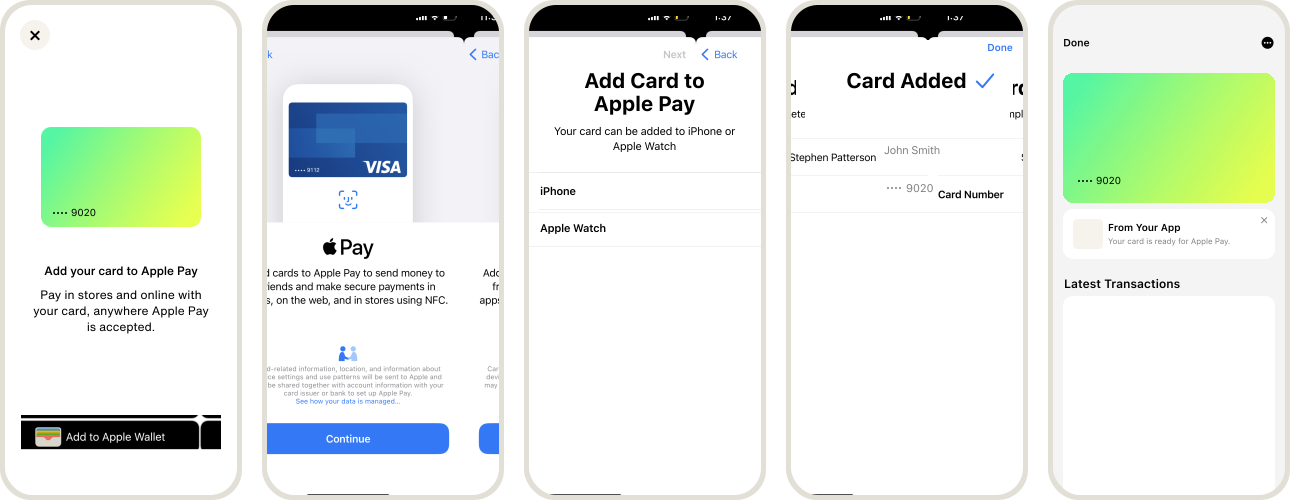
Apple Wallet provisioning experience
The following graphic is an example of an Apple Pay push provisioning user interface (UI) experience:
Provisioning flow
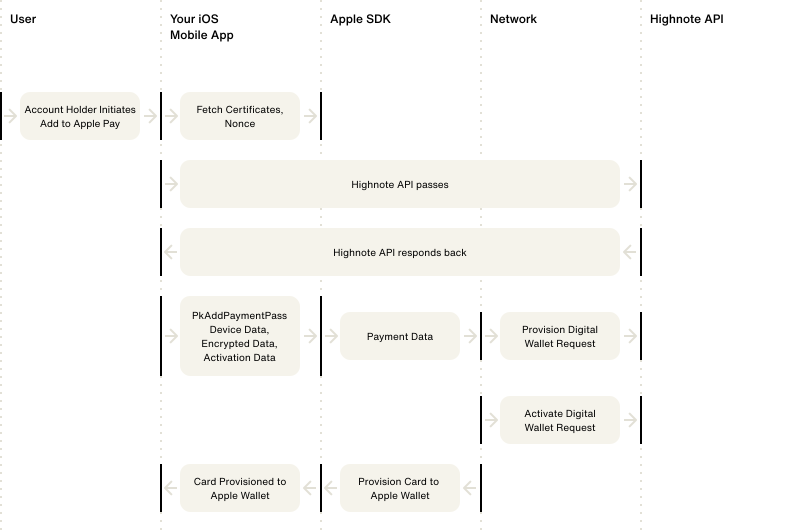
The following graphic displays the flow of data during the Apple Pay push provisioning process:
Apple Pay Web Push Provisioning
Apple Pay Web Push Provisioning (WPP) lets an account holder provision a card to one or more Apple devices linked to their Apple ID directly from a supported web browser. WPP is appropriate when your subscriber experience originates on the web rather than from an iOS app — for example, an account-management portal or a card-launch landing page.
WPP is supported for Visa and Mastercard products. Your Highnote representative will work with you to plan and launch your WPP use case.
Apple Pay Web Push Provisioning prerequisites
Before launching WPP, complete the following:
- Complete all Digital Wallet Tokenization design and configuration steps described in Tokenized card design and the Apple Pay prerequisites section above.
- Successfully complete either manual or in-app push provisioning with cards from your product. WPP cannot be your first provisioning surface — it builds on a working DWT integration.
- Receive sign-off from Apple for your WPP use case.
- Integrate with Highnote's WPP API as described below.
- Build, host, and test a website that provides the user experience described in the next section.
- Receive launch sign-off from Apple.
Contact your Highnote representative for non-production environment details, the partnerId assigned by Apple, and the "Add to Apple Wallet" website button assets.
User experience
Your website must provide the following user experience:
- The cardholder signs in to your site to identify their account.
- The cardholder initiates WPP by selecting one of their cards to provision.
- Your website displays Terms and Conditions, which the cardholder must accept.
- A pop-up browser window with a self-contained Apple sign-in experience (within Apple's domain) appears, where the cardholder signs in with their Apple ID.
- After signing in, the cardholder chooses one or more devices linked to their Apple ID to provision the card to, then confirms the provisioning result on each target device.
- Your website displays the result of the provisioning request for each selected Apple device.
Generate the provisioning token
Call the generateAppleWebPushProvisioningToken mutation from your website's backend to obtain a JSON Web Signature (JWS) object. The JWS is consumed by Apple's JavaScript library to initialize the WPP session.
The mutation validates that the paymentCardId is valid, the card is ACTIVE, and the card is allowed to be provisioned. If validation fails, the request is rejected.
GenerateAppleWebPushProvisioningToken
Query
mutation GenerateAppleWebPushProvisioningToken(
  $input: GenerateAppleWebPushProvisioningTokenInput!
) {
  generateAppleWebPushProvisioningToken(input: $input) {
    __typename
    ... on AppleWebPushProvisioningToken {
      jws {
        protected
        payload
        signature
        header {
          kid
        }
      }
      state
      expiresAt
    }
    ... on UserError {
      errors {
        code
        description
        errorPath
      }
    }
    ... on AccessDeniedError {
      message
    }
  }
}
Variables
{
  "input": {
    "paymentCardId": "<PAYMENT_CARD_ID>"
  }
}
Result
{
  "data": {
    "generateAppleWebPushProvisioningToken": {
      "__typename": "AppleWebPushProvisioningToken",
      "jws": {
        "protected": "eyJ4NXQjUzI1NiI6IlpXSmxPV1ZoWlRRNU5HUXpNalV5TjJNMU4yTTRZMlEzTmpBNFkyVXhNakJqWWpFME5URXdZMk16TlRBM04yRmxObVpsTkRZNU1UVTFZMlJoTVdZMlpnIiwiY3R5IjoiYXBwbGljYXRpb24vY3JlZGVudGlhbDtjaGFyc2V0PXV0Zi04IiwidHlwIjoiSk9TRStKU09OIiwiYWxnIjoiRVMyNTYifQ",
        "payload": "eyJhdWQiOiJBcHBsZSIsInN1YiI6InByb3Zpc2lvbmluZ1RhcmdldCIsImxpZCI6ImVuLVVTIiwiaXNzIjoiRGVtb0NhcmRDb25maWcxIiwiZXhwIjoxNzU3OTcxNzA0NjgwLCJpYXQiOjE3NTc5NjgxMDQ2ODAsImFpZCI6Ijk3NzdlZWE5ZjNjNGUxMzhiN2Y2ODJlMjUxMDllNTAwIiwianRpIjoiOTI3MjExZjAtODc5MC0xNzY5LWFiOTAtNmVkNDhmYTk2ODUxIn0",
        "signature": "99YU0TZ4n8XLbbeOsYttEq_LJjzr2VstlIJPXuKnZSg_Ktey9XwHYn__0JuQykmv5IyuLN_lqU7ySlwdgUCjbQ",
        "header": {
          "kid": "689ac97c-b566-473e-9e52-1b1caae187a2"
        }
      },
      "state": "927211f0-8790-176a-ab90-6ed48fa96851",
      "expiresAt": "2026-09-15T21:28:24.680Z"
    }
  },
  "extensions": {
    "requestId": "<REQUEST_ID>"
  }
}
The response contains:
jws— the signed token your website passes to the Apple JavaScript library. Includesprotected,payload,signature, and aheader.kid(key identifier).state— the provisioning session state identifier.expiresAt— the token expiration time in ISO 8601 format. Generate a fresh token if the cardholder reaches the "Add to Apple Wallet" button after this time.
Integrate with Apple's JavaScript library
After your backend issues the JWS, your website integrates with Apple's initAddToAppleWallet JavaScript library to render the "Add to Apple Wallet" button and handle the provisioning flow. The integration consists of three parts:
- Place the button. Use the "Add to Apple Wallet" assets provided by your Highnote representative. Reference Apple's Add to Apple Wallet button guidelines for sizing and placement.
- Initialize the library. Call
initAddToAppleWalletwith thepartnerIdApple assigned during your WPP implementation, the production domainhttps://apple-pay.apple.com, the DOMidof your button, ajwtResolvercallback that fetches the JWS from your backend, and aresultResolvercallback that receives the per-device provisioning result. - Handle the result. The
resultResolveris invoked with a status code indicating success, partial success, timeout, or failure for each selected device. See JavaScript status codes for the full list.
Apple's Web Provisioning JavaScript documentation is the authoritative reference for the JavaScript implementation.
JavaScript status codes
Your resultResolver callback must handle the following status codes returned by Apple's JavaScript library.
1xx — interim
| Code | Description |
|---|---|
| 10001 | The selected device connected after the web provisioning. The UI timed out, and the credential may be provisioned on the device. |
| 10002 | The Issuer was contacted to begin provisioning for the selected device. The UI timed out, and the credential may be provisioned on the device. |
2xx — success
| Code | Description |
|---|---|
| 200 | Successful. Provisioning succeeded on all devices selected by the cardholder. |
| 201 | Status unknown. Apple reached out to the device(s), but the device(s) didn't respond to the notifications within the UI timeout threshold. The credential might still provision after the timeout. |
| 202 | No eligible devices. |
| 206 | Partially successful. Provisioning succeeded on some of the devices selected by the cardholder. Not applicable if the flow is constrained to a single device. |
4xx — client errors
| Code | Description |
|---|---|
| 403 | User interaction failed. The Apple ID sign-in failed. |
| 406 | The Issuer rejected or failed the provisioning attempt. |
| 408 | Timeout. No result was obtained — the cardholder may have closed the pop-up window without interaction or moved to another app or window. See also code 444. |
| 40801 | Timeout. The Apple UI failed to load. |
| 412 | Bad JWS. |
| 41201 | Bad JWS. Expired. |
| 444 | Cardholder dismissed the page without completing the flow. The system may sometimes return a 408 instead if it can't identify this scenario. |
5xx — server errors
| Code | Description |
|---|---|
| 500 | Error. An unknown error on Apple systems. |
| 50001 | Error. Apple failed to process the provisioning. |
Google Wallet in-app push provisioning
The Google Wallet push provisioning process validates the following:
- The
paymentCardIdprovided is valid - The payment card has a status of
ACTIVE - The payment card is allowed to be provisioned
If any of the above criteria fails validation, the request is rejected. If all validations pass, the API returns the response required by Google SDK for provisioning the card to the Google Wallet.
AddPaymentCardToGooglePayByDevicePushProvisioning
Query
mutation AddPaymentCardToGooglePayByDevicePushProvisioning(
  $input: AddPaymentCardToGooglePayByDevicePushProvisioningInput!
) {
  addPaymentCardToGooglePayByDevicePushProvisioning(input: $input) {
    __typename
    ... on PaymentCardDigitalWalletTokenGooglePayPushProvisioning {
      cardholderName {
        formattedName
        title
        givenName
        middleName
        familyName
        suffix
      }
      billingAddress {
        streetAddress
        extendedAddress
        locality
        region
        countryCodeAlpha3
        postalCode
      }
      displayName
      network
      opaquePaymentCard
      paymentCard {
        __typename
        id
        last4
      }
      tokenServiceProvider
      createdAt
    }
    ... on UserError {
      errors {
        code
        description
      }
    }
    ... on AccessDeniedError {
      message
    }
  }
}
Variables
{
  "input": {
    "paymentCardId": "<PAYMENT_CARD_ID>",
    "deviceType": "MOBILE",
    "walletDetails": {
      "clientWalletProvider": "GOOGLE_PAY",
      "clientWalletAccountIdentifier": "1CFA8B242688E000",
      "clientDeviceIdentifier": "ed6abb56323ba656521ac476"
    }
  }
}
Result
{
  "data": {
    "addPaymentCardToGooglePayByDevicePushProvisioning": {
      "__typename": "CardDigitalWalletTokenGooglePayDevicePushProvisioning",
      "cardholderName": {
        "formattedName": "John M Deo",
        "familyName": "Deo",
        "givenName": "John",
        "middleName": "M"
      },
      "billingAddress": {
        "streetAddress": "123 main st",
        "extendedAddress": "Suite # 200",
        "postalCode": "94102",
        "region": "CA",
        "locality": "San Francisco",
        "countryCodeAlpha3": "USA"
      },
      "displayName": "Subscriber App",
      "network": "MASTERCARD",
      "opaquePaymentCard": "IHvigJx0b2tlblVuaXF1ZVJlZmVyZW5jZUluY2x1ZGVkIjoiWFhYWFgiLAogICAgIOKAnHNpZ25hdHVyZUFsZ29yaXRobSI6IlhYWFhYWFhYIiwKICAgICDigJxzaWduYXR1cmUiOiJYWFhYWFhYWFhYWFhYWFhYWFhYWFhYWFhYWFhYWFhYWCIsCiAgICAg4oCcZXhwaXJhdGlvbkRhdGVJbmNsdWRlZCI6IlhYWFgiCn0=",
      "paymentCard": {
        "__typename": "PaymentCard",
        "id": "<PAYMENT_CARD_ID>",
        "last4": "1234"
      },
      "tokenServiceProvider": "MASTERCARD",
      "createdAt": "2022-07-07T23:22:30.475Z"
    }
  },
  "extensions": {
    "requestId": "<REQUEST_ID>"
  }
}
User experience
You must add a "Save to Phone" call to action in your Android app that uses the mutation AddPaymentCardToGooglePayByDevicePushProvisioning.
Google provides assets for the button.
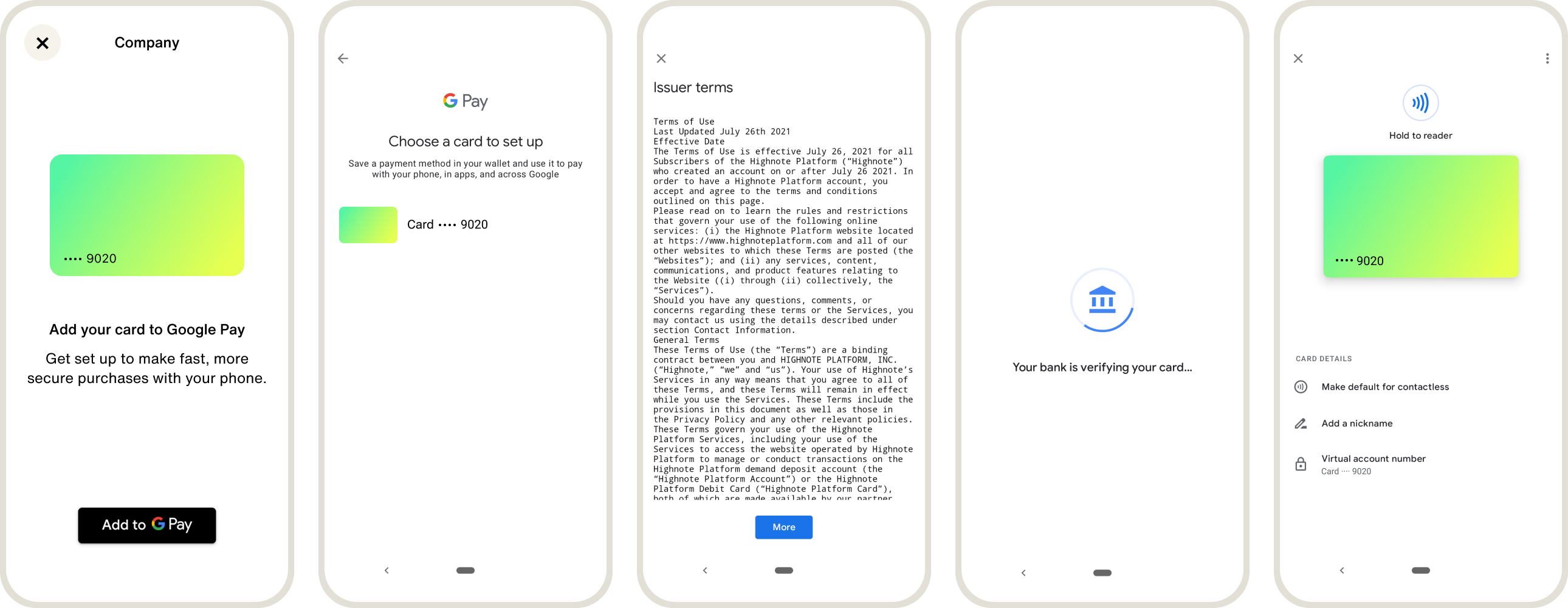
Google Wallet provisioning experience
The following graphic is an example of a Google Wallet push provisioning user interface (UI) experience:
Provisioning flow
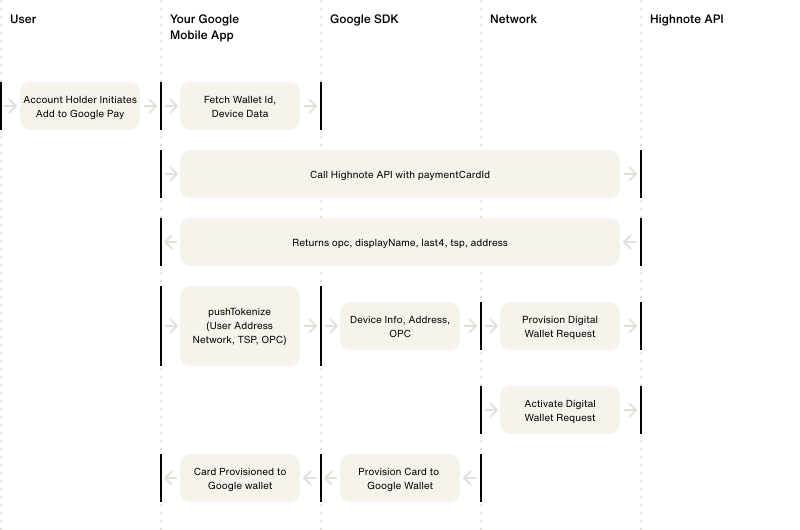
The following graphic displays the flow of data during the Google Wallet push provisioning process:
Provisioning decline controls
Highnote offers a digital card profile control that can make digital wallet provisioning stricter (never more permissive) than the wallet provider recommends.
By default, when a cardholder adds a card to a digital wallet, the wallet provider (via the payment network) returns a recommendation to approve, request additional verification, or decline the provisioning attempt, plus one or more reason codes describing the risk it observed. Highnote follows that recommendation, unless your digital card profile has a stricter provisioning control enabled.
When enabled, the control declines a provisioning attempt on a disqualifying reason, even one the wallet provider would approve. The control is off by default: with no reasons configured, provisioning behaves exactly as before.
In the current release, provisioning decline reasons are configured by Highnote per digital card profile rather than through a subscriber-facing API. Contact your Highnote representative to enable or adjust this control.
How it works
- A cardholder attempts to add a card to a digital wallet.
- The wallet provider, through the network, returns a recommendation and a set of reason codes.
- If any reason your digital card profile is configured to decline on is present in that set, Highnote declines the provisioning attempt, regardless of the wallet provider's recommendation.
- The decline is recorded on the digital wallet token with an issuer decline reason of
PROVISIONING_REASON_RESTRICTED. The wallet provider's own recommendation and reasons remain recorded separately.
The control overrides a recommendation to approve or request additional verification. It does not affect an attempt the wallet provider already declines — a network decline stands on its own.
Decline reasons
A digital card profile can be configured to decline on any of the following wallet-provider reasons:
| Reason | The wallet provider ... |
|---|---|
HIGH_RISK | flagged the provisioning attempt as high risk or suspected fraud. |
SUSPICIOUS_ACTIVITY | reported suspicious activity on the account or device. |
LOW_DEVICE_SCORE | reported a low device trust score. |
LOW_ACCOUNT_SCORE | reported a low account trust score. |
TOO_MANY_RECENT_ATTEMPTS | reported too many recent provisioning attempts for the cardholder. |
ACCOUNT_CARD_TOO_NEW | reported that the account or the account-card relationship is too new. |
What a cardholder sees
When a provisioning attempt is declined, the card is not added to the wallet, and the cardholder sees the wallet's standard "could not add card" outcome. This control introduces no new cardholder-facing notification.
Observe a decline
A decline caused by the provisioning decline control is recorded on the digital wallet token.
When you query the token's additionalWalletTokenDetails, the issuer decline reason PROVISIONING_REASON_RESTRICTED appears in issuerDeclineReasons, alongside the wallet provider's own reasons in walletProviderDeclineReasons.
See View token status and details to look up a token. That example doesn't select additionalWalletTokenDetails, so query that field directly to see the decline reasons above.
You can also subscribe to the CARD_DIGITAL_WALLET_TOKEN_PROVISIONING_DENIED webhook to be notified the moment a provisioning attempt is declined, instead of polling for it — see Digital wallet token provisioning.
Manage digital wallet tokens
When a payment card is added to a digital wallet, a token provisioning request is sent to the digital wallet, network, and Highnote.
The request may go to the PENDING_VERIFICATION state, which requires your account holder to verify their identity.
The following verification methods may be configured for your product:
- Email: A passcode is sent by Highnote to the customer's email, which the customer enters into the digital wallet.
- SMS: A passcode is sent by Highnote to the customer's mobile phone, which the customer enters into the digital wallet.
The following states are associated with a digital wallet token provisioning request:
| Token State | Description |
|---|---|
REQUESTED | The account holder has requested a digital wallet token. |
APPROVED | The account holder successfully tokenized the payment card without additional identity verification. The token is ACTIVE and ready for transaction use. |
DENIED | The payment card cannot be tokenized and may be due to the payment card's state or invalid data provided. |
PENDING_VERIFICATION | The wallet provider, network, or issuer has requested additional identity details from the account holder to validate their identity. |
For information on how existing tokens behave when a card is reissued or closed, see Digital wallet tokens on reissue and Digital wallet tokens on close.
Subscribe to a digital wallet token provisioning event to get a real-time webhook for each of these four states as it happens, rather than only learning about a token once it reaches ACTIVE.
Find a token
You can search for digital wallet tokens on a given payment card or a digital wallet token's associated payment card using the following query:
FindPaymentCard
Query
query FindPaymentCard($id: ID!) {
  node(id: $id) {
    ... on PaymentCard {
      id
      bin
      last4
      expirationDate
      network
      status
      formFactor
      cardProductApplication {
        ... on Node {
          id
        }
        ... on AccountHolderCardProductApplication {
          id
          applicationState {
            status
          }
        }
      }
      cardDigitalWalletTokens(first: 10) {
        pageInfo {
          hasNextPage
        }
        edges {
          cursor
          node {
            __typename
            ... on CardDigitalWalletToken {
              id
              status
              createdAt
              updatedAt
              requesterName
              cardDigitalWalletTokenStateTransitions(first: 10) {
                pageInfo {
                  hasNextPage
                }
                edges {
                  cursor
                  node {
                    __typename
                    ... on CardDigitalWalletTokenStateTransition {
                      state
                      reason
                      createdAt
                      updatedAt
                    }
                  }
                }
              }
            }
          }
        }
      }
    }
  }
}
Variables
{
  "id": "<PAYMENT_CARD_ID>"
}
Result
{
  "data": {
    "node": {
      "id": "<PAYMENT_CARD_ID>",
      "bin": "531592",
      "last4": "4689",
      "expirationDate": "2026-01-01T23:59:59Z",
      "network": "MASTERCARD",
      "status": "ACTIVE",
      "formFactor": "PHYSICAL",
      "cardProductApplication": null,
      "cardDigitalWalletTokens": {
        "pageInfo": {
          "hasNextPage": false
        },
        "edges": [
          {
            "cursor": "some-cursor",
            "node": {
              "__typename": "CardDigitalWalletToken",
              "id": "<TOKEN_ID>",
              "status": "TERMINATED",
              "createdAt": "2022-06-08T16:06:44.744Z",
              "updatedAt": "2022-06-08T17:58:22.930Z",
              "requesterName": "Google Pay",
              "cardDigitalWalletTokenStateTransitions": {
                "pageInfo": {
                  "hasNextPage": false
                },
                "edges": [
                  {
                    "cursor": "some-cursor",
                    "node": {
                      "__typename": "CardDigitalWalletTokenStateTransition",
                      "state": "TERMINATED",
                      "reason": "ACCOUNT_HOLDER_DELETED",
                      "createdAt": "2022-06-08T17:58:22.889Z",
                      "updatedAt": "2022-06-08T17:58:22.954Z"
                    }
                  },
                  {
                    "cursor": "some-cursor",
                    "node": {
                      "__typename": "CardDigitalWalletTokenStateTransition",
                      "state": "SUSPENDED",
                      "reason": "DEVICE_LOST",
                      "createdAt": "2022-06-08T16:07:36.701Z",
                      "updatedAt": "2022-06-08T16:07:36.734Z"
                    }
                  },
                  {
                    "cursor": "some-cursor",
                    "node": {
                      "__typename": "CardDigitalWalletTokenStateTransition",
                      "state": "ACTIVE",
                      "reason": null,
                      "createdAt": "2022-06-08T16:07:17.742Z",
                      "updatedAt": "2022-06-08T16:07:17.756Z"
                    }
                  },
                  {
                    "cursor": "some-cursor",
                    "node": {
                      "__typename": "CardDigitalWalletTokenStateTransition",
                      "state": "REQUESTED",
                      "reason": null,
                      "createdAt": "2022-06-08T16:06:44.749Z",
                      "updatedAt": "2022-06-08T16:06:44.811Z"
                    }
                  }
                ]
              }
            }
          }
        ]
      }
    }
  },
  "extensions": {
    "requestId": "<REQUEST_ID>"
  }
}
Suspend token
Account holders can suspend a token temporarily or a customer support agent may suspend a token if additional verification is required by the account holder.
Suspended tokens may have the following reasons associated with the token:
| Suspended Reason | Description |
|---|---|
DEVICE_LOST | Device is reported as lost. |
DEVICE_STOLEN | Device is reported as stolen. |
FRAUDULENT_TRANSACTIONS | Fraudulent transactions have been reported by Highnote or the account holder. |
OTHER | Any other reason for suspending the card digital wallet token. |
Use the following mutation to suspend a token:
SuspendCardDigitalWalletToken
Query
mutation SuspendCardDigitalWalletToken(
  $input: SuspendCardDigitalWalletTokenInput!
) {
  suspendCardDigitalWalletToken(input: $input) {
    __typename
    ... on CardDigitalWalletToken {
      id
      status
      createdAt
      updatedAt
      requesterName
      cardDigitalWalletTokenStateTransitions {
        edges {
          node {
            state
            reason
            updatedAt
            createdAt
          }
        }
      }
    }
    ... on UserError {
      errors {
        errorPath
        code
        description
      }
    }
    ... on AccessDeniedError {
      __typename
      message
    }
  }
}
Variables
{
  "input": {
    "cardDigitalWalletTokenId": "<TOKEN_ID>",
    "reason": "DEVICE_LOST"
  }
}
Result
{
  "data": {
    "suspendCardDigitalWalletToken": {
      "__typename": "CardDigitalWalletToken",
      "id": "<TOKEN_ID>",
      "status": "SUSPENDED",
      "createdAt": "2022-06-12T07:30:18.346Z",
      "updatedAt": "2022-06-12T07:30:46.748Z",
      "requesterName": "Google Pay",
      "cardDigitalWalletTokenStateTransitions": {
        "edges": [
          {
            "node": {
              "state": "SUSPENDED",
              "reason": "DEVICE_LOST",
              "updatedAt": "2022-06-12T07:30:46.753Z",
              "createdAt": "2022-06-12T07:30:46.717Z"
            }
          },
          {
            "node": {
              "state": "ACTIVE",
              "reason": null,
              "updatedAt": "2022-06-12T07:30:34.455Z",
              "createdAt": "2022-06-12T07:30:34.446Z"
            }
          },
          {
            "node": {
              "state": "REQUESTED",
              "reason": null,
              "updatedAt": "2022-06-12T07:30:18.729Z",
              "createdAt": "2022-06-12T07:30:18.362Z"
            }
          }
        ]
      }
    }
  },
  "extensions": {
    "requestId": "<REQUEST_ID>"
  }
}
Unsuspend token
You may provide your customer support agents or your account holders the ability to reactivate or unsuspend a token after it has been suspended.
Suspended tokens that have been unsuspended or reactivated may have the following reasons associated with the token:
| Unsuspend Reason | Description |
|---|---|
DEVICE_FOUND | A lost or stolen device has been found or recovered. |
NON_FRAUDULENT_TRANSACTIONS | After reviewing transaction history, the account holder or Highnote confirmed that there were no fraudulent transactions. |
OTHER | Any other reason for reactivating the card digital wallet token. |
Use the following mutation to unsuspend a token:
UnsuspendCardDigitalWalletToken
Query
mutation UnsuspendCardDigitalWalletToken(
  $input: UnsuspendCardDigitalWalletTokenInput!
) {
  unsuspendCardDigitalWalletToken(input: $input) {
    __typename
    ... on CardDigitalWalletToken {
      id
      status
      requesterName
      cardDigitalWalletTokenStateTransitions {
        edges {
          node {
            state
            reason
            updatedAt
            createdAt
          }
        }
      }
    }
    ... on UserError {
      errors {
        errorPath
        code
        description
      }
    }
    ... on AccessDeniedError {
      __typename
      message
    }
  }
}
Variables
{
  "input": {
    "cardDigitalWalletTokenId": "<TOKEN_ID>",
    "reason": "NON_FRAUDULENT_TRANSACTIONS"
  }
}
Result
{
  "data": {
    "unsuspendCardDigitalWalletToken": {
      "__typename": "CardDigitalWalletToken",
      "id": "<TOKEN_ID>",
      "status": "ACTIVE",
      "requesterName": "Google Pay",
      "cardDigitalWalletTokenStateTransitions": {
        "edges": [
          {
            "node": {
              "state": "ACTIVE",
              "reason": "NON_FRAUDULENT_TRANSACTIONS",
              "updatedAt": "2022-06-12T07:32:41.837Z",
              "createdAt": "2022-06-12T07:32:41.818Z"
            }
          },
          {
            "node": {
              "state": "SUSPENDED",
              "reason": "DEVICE_LOST",
              "updatedAt": "2022-06-12T07:30:46.753Z",
              "createdAt": "2022-06-12T07:30:46.717Z"
            }
          },
          {
            "node": {
              "state": "ACTIVE",
              "reason": null,
              "updatedAt": "2022-06-12T07:30:34.455Z",
              "createdAt": "2022-06-12T07:30:34.446Z"
            }
          },
          {
            "node": {
              "state": "REQUESTED",
              "reason": null,
              "updatedAt": "2022-06-12T07:30:18.729Z",
              "createdAt": "2022-06-12T07:30:18.362Z"
            }
          }
        ]
      }
    }
  },
  "extensions": {
    "requestId": "<REQUEST_ID>"
  }
}
Terminate token
A token may be terminated by your customer support agents or account holders. Once a token is terminated, the token is deleted and can no longer be used to transact. A new token must be created once it is terminated.
Terminated tokens may have the following reasons associated with the token:
| Termination Reason | Description |
|---|---|
ACCOUNT_HOLDER_DELETED | Account holder has been deleted. |
DEVICE_LOST | Device is reported as lost. |
DEVICE_STOLEN | Device is reported as stolen. |
FRAUDULENT_TRANSACTIONS | Fraudulent transactions have been reported by Highnote or the account holder. |
OTHER | Any other reason for terminating the card digital wallet token. |
Use the following mutation to terminate a token:
TerminateCardDigitalWalletToken
Query
mutation TerminateCardDigitalWalletToken(
  $input: TerminateCardDigitalWalletTokenInput!
) {
  terminateCardDigitalWalletToken(input: $input) {
    __typename
    ... on CardDigitalWalletToken {
      id
      status
      requesterName
      cardDigitalWalletTokenStateTransitions {
        edges {
          node {
            state
            reason
            updatedAt
            createdAt
          }
        }
      }
    }
    ... on UserError {
      errors {
        errorPath
        code
        description
      }
    }
    ... on AccessDeniedError {
      __typename
      message
    }
  }
}
Variables
{
  "input": {
    "cardDigitalWalletTokenId": "<TOKEN_ID>",
    "reason": "FRAUDULENT_TRANSACTIONS"
  }
}
Result
{
  "data": {
    "terminateCardDigitalWalletToken": {
      "__typename": "CardDigitalWalletToken",
      "id": "<TOKEN_ID>",
      "status": "TERMINATED",
      "requesterName": "Google Pay",
      "cardDigitalWalletTokenStateTransitions": {
        "edges": [
          {
            "node": {
              "state": "TERMINATED",
              "reason": "FRAUDULENT_TRANSACTIONS",
              "updatedAt": "2022-06-12T07:34:20.433Z",
              "createdAt": "2022-06-12T07:34:20.420Z"
            }
          },
          {
            "node": {
              "state": "ACTIVE",
              "reason": "NON_FRAUDULENT_TRANSACTIONS",
              "updatedAt": "2022-06-12T07:32:41.837Z",
              "createdAt": "2022-06-12T07:32:41.818Z"
            }
          },
          {
            "node": {
              "state": "SUSPENDED",
              "reason": "DEVICE_LOST",
              "updatedAt": "2022-06-12T07:30:46.753Z",
              "createdAt": "2022-06-12T07:30:46.717Z"
            }
          },
          {
            "node": {
              "state": "ACTIVE",
              "reason": null,
              "updatedAt": "2022-06-12T07:30:34.455Z",
              "createdAt": "2022-06-12T07:30:34.446Z"
            }
          },
          {
            "node": {
              "state": "REQUESTED",
              "reason": null,
              "updatedAt": "2022-06-12T07:30:18.729Z",
              "createdAt": "2022-06-12T07:30:18.362Z"
            }
          }
        ]
      }
    }
  },
  "extensions": {
    "requestId": "<REQUEST_ID>"
  }
}
View token status and details
Find the status of a token and its historical state transitions using the following query:
FindCardDigitalWalletToken
Query
query FindCardDigitalWalletToken($id: ID!) {
  node(id: $id) {
    ... on CardDigitalWalletToken {
      __typename
      id
      status
      createdAt
      updatedAt
      requesterName
      requesterIdentifier
      tokenType
      sourceEntryMethod
      last4
      expirationDate
      cardDigitalWalletTokenStateTransitions(first: 10) {
        edges {
          node {
            state
            reason
            createdAt
            updatedAt
          }
        }
      }
    }
  }
}
Variables
{
  "id": "<DIGITAL_WALLET_TOKEN>"
}
Result
{
  "data": {
    "node": {
      "__typename": "CardDigitalWalletToken",
      "id": "<DIGITAL_WALLET_TOKEN>",
      "status": "TERMINATED",
      "createdAt": "2022-06-12T07:30:18.346Z",
      "updatedAt": "2022-06-12T07:34:20.424Z",
      "requesterName": "Google Pay",
      "requesterIdentifier": "11223344",
      "tokenType": "ECOMMERCE",
      "sourceEntryMethod": "CARD_ON_FILE",
      "last4": "8744",
      "expirationDate": "2028-01-31T23:59:59Z",
      "cardDigitalWalletTokenStateTransitions": {
        "edges": [
          {
            "node": {
              "state": "TERMINATED",
              "reason": "FRAUDULENT_TRANSACTIONS",
              "createdAt": "2022-06-12T07:34:20.420Z",
              "updatedAt": "2022-06-12T07:34:20.433Z"
            }
          },
          {
            "node": {
              "state": "ACTIVE",
              "reason": "NON_FRAUDULENT_TRANSACTIONS",
              "createdAt": "2022-06-12T07:32:41.818Z",
              "updatedAt": "2022-06-12T07:32:41.837Z"
            }
          },
          {
            "node": {
              "state": "SUSPENDED",
              "reason": "DEVICE_LOST",
              "createdAt": "2022-06-12T07:30:46.717Z",
              "updatedAt": "2022-06-12T07:30:46.753Z"
            }
          },
          {
            "node": {
              "state": "ACTIVE",
              "reason": null,
              "createdAt": "2022-06-12T07:30:34.446Z",
              "updatedAt": "2022-06-12T07:30:34.455Z"
            }
          },
          {
            "node": {
              "state": "REQUESTED",
              "reason": null,
              "createdAt": "2022-06-12T07:30:18.362Z",
              "updatedAt": "2022-06-12T07:30:18.729Z"
            }
          }
        ]
      }
    }
  },
  "extensions": {
    "requestId": "<REQUEST_ID>"
  }
}
Simulate digital wallet token provisioning
You can use Highnote's digital wallet token provisioning simulation to generate and activate a digital wallet token, and test token status events. For more information, see Simulate Digital Wallet Token Provisioning.