Print Physical Cards
Overview
After you issue a virtual card, you can order physical cards for eligible, multi-use card products. The Highnote platform supports two kinds of physical cards:
- Personalized physical cards: Payment cards that are personalized for the account holder
- Preprinted physical cards: Generic cards that are not personalized for the account holder
This guide provides an overview of printing personalized physical cards using the Highnote API. To issue cards to embedded devices such as wristbands, see Issue Cards to Embedded Devices.
Prerequisites
- A Highnote account
- An API key or the API Explorer
- A Highnote virtual card.
Individual card orders
Individual physical card orders let you print a single physical card. Physical card orders are:
- Packaged with a card carrier
- Shipped to a single location
- Not connected to other orders at any time in the physical card order lifecycle
Individual physical card orders are the most common order type across card products. For example, when issuing a card to a single account holder for a consumer debit product, you will use this order type.
Group card orders
Group physical card orders allow you to request several physical cards at once. Note the following about group physical card orders:
- Packaged individually with a card carrier
- Shipped in bulk as a single shipment to one location
Group physical card orders are essentially a set of individual card orders that are packaged into a single shipment during the last step of the physical card order lifecycle. For information on group card orders, see Print Cards in Bulk.
Card personalization
Card personalization is dynamic information printed on a physical card that is unique to the cardholder.
Line 1 and Line 2 represent the card personalization on a payment card:
- Line 1 is required and used for the cardholder's name. Examples of cardholders include account holders and authorized users.
- Line 2 is optional and can be used for any additional information. For example, a business account holder may use line 2 for the business name.
Each line has minimum length of 1 and maximum length of 23.
Valid characters are all alphanumeric characters, plus 7 special characters , . ' & - \ $ and space.
Card order lifecycle
You cannot cancel a card order after it has been sent to the printer.
The following graphic shows the standard card order lifecycle, beginning with an order for a physical card and ending with a shipment received by the account holder:
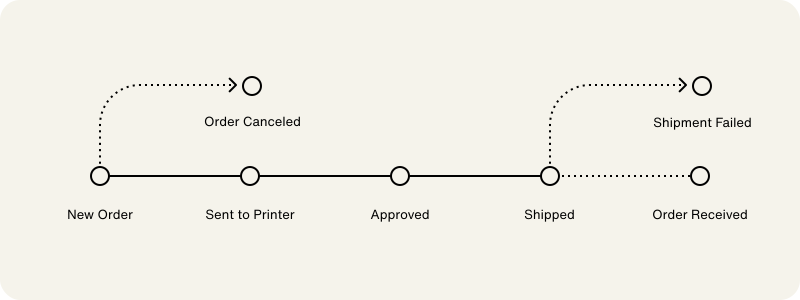
Each step in the card order lifecycle corresponds with a status. Refer to the following table for a description of each status in the card order lifecycle:
| Status | Description |
|---|---|
NEW | A request for a physical card has been made. This is the only stage at which an order may be canceled. |
PENDING | The group order is ready to ship but has not yet been sent to the printer. This status is only applicable to group orders. |
SENT_TO_PRINTER | The order has successfully been sent to the printer. |
APPROVED | The printer has approved the order. |
SHIPPED | The order has been shipped. All shipment methods besides USPS Ground return a tracking number. |
CANCELED | You requested to cancel the order. |
SHIP_FAILED | The order failed to reach the account holder. Failed orders are returned to the return address on file. |
Fulfillment
Highnote sends physical card fulfillment requests to the printer several times a day. The printer's standard turnaround is 2 business days (Monday-Friday, excluding Federal Reserve holidays) after Highnote submits the request.
The requestedShipDate input variable accepts a date in YYYY-MM-DD format:
- To schedule a future ship date, provide a date in
YYYY-MM-DDformat - To ship as soon as possible, omit the
requestedShipDatefield
If the date provided is in the past, the value is ignored and the order ships as soon as possible.
Shipping methods
You can choose various shipping methods for individual and group card orders. Shipping cost is based on the price outlined in your Highnote Master Services Agreement.
For a general overview of the PaymentCardShippingMethod enum, see the API Reference. For which shipping methods trigger EXPEDITED_PHYSICAL_CARD_FEE, see Physical card fees.
USPS features
Note the following USPS features:
- USPS is the only supported carrier for shipments to P.O. boxes.
- USPS Priority Mail Express includes Signature Confirmation at no additional cost. If you do not want this feature, we recommend using another shipping method.
- USPS Ground does not provide tracking numbers for your shipped cards.
FedEx delivery windows
Both FedEx Overnight service levels arrive the next business day:
- Priority Overnight: by 10:30 a.m. to most businesses, by noon to residences
- Standard Overnight: by 5 p.m. to businesses, by 8 p.m. to residences
Shipping individual orders
Expedited and same-day processing incurs additional fees under your Master Services Agreement, separate from the account holder's EXPEDITED_PHYSICAL_CARD_FEE—see Physical card fees. Confirm availability with Highnote support.
The following table outlines the available couriers, shipping options, and expected shipping times for individual card orders. UPS availability depends on your card vendor and is not shown here—confirm with Highnote support if you don't see it as an option:
| Courier | Shipment Option | Expected Transit Time | On-demand Card | Premium Card |
|---|---|---|---|---|
| USPS | Ground → USPS_GROUND | 2-8 business days |  | |
| Ground - Processed Same Day → SAME_DAY_USPS_GROUND | 2-8 business days | |  | |
| Priority Mail ® → USPS_PRIORITY | 1-3 business days | | | |
| Priority Mail ® - Processed Same Day → SAME_DAY_USPS_PRIORITY | 1-3 business days | | | |
| Priority Mail Express ® → USPS_EXPRESS | 1-2 business days | | | |
| FedEx | Ground → FEDEX_GROUND | 1-5 business days | | |
| Ground - Processed Same Day → SAME_DAY_FEDEX_GROUND | 1-5 business days | | | |
| One Rate → FEDEX_ONE_RATE | 2-3 business days | | | |
| 2 Day → FEDEX_2_DAY | 2 business days | | | |
| Standard Overnight → FEDEX_OVERNIGHT | Next business day → by 5 p.m. / 8 p.m. | | | |
| Standard Overnight - Processed Same Day → SAME_DAY_FEDEX_1_DAY | Next business day → by 5 p.m. / 8 p.m. | | | |
| Priority Overnight → FEDEX_PRIORITY_OVERNIGHT | Next business day → by 10:30 a.m. / noon | | | |
| International Priority → FEDEX_INTERNATIONAL_PRIORITY | 2-5 business days | | |
Shipping group orders
Expedited and same-day processing incurs additional fees under your Master Services Agreement, separate from the account holder's EXPEDITED_PHYSICAL_CARD_FEE—see Physical card fees. Confirm availability with Highnote support.
At this time, group card orders are only available for on-demand cards. The following table outlines the available couriers, shipping options, and expected shipping times for group card orders. UPS availability depends on your card vendor and is not shown here—confirm with Highnote support if you don't see it as an option:
| Courier | Shipment Option | Expected Transit Time |
|---|---|---|
| USPS | Ground → USPS_GROUND | 2-8 business days |
| Ground - Processed Same Day → SAME_DAY_USPS_GROUND | 2-8 business days | |
| Priority Mail ® → USPS_PRIORITY | 1-3 business days | |
| Priority Mail ® - Processed Same Day → SAME_DAY_USPS_PRIORITY | 1-3 business days | |
| FedEx | Ground → FEDEX_GROUND | 1-5 business days |
| Ground - Processed Same Day → SAME_DAY_FEDEX_GROUND | 1-5 business days | |
| 2 Day → FEDEX_2_DAY | 2 business days | |
| Standard Overnight → FEDEX_OVERNIGHT | Next business day → by 5 p.m. / 8 p.m. | |
| Standard Overnight - Processed Same Day → SAME_DAY_FEDEX_1_DAY | Next business day → by 5 p.m. / 8 p.m. | |
| Priority Overnight → FEDEX_PRIORITY_OVERNIGHT | Next business day → by 10:30 a.m. / noon | |
| International Priority → FEDEX_INTERNATIONAL_PRIORITY | 2-5 business days |
Return address
Your return address is configured by the Highnote team when your card product is set up. To view or update your return address, send a request to support@highnote.com.
Orders that cannot be delivered are returned to the return address on file with Highnote.
Validate shipping address
Validated address tokens are cached for 24 hours. If they are not used, they expire. If they are used, they are converted to a permanent validated address record that can be reused anytime.
Before submitting a physical card order, you can validate the card order's shipping address using the validateAddress mutation. This mutation validates addresses using a CASS-certified service to ensure it is properly formatted to reduce possible shipping delays or returns.
The Highnote API returns an AddressValidationResult response with the following results:
- A validated address token
- An error message explaining why the address is invalid
Address validation responses
When validating an address, the API will return a response that indicates whether the address is valid, incomplete, or invalid. Each response type has a corresponding "next step" to create a physical card order or re-validate a new address.
Refer to the following table for an overview of address validation responses and their corresponding follow-up actions:
| Response type | Description | Next step |
|---|---|---|
AddressValidatedResult | The address passed in is properly formatted and CASS-certified. | Use the returned address token to submit a physical card order for the validated address. |
AddressValidatedWithChangesResult | The address passed in has been modified to be properly formatted and CASS-certified. | Use the returned address token to submit a physical card order for the modified validated address. Alternatively, you may adjust the address and resubmit an address validation request to generate a new validated address token. |
AddressIncompleteResult | The address is missing critical components and cannot be CASS-certified. | You must adjust the address and resubmit an address validation request to generate a new validated address token. |
AddressInvalidResult | The address passed in cannot be CASS-certified. | You must adjust the address and resubmit an address validation request to generate a new validated address token. |
Address components and attributes
Components
The Highnote API uses the following components to validate an address:
| Component | Description |
|---|---|
STREET_ADDRESS | The street number and street name of the address, including directionals. |
EXTENDED_ADDRESS | Additional information such as suite and apartment numbers. |
LOCALITY | Typically refers to the city or town portion of the address. |
REGION | The CLDR region code of the country or region of the address. For US addresses, this is the 2-character state code. |
POSTAL_CODE | The zip or postal code of the address. |
COUNTRY_CODE_ALPHA_3 | The three-character country code of the address. |
Attributes
When an address is validated, the API returns a list of attributes that you can use to determine whether to use the address for a shipment:
| Response code | Description |
|---|---|
PO_BOX | Indicates the address of a PO box. |
BUSINESS | Indicates the address of a business. |
RESIDENTIAL | Indicates the address of a residence. |
CMRA | Indicates the address of a Commercial Mail Receiving Agency, which is a private business receiving mail for customers. |
VACANT | Indicates the address is currently vacant. |
INACTIVE | Indicates the address is considered inactive. |
UNSECURED_LOCATION | Indicates that a door is accessible, but a package may not be left due to security concerns. |
UNCONFIRMED_EXTENDED_ADDRESS | Indicates that the primary address is confirmed but the secondary address is not confirmed. |
Example 1: Valid address
In the following example, the address passed to the API is valid as is. The API returns the address and a valid address token:
ValidateAddress
Query
mutation validateAddress($input: ValidateAddressInput!) {
  validateAddress(input: $input) {
    __typename
    ... on AddressValidationResult {
      outcome {
        ... on AddressInvalidResult {
          __typename
          componentsInvalid
          provided {
            streetAddress
            extendedAddress
            locality
            region
            postalCode
            countryCodeAlpha3
          }
        }
        ... on AddressIncompleteResult {
          __typename
          componentsMissing
          provided {
            streetAddress
            extendedAddress
            locality
            region
            postalCode
            countryCodeAlpha3
          }
        }
        ... on AddressValidatedWithChangesResult {
          __typename
          componentsChanged
          token {
            id
            provided {
              streetAddress
              extendedAddress
              locality
              region
              postalCode
              countryCodeAlpha3
            }
            standardized {
              streetAddress
              extendedAddress
              locality
              region
              postalCode
              countryCodeAlpha3
            }
            labels
            createdAt
          }
        }
        ... on AddressValidatedResult {
          __typename
          token {
            id
            provided {
              streetAddress
              extendedAddress
              locality
              region
              postalCode
              countryCodeAlpha3
            }
            standardized {
              streetAddress
              extendedAddress
              locality
              region
              postalCode
              countryCodeAlpha3
            }
            labels
            createdAt
          }
        }
      }
    }
    ... on UserError {
      errors {
        errorPath
        code
      }
    }
  }
}
Variables
{
  "input": {
    "idempotencyKey": "IDEMPOTENCY-KEY",
    "address": {
      "streetAddress": "24 Willie Mays Plz",
      "locality": "San Francisco",
      "region": "CA",
      "postalCode": "94107-2134",
      "countryCodeAlpha3": "USA"
    }
  }
}
Result
{
  "data": {
    "validateAddress": {
      "__typename": "AddressValidationResult",
      "outcome": {
        "__typename": "AddressValidatedResult",
        "token": {
          "id": "<ADDRESS_TOKEN_ID>",
          "provided": {
            "streetAddress": "24 Willie Mays Plz",
            "extendedAddress": "",
            "locality": "San Francisco",
            "region": "CA",
            "postalCode": "94107-2134",
            "countryCodeAlpha3": "USA"
          },
          "standardized": {
            "streetAddress": "24 WILLIE MAYS PLZ",
            "extendedAddress": "",
            "locality": "SAN FRANCISCO",
            "region": "CA",
            "postalCode": "94107-2134",
            "countryCodeAlpha3": "USA"
          },
          "labels": [
            "BUSINESS"
          ],
          "createdAt": "2024-06-18T17:23:46.591Z"
        }
      }
    }
  },
  "extensions": {
    "requestId": "<REQUEST_ID>",
    "rateLimit": {
      "cost": 14
    }
  }
}
Example 2: Address with missing components
In the following example, the address is missing a component: the suite number. The API returns a message detailing why the address is invalid:
ValidateAddress
Query
mutation validateAddress($input: ValidateAddressInput!) {
  validateAddress(input: $input) {
    __typename
    ... on AddressValidationResult {
      outcome {
        ... on AddressInvalidResult {
          __typename
          componentsInvalid
          provided {
            streetAddress
            extendedAddress
            locality
            region
            postalCode
            countryCodeAlpha3
          }
        }
        ... on AddressIncompleteResult {
          __typename
          componentsMissing
          provided {
            streetAddress
            extendedAddress
            locality
            region
            postalCode
            countryCodeAlpha3
          }
        }
        ... on AddressValidatedWithChangesResult {
          __typename
          componentsChanged
          token {
            id
            provided {
              streetAddress
              extendedAddress
              locality
              region
              postalCode
              countryCodeAlpha3
            }
            standardized {
              streetAddress
              extendedAddress
              locality
              region
              postalCode
              countryCodeAlpha3
            }
            labels
            createdAt
          }
        }
        ... on AddressValidatedResult {
          __typename
          token {
            id
            provided {
              streetAddress
              extendedAddress
              locality
              region
              postalCode
              countryCodeAlpha3
            }
            standardized {
              streetAddress
              extendedAddress
              locality
              region
              postalCode
              countryCodeAlpha3
            }
            labels
            createdAt
          }
        }
      }
    }
    ... on UserError {
      errors {
        errorPath
        code
      }
    }
  }
}
Variables
{
  "input": {
    "idempotencyKey": "<IDEMPOTENCY_KEY>",
    "address": {
      "streetAddress": "415 Mission St",
      "locality": "San Francisco",
      "region": "CA",
      "postalCode": "94111",
      "countryCodeAlpha3": "USA"
    }
  }
}
Result
{
  "data": {
    "validateAddress": {
      "__typename": "AddressValidationResult",
      "outcome": {
        "__typename": "AddressIncompleteResult",
        "componentsMissing": [
          "EXTENDED_ADDRESS"
        ],
        "provided": {
          "streetAddress": "415 Mission St",
          "extendedAddress": "",
          "locality": "San Francisco",
          "region": "CA",
          "postalCode": "94111",
          "countryCodeAlpha3": "USA"
        }
      }
    }
  },
  "extensions": {
    "requestId": "<REQUEST_ID>",
    "rateLimit": {
      "cost": 14
    }
  }
}
Example 3: Valid address with changes
In the following example, the address passed is valid once the street address and postal code were changed. This is an example of an address that is valid with changes. The API returns the updated address and valid address token:
ValidateAddress
Query
mutation validateAddress($input: ValidateAddressInput!) {
  validateAddress(input: $input) {
    __typename
    ... on AddressValidationResult {
      outcome {
        ... on AddressInvalidResult {
          __typename
          componentsInvalid
          provided {
            streetAddress
            extendedAddress
            locality
            region
            postalCode
            countryCodeAlpha3
          }
        }
        ... on AddressIncompleteResult {
          __typename
          componentsMissing
          provided {
            streetAddress
            extendedAddress
            locality
            region
            postalCode
            countryCodeAlpha3
          }
        }
        ... on AddressValidatedWithChangesResult {
          __typename
          componentsChanged
          token {
            id
            provided {
              streetAddress
              extendedAddress
              locality
              region
              postalCode
              countryCodeAlpha3
            }
            standardized {
              streetAddress
              extendedAddress
              locality
              region
              postalCode
              countryCodeAlpha3
            }
            labels
            createdAt
          }
        }
        ... on AddressValidatedResult {
          __typename
          token {
            id
            provided {
              streetAddress
              extendedAddress
              locality
              region
              postalCode
              countryCodeAlpha3
            }
            standardized {
              streetAddress
              extendedAddress
              locality
              region
              postalCode
              countryCodeAlpha3
            }
            labels
            createdAt
          }
        }
      }
    }
    ... on UserError {
      errors {
        errorPath
        code
      }
    }
  }
}
Variables
{
  "input": {
    "idempotencyKey": "<IDEMPOTENCY_KEY>",
    "address": {
      "streetAddress": "24 Willie Mays Plaza",
      "locality": "San Francisco",
      "region": "CA",
      "postalCode": "94107",
      "countryCodeAlpha3": "USA"
    }
  }
}
Result
{
  "data": {
    "validateAddress": {
      "__typename": "AddressValidationResult",
      "outcome": {
        "__typename": "AddressValidatedWithChangesResult",
        "componentsChanged": [
          "STREET_ADDRESS",
          "POSTAL_CODE"
        ],
        "token": {
          "id": "<ADDRESS_TOKEN_ID>",
          "provided": {
            "streetAddress": "24 Willie Mays Plaza",
            "extendedAddress": "",
            "locality": "San Francisco",
            "region": "CA",
            "postalCode": "94107",
            "countryCodeAlpha3": "USA"
          },
          "standardized": {
            "streetAddress": "24 WILLIE MAYS PLZ",
            "extendedAddress": "",
            "locality": "SAN FRANCISCO",
            "region": "CA",
            "postalCode": "94107-2134",
            "countryCodeAlpha3": "USA"
          },
          "labels": [
            "BUSINESS"
          ]
        }
      }
    }
  },
  "extensions": {
    "requestId": "<REQUEST_ID>",
    "rateLimit": {
      "cost": 14
    }
  }
}
Example 4: Invalid address
In the following example, the address is invalid. The API returns a message detailing which components are invalid and need updating before re-attempting address validation:
ValidateAddress
Query
mutation validateAddress($input: ValidateAddressInput!) {
  validateAddress(input: $input) {
    __typename
    ... on AddressValidationResult {
      outcome {
        ... on AddressInvalidResult {
          __typename
          componentsInvalid
          provided {
            streetAddress
            extendedAddress
            locality
            region
            postalCode
            countryCodeAlpha3
          }
        }
        ... on AddressIncompleteResult {
          __typename
          componentsMissing
          provided {
            streetAddress
            extendedAddress
            locality
            region
            postalCode
            countryCodeAlpha3
          }
        }
        ... on AddressValidatedWithChangesResult {
          __typename
          componentsChanged
          token {
            id
            provided {
              streetAddress
              extendedAddress
              locality
              region
              postalCode
              countryCodeAlpha3
            }
            standardized {
              streetAddress
              extendedAddress
              locality
              region
              postalCode
              countryCodeAlpha3
            }
            labels
            createdAt
          }
        }
        ... on AddressValidatedResult {
          __typename
          token {
            id
            provided {
              streetAddress
              extendedAddress
              locality
              region
              postalCode
              countryCodeAlpha3
            }
            standardized {
              streetAddress
              extendedAddress
              locality
              region
              postalCode
              countryCodeAlpha3
            }
            labels
            createdAt
          }
        }
      }
    }
    ... on UserError {
      errors {
        errorPath
        code
      }
    }
  }
}
Variables
{
  "input": {
    "idempotencyKey": "<IDEMPOTENCY_KEY>",
    "address": {
      "streetAddress": "1 Willie Mays Plaza",
      "locality": "San Francisco",
      "region": "CA",
      "postalCode": "94107-2134",
      "countryCodeAlpha3": "USA"
    }
  }
}
Result
{
  "data": {
    "validateAddress": {
      "__typename": "AddressValidationResult",
      "outcome": {
        "__typename": "AddressInvalidResult",
        "componentsInvalid": [
          "STREET_ADDRESS"
        ],
        "provided": {
          "streetAddress": "1 Willie Mays Plaza",
          "extendedAddress": "",
          "locality": "San Francisco",
          "region": "CA",
          "postalCode": "94107-2134",
          "countryCodeAlpha3": "USA"
        }
      }
    }
  },
  "extensions": {
    "requestId": "<REQUEST_ID>",
    "rateLimit": {
      "cost": 14
    }
  }
}
Simulate address validation
To simulate address validation, see the Simulate Address Validation guide.
Create physical card order
You can only submit one order for a given payment card. If the order is canceled or fails, you can retry the order for the same card. If the order is successful and you need another physical card, you must issue a new payment card.
After issuing a payment card, you can create an order for a physical card. When ordering a physical card, you can ship to the account holder's address on file or specify a different shipping address.
Physical card orders require:
- Card personalization details
- Shipping address
- Requested ship date
- Shipping method and signature requirements
Create physical card order with token
Highnote recommends that you use this mutation when creating physical card order as it requires a response token from the validateAddress mutation. It does not accept the raw address itself (validated or not), nor does it perform a regular expression check to validate address format.
Use the following mutation to create a physical card order with the response token from the validateAddress mutation.
- Call
validateAddressto check if the shipping address is valid. - Copy the response token representing the validated address.
- Call
orderPhysicalPaymentCardWithValidatedAddresswith the response token.
For group orders with a validated address, see Print Physical Cards in Bulk.
OrderPhysicalPaymentCardWithValidatedAddressToken
Query
mutation orderPhysicalPaymentCardWithValidatedAddressToken(
  $input: OrderPhysicalPaymentCardWithValidatedAddressTokenInput!
) {
  orderPhysicalPaymentCardWithValidatedAddressToken(input: $input) {
    __typename
    ... on PhysicalPaymentCardOrder {
      __typename
      id
      orderState {
        status
      }
      paymentCardShipment {
        courier {
          method
        }
        deliveryDetails {
          address {
            streetAddress
            extendedAddress
            locality
            postalCode
            region
            countryCodeAlpha3
          }
          companyName
          name {
            givenName
            familyName
          }
          validatedAddress {
            id
            provided {
              streetAddress
              extendedAddress
              locality
              postalCode
              region
              countryCodeAlpha3
            }
          }
        }
      }
      createdAt
      updatedAt
    }
    ... on UserError {
      errors {
        errorPath
        code
      }
    }
  }
}
Variables
{
  "input": {
    "idempotencyKey": "<IDEMPOTENCY_KEY>",
    "paymentCardId": "<PAYMENT_CARD_ID>",
    "deliveryDetails": {
      "name": {
        "givenName": "John",
        "middleName": "D",
        "familyName": "Doe"
      },
      "companyName": "Highnote",
      "validatedAddressId": "<VALIDATED_ADDRESS_ID>"
    },
    "requestedShipDate": "2026-04-03",
    "courier": {
      "method": "FEDEX_GROUND",
      "signatureRequiredOnDelivery": false
    },
    "cardPersonalization": {
      "textLines": {
        "line1": "John Doe"
      }
    }
  }
}
Result
{
  "data": {
    "orderPhysicalPaymentCardWithValidatedAddressToken": {
      "__typename": "PhysicalPaymentCardOrder",
      "id": "<PHYSICAL_PAYMENT_CARD_ORDER_ID>",
      "orderState": {
        "status": "NEW"
      },
      "paymentCardShipment": {
        "courier": {
          "method": "FEDEX_GROUND"
        },
        "deliveryDetails": {
          "address": {
            "streetAddress": "24 WILLIE MAYS PLZ",
            "extendedAddress": "",
            "locality": "SAN FRANCISCO",
            "postalCode": "94107-2134",
            "region": "CA",
            "countryCodeAlpha3": "USA"
          },
          "companyName": "Highnote",
          "name": {
            "givenName": "John",
            "familyName": "Doe"
          },
          "validatedAddress": {
            "id": "<ADDRESS_TOKEN_ID>",
            "provided": {
              "streetAddress": "24 Willie Mays Plz",
              "extendedAddress": "",
              "locality": "San Francisco",
              "postalCode": "94107-2134",
              "region": "CA",
              "countryCodeAlpha3": "USA"
            }
          }
        }
      },
      "createdAt": "2026-04-03T19:43:37.659Z",
      "updatedAt": "2026-04-03T19:43:37.659Z"
    }
  },
  "extensions": {
    "requestId": "<REQUEST_ID>",
    "rateLimit": {
      "cost": 18,
      "limit": 60060,
      "remaining": 60042
    }
  }
}
Create physical card order with token or address
This mutation lets you use a validateAddress token or the validated address itself. For best results, Highnote recommends that you use the response token.
Use the following mutation to create individual physical card orders.
- Call
validateAddressto check if the shipping address is valid. - Copy the response token representing the validated address or the address that you validated.
- Call
orderPhysicalPaymentCardwith either the token or the address.
For group card orders, see Print Physical Cards in Bulk.
OrderPhysicalPaymentCard
Query
mutation orderPhysicalPaymentCard($input: OrderPhysicalPaymentCardInput!) {
  orderPhysicalPaymentCard(input: $input) {
    ... on PhysicalPaymentCardOrder {
      id
      orderState {
        status
      }
      paymentCardShipment {
        courier {
          method
          signatureRequiredOnDelivery
          tracking {
            trackingNumber
            actualShipDateLocal
          }
        }
        requestedShipDate
      }
      stateHistory {
        previousStatus
        newStatus
        createdAt
      }
    }
    ... on UserError {
      errors {
        errorPath
        code
      }
    }
  }
}
Variables
{
  "input": {
    "paymentCardId": "<PAYMENT_CARD_ID>",
    "deliveryDetails": {
      "name": {
        "givenName": "John",
        "middleName": "D",
        "familyName": "Doe"
      },
      "companyName": "Highnote",
      "address": {
        "streetAddress": "123 Main St",
        "extendedAddress": "",
        "postalCode": "60654",
        "locality": "Chicago",
        "region": "IL",
        "countryCodeAlpha3": "USA"
      }
    },
    "requestedShipDate": "2026-04-03",
    "courier": {
      "method": "FEDEX_GROUND",
      "signatureRequiredOnDelivery": false
    },
    "cardPersonalization": {
      "textLines": {
        "line1": "John Doe"
      }
    }
  }
}
Result
{
  "data": {
    "orderPhysicalPaymentCard": {
      "id": "<PHYSICAL_PAYMENT_CARD_ORDER_ID>",
      "orderState": {
        "status": "SHIPPED"
      }
    },
    "paymentCardShipment": {
      "courier": {
        "method": "FEDEX_GROUND",
        "signatureRequiredOnDelivery": false,
        "tracking": {
          "trackingNumber": "123456789012345",
          "actualShipDateLocal": "2026-04-03"
        }
      },
      "requestedShipDate": "2026-04-03",
      "stateHistory": [
        {
          "previousStatus": "NEW",
          "newStatus": "SENT_TO_VENDOR",
          "createdAt": "2026-04-03T17:47:23.303Z"
        },
        {
          "previousStatus": "SENT_TO_VENDOR",
          "newStatus": "APPROVED",
          "createdAt": "2026-04-03T18:47:23.303Z"
        },
        {
          "previousStatus": "APPROVED",
          "newStatus": "SHIPPED",
          "createdAt": "2026-04-03T18:47:23.303Z"
        }
      ]
    }
  }
}
Monitor order status
Once you have requested a physical card order you can use a query for updates on the order’s status.
When the order has moved to SHIPPED status, you can query the tracking number to share with your customers.
Use the following query to check the status of a physical card order:
FindPhysicalPaymentCardOrder
Query
query FindPhysicalPaymentCardOrder($id: ID!) {
  node(id: $id) {
    ... on PhysicalPaymentCardOrder {
      id
      orderState {
        status
      }
      paymentCardShipment {
        courier {
          method
          signatureRequiredOnDelivery
          tracking {
            trackingNumber
            actualShipDateLocal
          }
        }
        requestedShipDate
        deliveryDetails {
          name {
            givenName
            familyName
            middleName
          }
          companyName
          address {
            streetAddress
            extendedAddress
            postalCode
            region
            locality
            countryCodeAlpha3
          }
        }
      }
      stateHistory {
        previousStatus
        newStatus
        createdAt
      }
    }
  }
}
Variables
{
  "input": {
    "id": "<PHYSICAL_PAYMENT_CARD_ORDER_ID>"
  }
}
Result
{
  "data": {
    "node": {
      "id": "<PHYSICAL_PAYMENT_CARD_ORDER_ID>",
      "orderState": {
        "status": "SHIPPED"
      }
    },
    "paymentCardShipment": {
      "courier": {
        "method": "FEDEX_GROUND",
        "signatureRequiredOnDelivery": false,
        "tracking": {
          "trackingNumber": "123456789012345",
          "actualShipDateLocal": "2026-04-03"
        }
      },
      "requestedShipDate": "2026-04-03",
      "deliveryDetails": {
        "name": {
          "givenName": "John",
          "middleName": "D",
          "familyName": "Doe"
        }
      },
      "companyName": "Highnote",
      "address": {
        "streetAddress": "123 Main St",
        "extendedAddress": "",
        "postalCode": "60654",
        "locality": "Chicago",
        "region": "IL",
        "countryCodeAlpha3": "USA"
      },
      "stateHistory": [
        {
          "previousStatus": "NEW",
          "newStatus": "SENT_TO_PRINTER",
          "createdAt": "2026-04-03T17:47:23.303Z"
        },
        {
          "previousStatus": "SENT_TO_PRINTER",
          "newStatus": "APPROVED",
          "createdAt": "2026-04-03T18:47:23.303Z"
        },
        {
          "previousStatus": "APPROVED",
          "newStatus": "SHIPPED",
          "createdAt": "2026-04-03T18:47:23.303Z"
        }
      ]
    }
  }
}
Cancel a card order
Orders can only be canceled if they have the NEW status, allowing you to cancel printing and shipment in the event a mistake was made.
If you need to edit attributes such as shipping address or make changes after the order passes the NEW status, contact support@highnote.com and create a new physical card order.
Use the following mutation to cancel a physical card order:
CancelPhysicalPaymentCardOrder
Query
mutation CancelPhysicalPaymentCardOrder(
  $input: CancelPhysicalPaymentCardOrderInput!
) {
  cancelPhysicalPaymentCardOrder(input: $input) {
    ... on PhysicalPaymentCardOrder {
      orderState {
        status
      }
    }
  }
}
Variables
{
  "input": {
    "physicalPaymentCardOrderId": "<PHYSICAL_PAYMENT_CARD_ORDER_ID>"
  }
}
Result
{
  "data": {
    "cancelPhysicalPaymentCardOrder": {
      "orderState": {
        "status": "CANCELED"
      }
    }
  }
}
Order failures
A SHIPMENT_FAILED status occurs when the physical card can not reach the provided address.
When this occurs, you must contact the account holder for more information and create a new orderPhysicalPaymentCard request with updated information.
Use the following query to find the status of a physical card order:
FindPhysicalPaymentCardOrder
Query
query FindPhysicalPaymentCardOrder($id: ID!) {
  node(id: $id) {
    ... on PhysicalPaymentCardOrder {
      id
      orderState {
        status
      }
    }
  }
}
Variables
{
  "input": {
    "physicalPaymentCardOrderId": "<PHYSICAL_PAYMENT_CARD_ORDER_ID>"
  }
}
Result
{
  "data": {
    "node": {
      "id": "<PHYSICAL_PAYMENT_CARD_ID>",
      "orderState": {
        "status": "SHIP_FAILED"
      }
    }
  }
}
Search physical card orders
You can use the Highnote API to search for physical card orders for status tracking or display order history on your website or application. You can narrow search results using filters for physical card order information or payment card details.
The following sections provide an overview of searching for individual card orders. For information on group orders, see Print Cards in Bulk.
Physical card order filters
Physical card order filters allow you to narrow search results based on information related to individual card orders. These filters include the following:
| Filter | Description |
|---|---|
physicalPaymentCardOrderId | Input to filter by the ID of the physical payment card order |
cardProductId | Input to filter by the ID of your card product |
paymentCardOrderStatus | Input to filter by the status of the card order; for a list of possible statuses, see the PaymentCardOrderStatus enum |
groupOrderId | Input to filter by the ID of the group order the individual payment card is in; not applicable to individual card orders not included in a group order |
shippingMethod | Input to filter by the shipping method of the group order; for a list of possible statuses, see the PaymentCardShippingMethod enum |
Payment card filters
You can also narrow down search results using the paymentCardFilterBy input. These filters return data related to the payment card in the physical card order:
| Filter | Description |
|---|---|
accountHolderId | Input to filter by the ID of an account holder |
paymentCardId | Input to filter by the ID of a payment card |
bin | Input to filter by the BIN of the payment card in the physical card order |
last4 | Input to filter by the last four digits of the payment card in the physical card order |
paymentCardPersonalizationLine1 | Input to filter by line 1 of the payment card's personalization details |
paymentCardPersonalizationLine2 | Input to filter by line 2 of the payment card's personalization details |
paymentCardStatus | Input to filter by the status of the payment card in the physical card order |
paymentCardHolderId | Input to filter by the ID of the cardholder; cardholders include account holders, authorized users, and primary authorized persons |
cardProfileSetId | Input to filter by the ID of the card profile set the payment card belongs to |
Example search query
The following query is an example search query that returns physical payment card orders for an organization, filtered using physical card order and payment card filters:
nodeOrganizationWithPhysicalPaymentCardOrders
Query
query nodeOrganizationWithPhysicalPaymentCardOrders(
  $id: ID!
  $first: Int
  $after: String
  $filterBy: PhysicalPaymentCardOrderFilterInput
) {
  node(id: $id) {
    __typename
    ... on Organization {
      id
      physicalPaymentCardOrders(
        first: $first
        after: $after
        filterBy: $filterBy
      ) {
        pageInfo {
          startCursor
          endCursor
          hasNextPage
          hasPreviousPage
        }
        edges {
          cursor
          node {
            ...physicalPaymentCardOrder
          }
        }
      }
    }
  }
}

fragment physicalPaymentCardOrder on PhysicalPaymentCardOrder {
  id
  orderState {
    status
  }
  cardPersonalization {
    textLines {
      line1
      line2
    }
  }
  paymentCardShipment {
    courier {
      method
      signatureRequiredOnDelivery
      tracking {
        trackingNumber
        actualShipDateLocal
      }
    }
    requestedShipDate
    senderDetails {
      name {
        givenName
        middleName
        familyName
      }
      companyName
      address {
        streetAddress
        extendedAddress
        postalCode
        region
        locality
        countryCodeAlpha3
      }
    }
    deliveryDetails {
      name {
        givenName
        familyName
        middleName
      }
      companyName
      address {
        streetAddress
        extendedAddress
        postalCode
        region
        locality
        countryCodeAlpha3
      }
    }
  }
  stateHistory {
    previousStatus
    newStatus
    createdAt
  }
  paymentCard {
    id
    bin
    last4
  }
  createdAt
  updatedAt
}
Variables
{
  "id": "<ORGANIZATION_ID>",
  "first": 0,
  "filterBy": {
    "physicalPaymentCardOrderId": {
      "equals": "<PHYSICAL_PAYMENT_CARD_ORDER_ID>"
    },
    "cardProductId": {
      "equals": "<CARD_PRODUCT_ID>"
    },
    "paymentCardOrderStatus": {
      "equals": "SENT_TO_PRINTER"
    },
    "groupOrderId": {
      "equals": "<GROUP_ORDER_ID>"
    },
    "shippingMethod": {
      "equals": "USPS_GROUND"
    },
    "paymentCardFilterBy": {
      "accountHolderId": {
        "equals": "<ACCOUNT_HOLDER_ID>"
      },
      "paymentCardId": {
        "equals": "<PAYMENT_CARD_ID>"
      },
      "bin": {
        "equals": "BIN"
      },
      "last4": {
        "equals": "PAN_LAST_4"
      },
      "paymentCardPersonalizationLine1": {
        "equals": "LINE_1"
      },
      "paymentCardPersonalizationLine2": {
        "equals": "LINE_2"
      },
      "paymentCardStatus": {
        "equals": "ACTIVE"
      },
      "paymentCardHolderId": {
        "equals": "<PAYMENT_CARDHOLDER_ID>"
      },
      "cardProfileSetId": {
        "equals": "<CARD_PROFILE_SET_ID>"
      }
    }
  }
}
Result
{
  "data": {
    "node": {
      "__typename": "Organization",
      "id": "<ORGANIZATION_ID>",
      "physicalPaymentCardOrders": {
        "pageInfo": {
          "startCursor": "start-cursor",
          "endCursor": "end-cursor",
          "hasNextPage": false,
          "hasPreviousPage": false
        },
        "edges": [
          {
            "cursor": "some-cursor",
            "node": {
              "id": "<CARD_ORDER_ID>",
              "orderState": {
                "status": "NEW"
              },
              "cardPersonalization": {
                "textLines": {
                  "line1": "BUSINESS USER",
                  "line2": "JAY"
                }
              },
              "paymentCardShipment": {
                "courier": {
                  "method": "USPS_PRIORITY",
                  "signatureRequiredOnDelivery": false,
                  "tracking": null
                },
                "requestedShipDate": "2000-01-01",
                "senderDetails": {
                  "name": {
                    "givenName": "John",
                    "middleName": "James",
                    "familyName": "Smith"
                  },
                  "companyName": "Highnote",
                  "address": {
                    "streetAddress": "1234 Main St",
                    "extendedAddress": "apt 6H",
                    "postalCode": "94132",
                    "region": "CA",
                    "locality": "San Francisco",
                    "countryCodeAlpha3": "USA"
                  }
                },
                "deliveryDetails": {
                  "name": {
                    "givenName": "Business User",
                    "familyName": "BUS",
                    "middleName": "Jay"
                  },
                  "companyName": "Highnote",
                  "address": {
                    "streetAddress": "123 Main St",
                    "extendedAddress": "",
                    "postalCode": "60654",
                    "region": "IL",
                    "locality": "Chicago",
                    "countryCodeAlpha3": "USA"
                  }
                }
              },
              "stateHistory": [
                {
                  "previousStatus": null,
                  "newStatus": "NEW",
                  "createdAt": "2024-04-16T22:52:03.617Z"
                }
              ],
              "paymentCard": {
                "id": "<PAYMENT_CARD_ID>",
                "bin": "480753",
                "last4": "7990"
              },
              "createdAt": "2024-04-16T22:52:03.616Z",
              "updatedAt": "2024-04-16T22:52:04.114Z"
            }
          }
        ]
      }
    }
  },
  "extensions": {
    "requestId": "<REQUEST_ID>",
    "rateLimit": {
      "cost": 143,
      "limit": 60060,
      "remaining": 59917
    }
  }
}
Simulate card order fulfillment
To simulate card order fulfillment for individual card orders, see the Simulate card order fulfillment guide.