Issue Virtual Cards
Overview
This guide provides an overview of issuing a financial account and virtual card product using the Highnote API.
Prerequisites
Issue a financial account
For security and compliance reasons, do not use the account holder's name when assigning a name to a financial account.
Once you have an account holder with an approved application, you can issue a financial account. Financial accounts hold funds for an account holder's payment card(s).
Use the following mutation to issue a financial account, using the approved application's applicationId as an input:
IssueFinancialAccountForApplication
Query
mutation IssueFinancialAccountForApplication(
  $input: IssueFinancialAccountForApplicationInput!
) {
  issueFinancialAccountForApplication(input: $input) {
    ... on FinancialAccount {
      id
      externalId
      name
      createdAt
      updatedAt
      application {
        id
        createdAt
      }
      cardProduct {
        id
        vertical
      }
      features {
        __typename
        enabled
        createdAt
        updatedAt
      }
      directDepositDetails {
        id
        restrictedDetails {
          __typename
          ... on DirectDepositDetailRestrictedDetails {
            number
            routingNumber
            bank {
              name
            }
          }
        }
      }
      owner {
        __typename
        ... on USPersonAccountHolder {
          id
        }
      }
    }
  }
}
Variables
{
  "input": {
    "applicationId": "APPLICATION_ID",
    "name": "Financial Account",
    "externalId": "YOUR_EXTERNAL_ID"
  }
}
Result
{
  "data": {
    "issueFinancialAccountForApplication": {
      "id": "FINANCIAL_ACCOUNT_ID",
      "externalId": "ABC123456",
      "name": "John Doe - Account",
      "createdAt": "2021-12-28T18:20:49.932Z",
      "updatedAt": "2021-12-28T18:20:49.960Z",
      "application": {
        "id": "APPLICATION_ID",
        "createdAt": "2021-12-20T17:59:33.570Z"
      },
      "cardProduct": {
        "id": "CARD_PRODUCT_ID",
        "vertical": "GENERAL_PURPOSE_RELOADABLE"
      },
      "features": [
        {
          "__typename": "DirectDepositFinancialAccountFeature",
          "enabled": true,
          "createdAt": "2021-12-28T18:20:49.933Z",
          "updatedAt": "2021-12-28T18:20:49.933Z"
        },
        {
          "__typename": "DebitPaymentCardFinancialAccountFeature",
          "enabled": true,
          "createdAt": "2021-12-28T18:20:49.933Z",
          "updatedAt": "2021-12-28T18:20:49.933Z"
        }
      ],
      "directDepositDetails": {
        "id": "FINANCIAL_ACCOUNT_ID",
        "restrictedDetails": {
          "__typename": "AccessDeniedError"
        }
      },
      "owner": {
        "__typename": "USPersonAccountHolder",
        "id": "ACCOUNT_HOLDER_ID"
      }
    }
  }
}
Add account notes
After issuing a financial account, you can use the following mutation to allow your agents to add notes to a financial account. Adding notes is useful for various internal servicing needs:
createGlobalNote
Query
mutation createGlobalNote($input: CreateGlobalNoteInput!) {
  createGlobalNote(input: $input) {
    __typename
    ... on GlobalNote {
      id
      createdBy {
        id
      }
      message
      createdAt
      primaryEntity {
        __typename
        ... on FinancialAccount {
          id
          externalId
        }
      }
      aggregateEntity {
        __typename
        ... on USBusinessAccountHolder {
          id
          externalId
        }
        ... on USPersonAccountHolder {
          id
          externalId
        }
      }
    }
    ... on AccessDeniedError {
      message
    }
    ... on UserError {
      errors {
        __typename
        errorPath
        code
        description
      }
    }
  }
}
Variables
{
  "input": {
    "message": "This is a note!",
    "primaryEntity": {
      "primaryEntityId": "FINANCIAL_ACCOUNT_ID",
      "primaryEntityType": "FINANCIAL_ACCOUNT"
    },
    "aggregateEntity": {
      "aggregateEntityId": "ACCOUNT_HOLDER_ID",
      "aggregateEntityType": "ACCOUNT_HOLDER"
    }
  }
}
Result
{
  "data": {
    "createGlobalNote": {
      "__typename": "GlobalNote",
      "id": "GLOBAL_NOTE_ID",
      "createdBy": {
        "id": "ORGANIZATION_ID"
      },
      "message": "This is a high note!",
      "createdAt": "2024-06-28T18:13:26.620Z",
      "primaryEntity": {
        "__typename": "FinancialAccount",
        "id": "FINANCIAL_ACCOUNT_ID",
        "externalId": "2KRBVWEJY4"
      },
      "aggregateEntity": {
        "__typename": "USPersonAccountHolder",
        "id": "ACCOUNT_HOLDER_ID",
        "externalId": "some-id"
      }
    }
  },
  "extensions": {
    "requestId": "REQUEST_ID",
    "rateLimit": {
      "cost": 13,
      "limit": 60060,
      "remaining": 60047
    }
  }
}
Find account notes by financial account
Use the following query to display notes on a financial account:
FindFinancialAccount
Query
query FindFinancialAccount($id: ID!) {
  node(id: $id) {
    ... on FinancialAccount {
      id
      globalNotes {
        ... on GlobalNoteConnection {
          pageInfo {
            hasNextPage
            hasPreviousPage
          }
          edges {
            node {
              message
            }
          }
        }
      }
    }
  }
}
Variables
{
  "id": "FINANCIAL_ACCOUNT_ID"
}
Result
{
  "data": {
    "node": {
      "id": "FINANCIAL_ACCOUNT_ID",
      "globalNotes": {
        "pageInfo": {
          "hasNextPage": true,
          "hasPreviousPage": false
        },
        "edges": [
          {
            "node": {
              "message": "This is a note!"
            }
          }
        ]
      }
    }
  }
}
Find account notes by account holder
Use the following query to find account notes for all financial accounts for an account holder:
GetPersonAccountHolder
Query
query getPersonAccountHolder($id: ID!) {
  node(id: $id) {
    ... on USPersonAccountHolder {
      id
      globalNotes {
        ... on GlobalNoteConnection {
          pageInfo {
            hasNextPage
            hasPreviousPage
          }
          edges {
            node {
              message
            }
          }
        }
      }
    }
  }
}
Variables
{
  "id": "ACCOUNT_HOLDER_ID"
}
Result
{
  "data": {
    "node": {
      "id": "ACCOUNT_HOLDER",
      "globalNotes": {
        "pageInfo": {
          "hasNextPage": true,
          "hasPreviousPage": false
        },
        "edges": [
          {
            "node": {
              "message": "This is a note!"
            }
          }
        ]
      },
      "extensions": {
        "requestId": "REQUEST_ID",
        "rateLimit": {
          "cost": 23,
          "limit": 60060,
          "remaining": 60037
        }
      }
    }
  }
}
Payment card lineage
When a new payment card is issued, a hierarchy of cards called a "lineage" is established. This lineage is made up of a Payment Account Reference (PAR) and a unique primary account number (PAN):
- Payment Account Reference (PAR): The highest level in the payment card lineage; a non-financial reference value assigned by the network to a lineage of payment cards
- Primary account number (PAN): Sits under a PAR in the payment card lineage; refers to the card number of the cardholder's payment card
A cardholder can only have one active payment card (PAN) in an existing lineage at a time. This is important to note for issuing new cards, reissuing cards, and terminating cards.
Refer to the following examples for each use case:
| Use Case | Example | Notes |
|---|---|---|
| Issue a new card | An account holder applies for your card product and is issued a payment card for the first time. | When the new card is issued, a new PAR is established, with the new payment card number as the PAR's one active PAN. |
| Reissue a card | An account holder's payment card is about to expire and they need a new card. | A payment card is reissued under the same lineage (PAR) and when activated, the old PAN is automatically deactivated. |
| Close a card | An account holder's payment card was stolen and they need a new card. | Stolen cards are reported to the card network, which results in the PAN and any predecessors in the card lineage being deactivated. This ensures that the card network does not deactivate the new payment card for being associated with the stolen card's lineage. |
Issue a virtual card
All payment cards start as virtual cards, with the option to issue physical or tokenized cards. After creating a financial account for the account holder, you can issue them a virtual card. Refer to the following guidelines when issuing virtual cards:
- If you are using card profiles, you can either specify the card profile for the virtual card or use the default card profile set. For more information on card profiles, see Manage Card Profiles.
- You can create and send a physical card, issue preprinted physical cards, or issue to embedded devices after you've issued a virtual card.
The following mutation can be used to issue a virtual card associated with a card profile set. If you are issuing a virtual card without a card profile set, remove the cardProfileSetId input variable:
IssuePaymentCardForFinancialAccount
Query
mutation IssuePaymentCardForFinancialAccount(
  $input: IssuePaymentCardForFinancialAccountInput!
) {
  issuePaymentCardForFinancialAccount(input: $input) {
    ... on PaymentCard {
      id
      bin
      last4
      expirationDate
      network
      status
    }
    ... on UserError {
      errors {
        errorPath
        code
        description
      }
    }
  }
}
Variables
{
  "input": {
    "financialAccountId": "FINANCIAL_ACCOUNT_ID",
    "options": {
      "activateOnCreate": true,
      "expirationDate": "2024-01-01T23:59:59Z",
      "cardProfileSetId": "CARD_PROFILE_SET_ID"
    }
  }
}
Result
{
  "data": {
    "issuePaymentCardForFinancialAccount": {
      "id": "PAYMENT_CARD_ID",
      "bin": "510520",
      "last4": "5968",
      "expirationDate": "2024-01-01T23:59:59Z",
      "network": "MASTERCARD",
      "status": "ACTIVE"
    }
  },
  "extensions": {
    "requestId": "REQUEST_ID",
    "rateLimit": {
      "limit": 30030,
      "remaining": 30010,
      "cost": 12
    }
  }
}
Activate a card
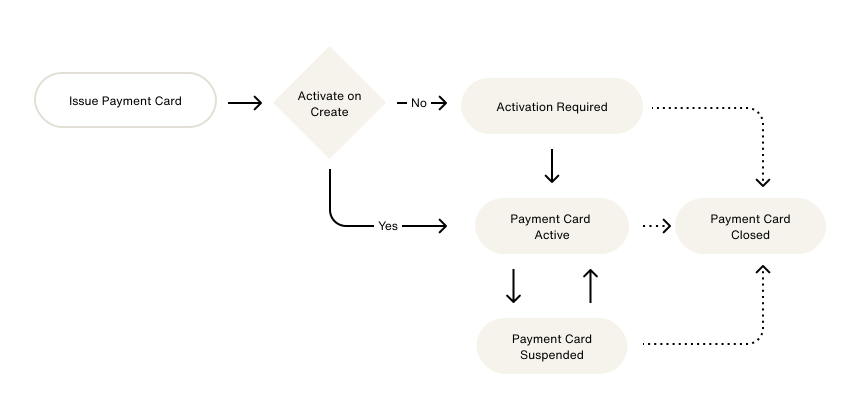
You can either activate virtual cards at creation or provide an experience for account holders to activate their virtual cards from your app or website. The following graphic provides an overview of the card activation flow:
Use the following mutation to activate a card:
ActivatePaymentCard
Query
mutation ActivatePaymentCard($input: ActivatePaymentCardInput!) {
  activatePaymentCard(input: $input) {
    ... on PaymentCard {
      status
    }
    ... on UserError {
      errors {
        code
        errorPath
      }
    }
  }
}
Variables
{
  "input": {
    "paymentCardId": "PAYMENT_CARD_ID"
  }
}
Result
{
  "data": {
    "status": "ACTIVE"
  }
}
Set a PIN
Payment cards must be activated before you set the PIN.
Prepaid cards have debit capabilities, so they must have a PIN set after activation. This allows access to ATMs and/or receive cashback at checkout.
You must create an interface for the account holder to set their PIN after activating their payment card. Refer to the following guides to create a PIN management interface:
- For web-based integrations, Highnote recommends you set the PIN with the Secure Inputs SDK.
- For native iOS and Android-based integrations, and non-native PCI-compliant environments, you can securely set a PIN from the API with a Client Token.
Use the following mutation to set a PIN:
SetPinForPaymentCard
Query
mutation SetPinForPaymentCard($input: SetPinForPaymentCardInput!) {
  setPinForPaymentCard(input: $input) {
    __typename
    ... on PaymentCard {
      id
    }
    ... on UserError {
      errors {
        errorPath
        code
      }
    }
  }
}
Variables
{
  "input": {
    "paymentCardId": "PAYMENT_CARD_ID",
    "newPin": "1234"
  }
}
Result
{
  "data": {
    "setPinForPaymentCard": {
      "__typename": "PaymentCard",
      "id": "PAYMENT_CARD_ID"
    }
  },
  "extensions": {
    "requestId": "REQUEST_ID"
  }
}
Next steps
When a virtual card is issued, you can print it is a physical card or issue a tokenized card. For more information, see the following guides: