AP Automation Template
Overview
AP automation card products allow you to issue cards to employees using a financial account owned by your business. AP automation cards are virtual payment cards that you can make available on your application or website. They are typically issued for specific transactions, controlled by spend rules and/or collaborative authorization.
The following graphic provides an overview of how an AP automation card product funds a virtual payment card:
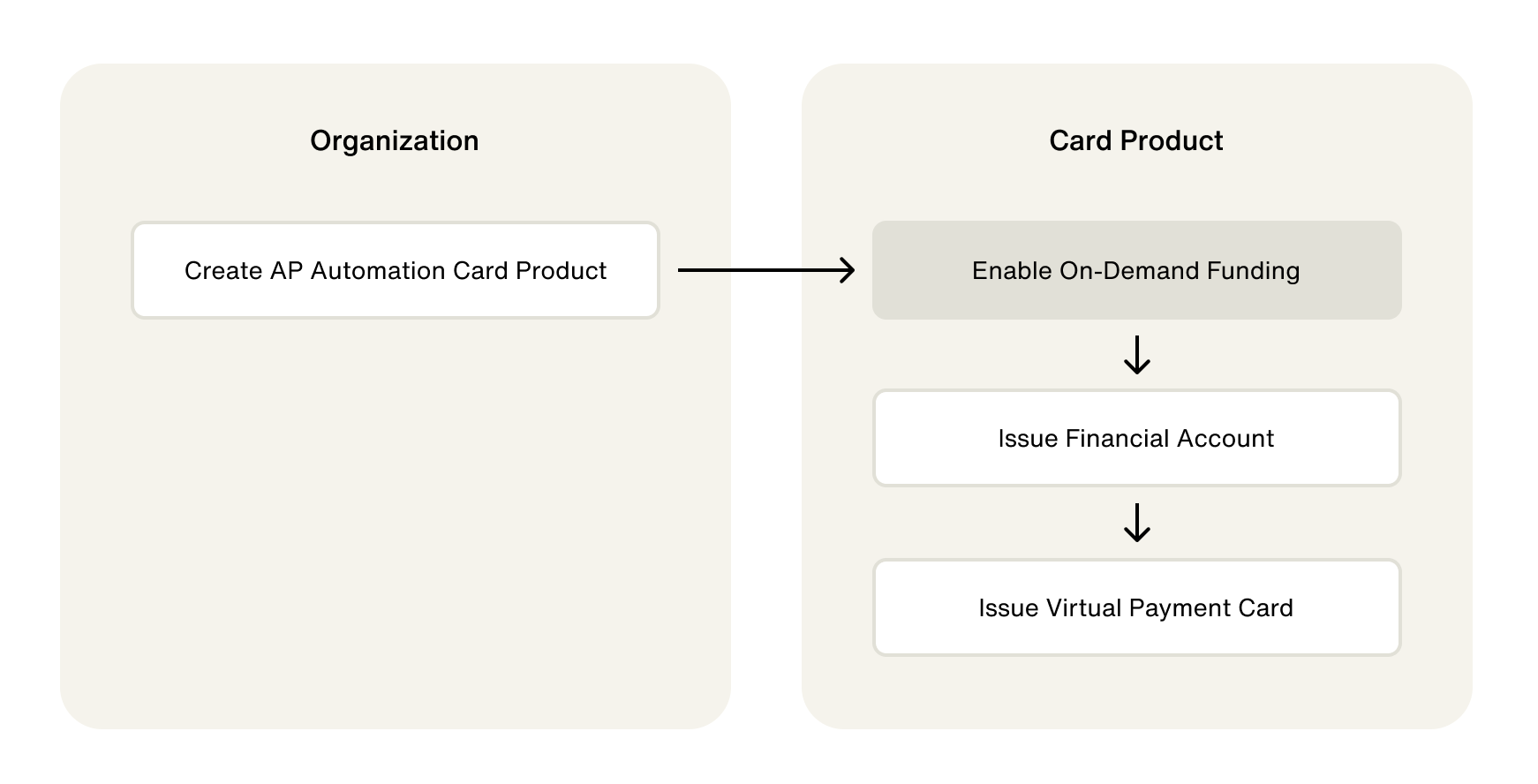
This guide provides an overview of creating and setting up an AP automation card product in your Test environment.
Create a card product
Use the following mutation to create an AP automation card product. Use AP_INVOICE_AUTOMATION as the vertical input variable:
CreateCardProduct
Query
mutation CreateCardProduct($input: CreateCardProductInput!) {
  createCardProduct(input: $input) {
    __typename
    ... on CardProduct {
      id
      name
      usage
    }
    ... on UserError {
      errors {
        errorPath
        code
        description
      }
    }
  }
}
Variables
{
  "input": {
    "cardProduct": {
      "name": "AP Automation",
      "vertical": "AP_INVOICE_AUTOMATION"
    }
  }
}
Result
{
  "data": {
    "createCardProduct": {
      "__typename": "CardProduct",
      "id": "Y2FyZHBy",
      "name": "Invoice Automation",
      "usage": "MULTI_USE"
    }
  },
  "extensions": {
    "requestId": "b85fc1ec-e770-9d06-922f-16b7486a690e"
  }
}
Fund your card program
AP automation card products use a product funding account to send funds to financial accounts. In the Test environment, you can simulate depositing funds into your product funding account. Simulating deposits doesn't require connecting a verified external bank account.
Funding your product funding account requires the following steps:
- Retrieve the product funding account ID.
- Initiate a wire transfer to the product funding account.
Find product funding account ID
Use the following query to find your product funding account ID:
GetCardProductwithAccounts
Query
query GetCardProductwithAccounts($id: ID!) {
  node(id: $id) {
    ... on CardProduct {
      __typename
      id
      name
      usage
      accounts {
        edges {
          node {
            id
            name
            features {
              __typename
              enabled
            }
            accountStatus
            owner {
              __typename
            }
          }
        }
      }
    }
  }
}
Variables
{
  "id": "<CARD_PRODUCT_ID>"
}
Result
{
  "data": {
    "node": {
      "id": "<CARD_PRODUCT_ID>",
      "accounts": {
        "edges": [
          {
            "node": {
              "id": "<FINANCIAL_ACCOUNT_ID>",
              "features": [
                {
                  "enabled": true,
                  "__typename": "ProductFundingFinancialAccountFeature"
                }
              ]
            }
          }
        ]
      }
    }
  },
  "extensions": {
    "requestId": "<REQUEST_ID>",
    "rateLimit": {
      "cost": 13,
      "limit": 60060,
      "remaining": 60041
    }
  }
}
Initiate a wire transfer
Using the following mutation, simulate a wire transfer in the Test environment using the product funding account ID as the toFinancialAccountId input variable:
SimulateDeposit
Query
mutation SimulateDeposit($input: SimulateDepositInput!) {
  simulateDeposit(input: $input) {
    __typename
    ... on Node {
      id
    }
    ... on Transfer {
      id
      status
      statusReason
      amount {
        value
        currencyCode
      }
      createdAt
      updatedAt
      ledgers {
        name
      }
    }
    ... on UserError {
      errors {
        code
      }
    }
    ... on AccessDeniedError {
      message
    }
  }
}
Variables
{
  "input": {
    "amount": {
      "value": 10000000,
      "currencyCode": "USD"
    },
    "source": "WIRE",
    "toFinancialAccountId": "<PRODUCT_FUNDING_ACCOUNT_ID>",
    "memo": "Consumer Credit product funding wire deposit"
  }
}
Result
{
  "data": {
    "simulateDeposit": {
      "__typename": "Transfer",
      "id": "<WIRE_TRANSFER_ID>",
      "status": "PENDING",
      "statusReason": null,
      "amount": {
        "value": 10000000,
        "currencyCode": "USD"
      },
      "createdAt": "2023-09-01T22:26:43.629Z",
      "updatedAt": "2023-09-01T22:26:43.629Z",
      "ledgers": null
    }
  },
  "extensions": {
    "requestId": "<REQUEST_ID>",
    "rateLimit": {
      "cost": 12,
      "limit": 60060,
      "remaining": 60040
    }
  }
}
Enable on-demand funding
AP automation card products use on-demand funding to fund account holder financial accounts. When you create an AP automation card product, your product funding account is used as the source account for on-demand funding.
On-demand funding has an optional feature called pseudo balance. Pseudo balance lets you set a spending limit on a financial account to ensure account holders cannot spend over a specific amount. When a transaction is initiated for a financial account with a pseudo balance, Highnote checks the PSEUDO_BALANCE ledger to approve or decline the authorization. If the pseudo balance feature is not enabled, Highnote checks the balance of your product funding account during authorization.
Use the following mutation to enable on-demand funding and use a boolean value to enable pseudo balance:
EnableOnDemandFundingFeature
Query
mutation EnableOnDemandFundingFeature(
  $input: EnableOnDemandFundingFeatureInput!
) {
  enableOnDemandFundingFeature(input: $input) {
    __typename
    ... on CardProduct {
      id
      features {
        __typename
        enabled
        ... on OnDemandFundingCardProductFeature {
          pseudoBalanceEnabled
        }
      }
    }
    ... on UserError {
      errors {
        errorPath
        code
        description
      }
    }
  }
}
Variables
{
  "input": {
    "cardProductId": "<CARD_PRODUCT_ID>",
    "pseudoBalanceEnabled": true
  }
}
Result
{
  "data": {
    "enableOnDemandFundingFeature": {
      "__typename": "CardProduct",
      "id": "<CARD_PRODUCT_ID>",
      "features": [
        {
          "__typename": "CollaborativeAuthorizationCardProductFeature",
          "enabled": true
        },
        {
          "__typename": "DisputeChargebackCardProductFeature",
          "enabled": true
        },
        {
          "__typename": "OnDemandFundingCardProductFeature",
          "enabled": true,
          "pseudoBalanceEnabled": true
        },
        {
          "__typename": "AuthorizedUserCardProductFeature",
          "enabled": false
        }
      ]
    }
  },
  "extensions": {
    "requestId": "f332c811-82e7-965d-b0e6-17519a7bd4b1",
    "rateLimit": {
      "cost": 11,
      "limit": 2500,
      "remaining": 2484,
      "asOf": "2025-06-06T16:06:09.019Z",
      "complexity": {
        "limit": 2500,
        "remaining": 2484,
        "cost": 11
      },
      "count": {
        "limit": 100,
        "remaining": 94,
        "cost": 1
      }
    }
  }
}
Issue financial account
Financial accounts for AP automation card products must have an on-demand funding source. The on-demand funding source is what enables the transfer of funds from your product funding account to the account holder's financial account.
Use the following mutation to issue a financial account with an on-demand funding source:
IssueFinancialAccountForApplicationWithOnDemandFundingSource
Query
mutation IssueFinancialAccountForApplicationWithOnDemandFundingSource(
  $input: IssueFinancialAccountForApplicationWithOnDemandFundingSourceInput!
) {
  issueFinancialAccountForApplicationWithOnDemandFundingSource(input: $input) {
    ... on FinancialAccount {
      id
      externalId
      name
      createdAt
      updatedAt
      application {
        id
        createdAt
      }
      cardProduct {
        id
        vertical
      }
      features {
        __typename
        enabled
        createdAt
        updatedAt
        ... on OnDemandFundingFinancialAccountFeature {
          sourceFinancialAccountId
        }
      }
      directDepositDetails {
        id
        restrictedDetails {
          __typename
          ... on DirectDepositDetailRestrictedDetails {
            number
            routingNumber
            bank {
              name
            }
          }
        }
      }
      owner {
        __typename
        ... on Node {
          id
        }
        ... on USPersonAccountHolder {
          id
        }
      }
    }
  }
}
Variables
{
  "input": {
    "applicationId": "<APPLICATION_ID>",
    "name": "Financial Account",
    "externalId": "<YOUR_EXTERNAL_ID>",
    "sourceFinancialAccountId": "<FINANCIAL_ACCOUNT_ID>"
  }
}
Result
{
  "data": {
    "IssueFinancialAccountForApplicationWithOnDemandFundingSource": {
      "id": "<FINANCIAL_ACCOUNT_ID>",
      "externalId": "ABC123456",
      "name": "John Doe - Account",
      "createdAt": "2021-12-28T18:20:49.932Z",
      "updatedAt": "2021-12-28T18:20:49.960Z",
      "application": {
        "id": "<APPLICATION_ID>",
        "createdAt": "2021-12-20T17:59:33.570Z"
      },
      "cardProduct": {
        "id": "<CARD_PRODUCT_ID>",
        "vertical": "GENERAL_PURPOSE_RELOADABLE"
      },
      "features": [
        {
          "__typename": "DirectDepositFinancialAccountFeature",
          "enabled": true,
          "createdAt": "2021-12-28T18:20:49.933Z",
          "updatedAt": "2021-12-28T18:20:49.933Z"
        },
        {
          "__typename": "DebitPaymentCardFinancialAccountFeature",
          "enabled": true,
          "createdAt": "2021-12-28T18:20:49.933Z",
          "updatedAt": "2021-12-28T18:20:49.933Z"
        },
        {
          "__typename": "OnDemandFundingFinancialAccountFeature",
          "enabled": true,
          "createdAt": "2021-12-28T18:20:49.933Z",
          "updatedAt": "2021-12-28T18:20:49.933Z",
          "sourceFinancialAccountId": "<FINANCIAL_ACCOUNT_ID>"
        }
      ],
      "directDepositDetails": {
        "id": "<FINANCIAL_ACCOUNT_ID>",
        "restrictedDetails": {
          "__typename": "AccessDeniedError"
        }
      },
      "owner": {
        "__typename": "USPersonAccountHolder",
        "id": "<ACCOUNT_HOLDER_ID>"
      }
    }
  }
}
Initiate pseudo balance update
If you have pseudo balance enabled for your AP automation card product, you must initiate a pseudo balance update after issuing a financial account. This sets the pseudo balance, or spending limit, for the financial account.
Use the following guide for managing pseudo balance limits and balances:
Issue payment card
AP automation cards are virtual cards that can be made available on your application or website. Use the following mutation to issue a virtual card:
IssuePaymentCardForFinancialAccount
Query
mutation IssuePaymentCardForFinancialAccount(
  $input: IssuePaymentCardForFinancialAccountInput!
) {
  issuePaymentCardForFinancialAccount(input: $input) {
    ... on PaymentCard {
      id
      bin
      last4
      expirationDate
      network
      status

      financialAccounts {
        id
      }

      restrictedDetails {
        ... on PaymentCardRestrictedDetails {
          cvv
          number
        }
        ... on AccessDeniedError {
          message
        }
      }
    }
    ... on UserError {
      errors {
        errorPath
        code
        description
      }
    }
  }
}
Variables
{
  "input": {
    "financialAccountId": "<FINANCIAL_ACCOUNT_ID>",
    "options": {
      "activateOnCreate": true,
      "expirationDate": "2027-01-01T23:59:59Z"
    }
  }
}
Result
{
  "data": {
    "issuePaymentCardForFinancialAccount": {
      "id": "<PAYMENT_CARD_ID>",
      "bin": "510515",
      "last4": "7162",
      "expirationDate": "2027-01-01T23:59:59Z",
      "network": "MASTERCARD",
      "status": "ACTIVE",
      "financialAccounts": [
        {
          "id": "<FINANCIAL_ACCOUNT_ID>"
        }
      ],
      "restrictedDetails": {
        "message": "Access is denied"
      }
    }
  }
}
Display payment card data
Highnote recommends using the Card Viewer SDK to securely display payment card data and and reduce PCI non-compliance.
There are two methods for displaying payment card data on your website or application:
- Fetching the data from the Highnote API
- Use the Card Viewer SDK to ensure PCI compliance
To fetch payment card data from the API, use the following query:
FindPaymentCard
Query
query FindPaymentCard($id: ID!) {
  node(id: $id) {
    ... on PaymentCard {
      bin
      last4
      expirationDate
      restrictedDetails {
        ... on PaymentCardRestrictedDetails {
          cvv
          number
        }
      }
    }
  }
}
Variables
{
  "id": "<PAYMENT_CARD_ID>"
}
Result
{
  "data": {
    "node": {
      "bin": "BIN",
      "last4": "LAST_4",
      "expirationDate": "<EXPIRATION_DATE>",
      "restrictedDetails": {
        "cvv": "CVV",
        "number": "<NUMBER>"
      }
    }
  }
}
Simulate transactions
After configuring your card product, we recommend simulating transactions. Simulating transactions is useful for testing your card program's configuration and settings.
For more information on simulating transactions, see Simulate Transactions.
Expand your integration
After configuring your card product and simulating transactions, you can use the following features to further expand your integration:
- Create authorization controls to manage spending.
- Create a rewards program for your card product.
- Setup notifications to automate your integration.