Fleet Credit Template
Overview
Fleet credit card products allow businesses to use payment cards to purchase fuel and vehicle maintenance-related services. Fleet cards are useful for the following features:
- Track spending on fuel, mileage driven, and maintenance schedules
- Restrict purchases to fueling stations
- Designate payment cards to vehicles
- Report enhanced transaction data metrics
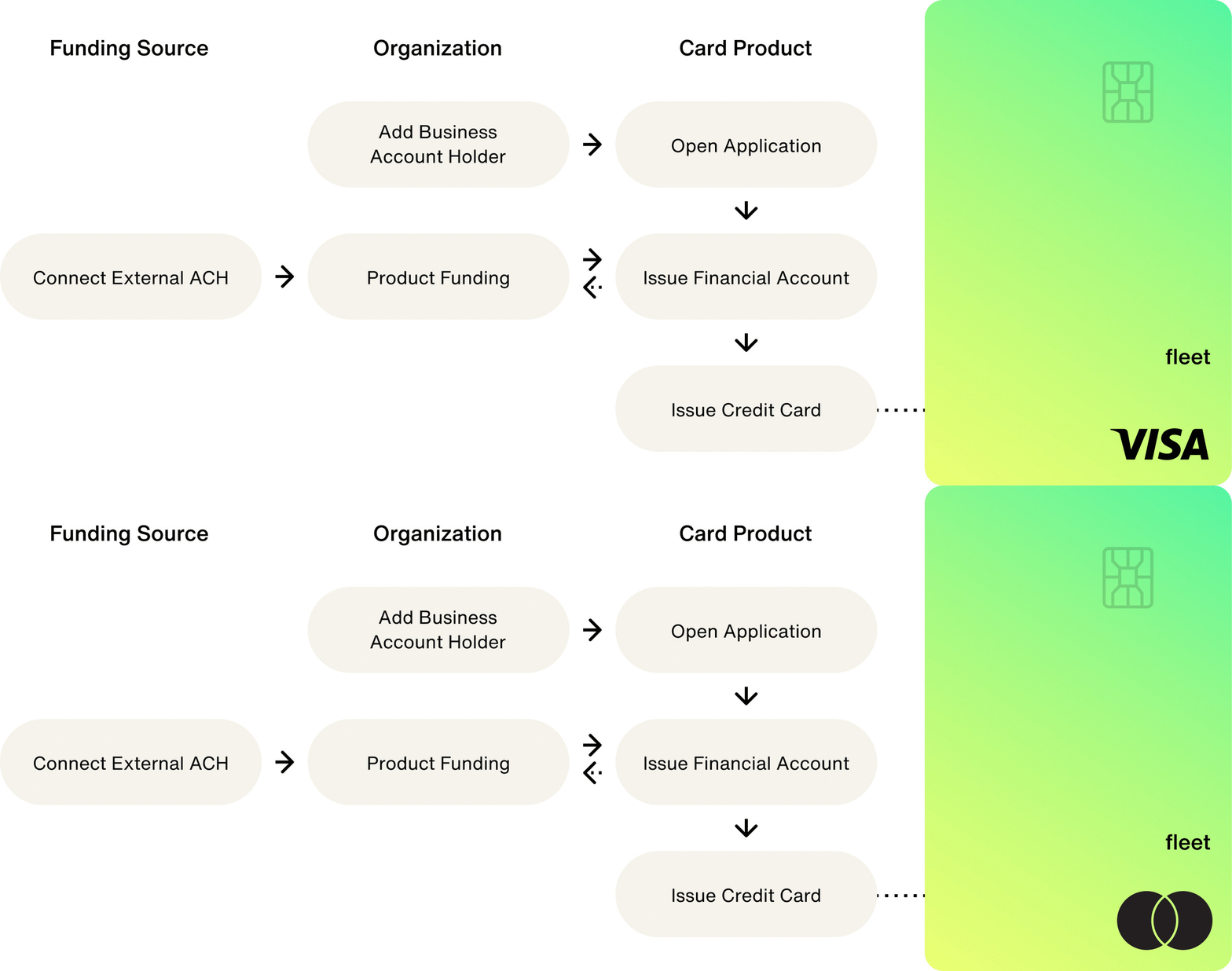
The following graphic provides an overview of the processing for issuing fleet cards:
How it works
Fleet card products are credit card products that have specialized features and settings. Fleet card products use the following features and settings:
- Required: Spend rules to limit how payment cards may be used
- Optional: Collaborative authorization for approving and denying transactions in real-time
For clearing events, fleet cards return enhanced data using specialized clearing messages. This data is split into three levels:
- Level 1: Contains standard payment network transaction data provided by merchants. Level 1 data is the same for all transaction types and merchants. No enhanced data is captured or provided at this level.
- Level 2: Contains enhanced data captured at the point of sale and sent with transactions. Level 2 data is always sent with clearing records.
- Level 3: Contains detailed enhanced data for transactions and is generally used to send specifics for non-fuel products and services. Level 3 data is sent anywhere from 24 hours to 48 hours after a transaction clears.
For simulating enhanced data, see Simulate Fleet Transactions.
Create a card product
Use the following mutation to create a fleet card product in the Test environment. Use FLEET as the vertical input variable:
CreateCardProduct
Query
mutation CreateCardProduct($input: CreateCardProductInput!) {
  createCardProduct(input: $input) {
    __typename
    ... on CardProduct {
      id
      name
      usage
    }
    ... on UserError {
      errors {
        errorPath
        code
        description
      }
    }
  }
}
Variables
{
  "input": {
    "cardProduct": {
      "name": "Fleet Credit",
      "usage": "MULTI_USE",
      "vertical": "FLEET"
    }
  }
}
Result
{
  "data": {
    "createCardProduct": {
      "__typename": "CardProduct",
      "id": "Y2FyZHBy",
      "name": "Fleet Credit",
      "usage": "MULTI_USE"
    }
  },
  "extensions": {
    "requestId": "b85fc1ec-e770-9d06-922f-16b7486a690e"
  }
}
Fund your card program
Fleet card products use a product funding account to issue lines of credit. The product funding account is where you deposit the capital that you or your debt facility provide to back lines of credit.
In the Test environment, you can simulate depositing funds into your product funding account. Simulating deposits doesn't require connecting a verified bank account.
Funding your product funding account requires the following steps:
- Retrieve the product funding account ID.
- Initiate a wire transfer to the product funding account.
Find product funding account ID
Use the following query to find your product funding account ID:
GetCardProductwithAccounts
Query
query GetCardProductwithAccounts($id: ID!) {
  node(id: $id) {
    ... on CardProduct {
      __typename
      id
      name
      usage
      accounts {
        edges {
          node {
            id
            name
            features {
              __typename
              enabled
            }
            accountStatus
            owner {
              __typename
            }
          }
        }
      }
    }
  }
}
Variables
{
  "id": "<CARD_PRODUCT_ID>"
}
Result
{
  "data": {
    "node": {
      "id": "<CARD_PRODUCT_ID>",
      "accounts": {
        "edges": [
          {
            "node": {
              "id": "<FINANCIAL_ACCOUNT_ID>",
              "features": [
                {
                  "enabled": true,
                  "__typename": "ProductFundingFinancialAccountFeature"
                }
              ]
            }
          }
        ]
      }
    }
  },
  "extensions": {
    "requestId": "<REQUEST_ID>",
    "rateLimit": {
      "cost": 13,
      "limit": 60060,
      "remaining": 60041
    }
  }
}
Initiate a wire transfer
Using the following mutation, simulate a wire transfer in the Test environment using the product funding account ID as the toFinancialAccountId input variable:
SimulateDeposit
Query
mutation SimulateDeposit($input: SimulateDepositInput!) {
  simulateDeposit(input: $input) {
    __typename
    ... on Node {
      id
    }
    ... on Transfer {
      id
      status
      statusReason
      amount {
        value
        currencyCode
      }
      createdAt
      updatedAt
      ledgers {
        name
      }
    }
    ... on UserError {
      errors {
        code
      }
    }
    ... on AccessDeniedError {
      message
    }
  }
}
Variables
{
  "input": {
    "amount": {
      "value": 10000000,
      "currencyCode": "USD"
    },
    "source": "WIRE",
    "toFinancialAccountId": "<PRODUCT_FUNDING_ACCOUNT_ID>",
    "memo": "Consumer Credit product funding wire deposit"
  }
}
Result
{
  "data": {
    "simulateDeposit": {
      "__typename": "Transfer",
      "id": "<WIRE_TRANSFER_ID>",
      "status": "PENDING",
      "statusReason": null,
      "amount": {
        "value": 10000000,
        "currencyCode": "USD"
      },
      "createdAt": "2023-09-01T22:26:43.629Z",
      "updatedAt": "2023-09-01T22:26:43.629Z",
      "ledgers": null
    }
  },
  "extensions": {
    "requestId": "<REQUEST_ID>",
    "rateLimit": {
      "cost": 12,
      "limit": 60060,
      "remaining": 60040
    }
  }
}
Create an account holder
Fleet card products are used by business account holders. US business account holders must provide business details and a primary authorized person, with the option to add beneficial owners.
Before issuing a line of credit, you may want to collect creditRiskAttribute inputs in the credit application.
These fields can be used to simulate credit line assignment or simulate adverse action reasons.
Fuel tax exemption
Be careful. The fuel tax exemption attribute must be set during account holder creation. It cannot be added or updated after onboarding.
For non-exempt fleets, omit businessPlanAttributes (which is optional).
For fuel tax exempt fleets, pass businessPlanAttributes in the businessProfile input with:
typeset toFUEL_TAX_EXEMPTvalueset totruereportedAtdate inYYYY-MM-DDformat.
When the fuel tax exemption is enabled, Highnote's platform tracks the Fleet's qualifying transactions to enable fuel tax reclamation reporting.
Use the following mutation to create a business account holder.
CreateUSBusinessAccountHolder
Query
mutation CreateUSBusinessAccountHolder(
  $input: CreateUSBusinessAccountHolderInput!
) {
  createUSBusinessAccountHolder(input: $input) {
    __typename
    ... on UserError {
      errors {
        errorPath
        code
        description
      }
    }
    ... on USBusinessAccountHolder {
      id
      externalId
      createdAt
      updatedAt
      businessProfile {
        id
        name {
          legalBusinessName
          doingBusinessAsName
        }
        businessType
        operatingDetails {
          indicatorAttributes {
            type
            value
            reportedAt
          }
        }
      }
    }
  }
}
Variables
{
  "input": {
    "primaryAuthorizedPerson": {
      "name": {
        "givenName": "<GIVEN_NAME>",
        "familyName": "<FAMILY_NAME>"
      },
      "dateOfBirth": "1980-01-01",
      "homeAddress": {
        "streetAddress": "123 Main St",
        "postalCode": "60654",
        "locality": "Chicago",
        "region": "IL",
        "countryCodeAlpha3": "USA"
      },
      "identificationDocument": {
        "socialSecurityNumber": {
          "number": "111-11-1111",
          "countryCodeAlpha3": "USA"
        }
      }
    },
    "businessProfile": {
      "name": {
        "legalBusinessName": "LEGAL_BUSINESS_NAME"
      },
      "businessType": "LIMITED_LIABILITY_COMPANY",
      "billingAddress": {
        "streetAddress": "456 Commerce Blvd",
        "postalCode": "90210",
        "locality": "Los Angeles",
        "region": "CA",
        "countryCodeAlpha3": "USA"
      },
      "identificationDocument": {
        "employerIdentificationNumber": {
          "number": "12-3456789",
          "countryCodeAlpha3": "USA"
        }
      },
      "businessPlanAttributes": [
        {
          "indicatorAttribute": {
            "type": "FUEL_TAX_EXEMPT",
            "value": true,
            "reportedAt": "2026-03-15"
          }
        }
      ]
    }
  }
}
Result
{
  "data": {
    "createUSBusinessAccountHolder": {
      "__typename": "USBusinessAccountHolder",
      "id": "<BUSINESS_ACCOUNT_HOLDER_ID>",
      "externalId": null,
      "createdAt": "2026-03-26T18:00:00.000Z",
      "updatedAt": "2026-03-26T18:00:00.000Z",
      "businessProfile": {
        "id": "<BUSINESS_ACCOUNT_HOLDER_ID>",
        "name": {
          "legalBusinessName": "LEGAL_BUSINESS_NAME",
          "doingBusinessAsName": null
        },
        "businessType": "LIMITED_LIABILITY_COMPANY",
        "operatingDetails": {
          "indicatorAttributes": [
            {
              "type": "FUEL_TAX_EXEMPT",
              "value": true,
              "reportedAt": "2026-03-15"
            }
          ]
        }
      }
    }
  },
  "extensions": {
    "requestId": "1ab32e1c-4949-9421-8240-c39ca4123jkl"
  }
}
The tokenizeUSBusinessAccountHolder mutation accepts the same input, so businessPlanAttributes can be included in the tokenized flow.
Query fuel tax exemption status
You can read back the fuel tax exemption status by querying the business account holder's operatingDetails.indicatorAttributes:
GetBusinessAccountHolder
Query
query GetBusinessAccountHolder($id: ID!) {
  node(id: $id) {
    ... on USBusinessAccountHolder {
      id
      businessProfile {
        name {
          legalBusinessName
        }
        operatingDetails {
          indicatorAttributes {
            type
            value
            reportedAt
          }
        }
      }
    }
  }
}
Variables
{
  "id": "<BUSINESS_ACCOUNT_HOLDER_ID_1>"
}
Result
{
  "data": {
    "node": {
      "id": "<BUSINESS_ACCOUNT_HOLDER_ID_2>",
      "businessProfile": {
        "name": {
          "legalBusinessName": "Fuel Corp."
        },
        "operatingDetails": {
          "indicatorAttributes": [
            {
              "type": "FUEL_TAX_EXEMPT",
              "value": true,
              "reportedAt": "2026-03-15"
            }
          ]
        }
      }
    }
  },
  "extensions": {
    "requestId": "a23de4f1-8821-4b3c-9a17-6c4f82d19e05"
  }
}
Open an application
After creating an account holder, you can open an application to onboard them to your card product. Opening an application triggers identity verification processes. You can participate in the application decisioning process using Collaborative Application Decisioning.
In some cases, additional documents may be required to approve an application. For more information on collecting additional documents, see Request Documents for Application Review.
Use the following mutation to open an application for an account holder:
createAccountHolderCardProductApplication
Query
mutation createAccountHolderCardProductApplication(
  $input: CreateAccountHolderCardProductApplicationInput!
) {
  createAccountHolderCardProductApplication(input: $input) {
    __typename
    ... on AccountHolderCardProductApplication {
      id
      applicationState {
        status
      }
      updatedAt
      createdAt
    }
    ... on UserError {
      errors {
        errorPath
        code
        description
      }
    }
  }
}
Variables
{
  "input": {
    "accountHolderId": "<ACCOUNT_HOLDER_ID>",
    "cardProductId": "<CARD_PRODUCT_ID>",
    "cardHolderAgreementConsent": {
      "primaryAuthorizedPersonId": "<PRIMARY_AUTHORIZED_PERSON_ID>",
      "consentTimestamp": "2021-12-22T17:10:55.662Z"
    }
  }
}
Result
{
  "data": {
    "createAccountHolderCardProductApplication": {
      "__typename": "AccountHolderCardProductApplication",
      "id": "<APPLICATION_ID>",
      "applicationState": {
        "status": "PENDING"
      },
      "createdAt": "2021-07-07T23:22:30.475Z",
      "updatedAt": "2021-07-07T23:22:30.475Z"
    }
  },
  "extensions": {
    "requestId": "<REQUEST_ID>"
  }
}
Simulate application decision
The Test environment does not run identity verification checks on applications. During testing, you can simulate application approvals or denials using simulation values. These simulation values produce tags that result in the following application statuses:
APPROVEDIN_REVIEWDENIED
For more information on using this simulation, see Simulate Underwriting Decision.
Issue a financial account
Financial accounts hold the balance for payment cards.
To create a new financial account, pass the id of a verified application.
Financial accounts have an externalId variable field that allows you to tie the financial account to an entity in your system.
If you do not pass in an externalId, Highnote will generate one.
Use the following mutation to issue a financial account for an application:
IssueFinancialAccountForApplication
Query
mutation IssueFinancialAccountForApplication(
  $input: IssueFinancialAccountForApplicationInput!
) {
  issueFinancialAccountForApplication(input: $input) {
    ... on FinancialAccount {
      id
      externalId
      name
      createdAt
      updatedAt
      application {
        id
        createdAt
      }
      cardProduct {
        id
        vertical
      }
      features {
        __typename
        enabled
        createdAt
        updatedAt
      }
      directDepositDetails {
        id
        restrictedDetails {
          __typename
          ... on DirectDepositDetailRestrictedDetails {
            number
            routingNumber
            bank {
              name
            }
          }
        }
      }
      owner {
        __typename
        ... on Node {
          id
        }
        ... on USPersonAccountHolder {
          id
        }
      }
    }
  }
}
Variables
{
  "input": {
    "applicationId": "<APPLICATION_ID>",
    "name": "Financial Account",
    "externalId": "<YOUR_EXTERNAL_ID>"
  }
}
Result
{
  "data": {
    "issueFinancialAccountForApplication": {
      "id": "<FINANCIAL_ACCOUNT_ID>",
      "externalId": "ABC123456",
      "name": "John Doe - Account",
      "createdAt": "2021-12-28T18:20:49.932Z",
      "updatedAt": "2021-12-28T18:20:49.960Z",
      "application": {
        "id": "<APPLICATION_ID>",
        "createdAt": "2021-12-20T17:59:33.570Z"
      },
      "cardProduct": {
        "id": "<CARD_PRODUCT_ID>",
        "vertical": "GENERAL_PURPOSE_RELOADABLE"
      },
      "features": [
        {
          "__typename": "DirectDepositFinancialAccountFeature",
          "enabled": true,
          "createdAt": "2021-12-28T18:20:49.933Z",
          "updatedAt": "2021-12-28T18:20:49.933Z"
        },
        {
          "__typename": "DebitPaymentCardFinancialAccountFeature",
          "enabled": true,
          "createdAt": "2021-12-28T18:20:49.933Z",
          "updatedAt": "2021-12-28T18:20:49.933Z"
        }
      ],
      "directDepositDetails": {
        "id": "<FINANCIAL_ACCOUNT_ID>",
        "restrictedDetails": {
          "__typename": "AccessDeniedError"
        }
      },
      "owner": {
        "__typename": "USPersonAccountHolder",
        "id": "<ACCOUNT_HOLDER_ID>"
      }
    }
  }
}
Set credit limit
Setting or updating a credit limit is an asynchronous process with the Highnote team to ensure your ledger balances and validations are in check.
You can set a financial account's credit limit by providing the financialAccountId and the credit limit you want to assign to the financial account. Your product funding financial account must have funds equal to or exceeding any credit limit you extend to your account holders.
Use the following mutation to set a credit limit:
InitiateFinancialAccountCreditLimitUpdateFromProductFunding
Query
mutation InitiateFinancialAccountCreditLimitUpdateFromProductFunding(
  $input: InitiateFinancialAccountCreditLimitUpdateFromProductFundingInput!
) {
  initiateFinancialAccountCreditLimitUpdateFromProductFunding(input: $input) {
    __typename
    ... on Node {
      id
    }
    ... on FinancialAccountCreditLimitUpdateFromProductFunding {
      id
      status
      statusReason
      createdAt
      updatedAt
      memo
      amount {
        value
        currencyCode
      }
    }
    ... on UserError {
      errors {
        code
      }
    }
    ... on AccessDeniedError {
      message
    }
  }
}
Variables
{
  "input": {
    "financialAccountId": "<FINANCIAL_ACCOUNT_ID>",
    "memo": "Set Limit",
    "amount": {
      "value": 100,
      "currencyCode": "USD"
    }
  }
}
Result
{
  "data": {
    "initiateFinancialAccountCreditLimitUpdateFromProductFunding": {
      "__typename": "FinancialAccountCreditLimitUpdateFromProductFunding",
      "id": "<FINANCIAL_ACCOUNT_ID>",
      "status": "PENDING",
      "statusReason": null,
      "createdAt": "2022-06-21T18:01:28.992Z",
      "updatedAt": "2022-06-21T18:01:28.993Z",
      "memo": null,
      "amount": {
        "value": 100,
        "currencyCode": "USD"
      }
    }
  },
  "extensions": {
    "requestId": "<REQUEST_ID>"
  }
}
Available credit
After setting a credit limit for a financial account, account holders can use their payment cards for fuel and maintenance purchases. Each transaction results in ledger entries that reflect adjustments to the AVAILABLE_CREDIT ledger.
To reflect repayment and adjustments, you must update the AVAILABLE_CREDIT ledger to reflect the available funds the account holder can spend.
Increase available credit
When an account holder repays their balance, you can increase their AVAILABLE_CREDIT ledger using the following mutation:
initiateTransferFromFundingFinancialAccountToPaymentCardFinancialAccount
Query
mutation initiateTransferFromFundingFinancialAccountToPaymentCardFinancialAccount(
  $input: InitiateTransferFromFundingFinancialAccountToPaymentCardFinancialAccountInput!
) {
  initiateTransferFromFundingFinancialAccountToPaymentCardFinancialAccount(
    input: $input
  ) {
    __typename
    ... on InterFinancialAccountTransfer {
      id
      status
      statusReason
      createdAt
      updatedAt
      memo
      amount {
        value
        currencyCode
      }
    }
    ... on UserError {
      errors {
        code
        errorPath
        description
      }
    }
    ... on AccessDeniedError {
      message
    }
  }
}
Variables
{
  "input": {
    "toFinancialAccountId": "<FINANCIAL_ACCOUNT_ID>",
    "fromFinancialAccountId": "<PRODUCT_BALANCE_ID>",
    "memo": "",
    "amount": {
      "value": 6000,
      "currencyCode": "USD"
    }
  }
}
Result
{
  "data": {
    "initiateTransferFromFundingFinancialAccountToPaymentCardFinancialAccount": {
      "__typename": "InterFinancialAccountTransfer",
      "id": "<INTER_FINANCIAL_ACCOUNT_TRANSFER_ID>",
      "status": "PENDING",
      "statusReason": null,
      "createdAt": "2022-09-09T00:09:02.864Z",
      "updatedAt": "2022-09-09T00:09:02.867Z",
      "memo": "",
      "amount": {
        "value": 6000,
        "currencyCode": "USD"
      }
    }
  },
  "extensions": {
    "requestId": "24f2f37c-4414-46d3-9e66-a031f30113af"
  }
}
Decrease available credit
To reduce the balance of the AVAILABLE_CREDIT ledger, use the following mutation:
initiateTransferFromPaymentCardFinancialAccountToFundingFinancialAccount
Query
mutation initiateTransferFromPaymentCardFinancialAccountToFundingFinancialAccount(
  $input: InitiateTransferFromPaymentCardFinancialAccountToFundingFinancialAccountInput!
) {
  initiateTransferFromPaymentCardFinancialAccountToFundingFinancialAccount(
    input: $input
  ) {
    __typename
    ... on InterFinancialAccountTransfer {
      id
      status
      statusReason
      createdAt
      updatedAt
      memo
      amount {
        value
        currencyCode
      }
    }
    ... on UserError {
      errors {
        code
        errorPath
        description
      }
    }
    ... on AccessDeniedError {
      message
    }
  }
}
Variables
{
  "input": {
    "toFinancialAccountId": "<PRODUCT_BALANCE_ID>",
    "fromFinancialAccountId": "<FINANCIAL_ACCOUNT_ID>",
    "memo": "unload card",
    "amount": {
      "value": 5000,
      "currencyCode": "USD"
    }
  }
}
Result
{
  "data": {
    "initiateTransferFromPaymentCardFinancialAccountToFundingFinancialAccount": {
      "__typename": "InterFinancialAccountTransfer",
      "id": "<TRANSFER_ID>",
      "status": "COMPLETED",
      "memo": "unload card",
      "statusReason": null,
      "createdAt": "2022-2-27T22:26:55.102Z",
      "updatedAt": "2022-2-27T22:26:55.127Z",
      "amount": {
        "value": 5000,
        "currencyCode": "USD"
      }
    }
  }
}
Issue a payment card
Once you have created a financial account, you can issue a payment card. By default, all payment cards start as virtual cards. See Issue Virtual Cards.
Use the following mutation to issue a virtual card:
IssuePaymentCardForFinancialAccount
Query
mutation IssuePaymentCardForFinancialAccount(
  $input: IssuePaymentCardForFinancialAccountInput!
) {
  issuePaymentCardForFinancialAccount(input: $input) {
    ... on PaymentCard {
      id
      bin
      last4
      expirationDate
      network
      status
      financialAccounts {
        id
        name
      }
      restrictedDetails {
        ... on PaymentCardRestrictedDetails {
          cvv
          number
        }
        ... on AccessDeniedError {
          message
        }
      }
    }
    ... on UserError {
      errors {
        errorPath
        code
        description
      }
    }
  }
}
Variables
{
  "input": {
    "financialAccountId": "<FINANCIAL_ACCOUNT_ID>",
    "options": {
      "activateOnCreate": true,
      "expirationDate": "2023-01-01T23:59:59Z"
    }
  }
}
Result
{
  "data": {
    "issuePaymentCardForFinancialAccount": {
      "id": "<PAYMENT_CARD_ID>",
      "bin": "489661",
      "last4": "9602",
      "expirationDate": "2025-01-01T23:59:59Z",
      "network": "MASTERCARD",
      "status": "ACTIVE",
      "financialAccounts": [
        {
          "id": "<FINANCIAL_ACCOUNT_ID>",
          "name": "Test Consumer Credit Account"
        }
      ],
      "restrictedDetails": {
        "message": "Access is denied"
      }
    }
  },
  "extensions": {
    "requestId": "<REQUEST_ID>"
  }
}
Physical cards
Highnote also supports issuing personalized payment cards to account holders. See Print Physical Cards.
Digital wallets
Highnote supports issuing tokenized cards. Account holders can add tokenized cards to digital wallets like Apple and Google Pay. See Add Cards to Digital Wallets.
Display payment card data
Highnote recommends using the Card Viewer SDK to securely display payment card data and reduce your PCI scope.
There are two methods for displaying payment card data on your website or application:
- Fetching the data from the Highnote API
- Use the Card Viewer SDK to ensure PCI compliance
To fetch payment card data from the API, use the following query:
FindPaymentCard
Query
query FindPaymentCard($id: ID!) {
  node(id: $id) {
    ... on PaymentCard {
      bin
      last4
      expirationDate
      restrictedDetails {
        ... on PaymentCardRestrictedDetails {
          cvv
          number
        }
      }
    }
  }
}
Variables
{
  "id": "<PAYMENT_CARD_ID>"
}
Result
{
  "data": {
    "node": {
      "bin": "BIN",
      "last4": "LAST_4",
      "expirationDate": "<EXPIRATION_DATE>",
      "restrictedDetails": {
        "cvv": "CVV",
        "number": "<NUMBER>"
      }
    }
  }
}
Configure spend rules
Fleet card products use spend rules and velocity controls to control spending for the following common use cases:
- Spending amount limits
- Authorization count limits
- Merchant category code (MCC) limits
- Merchant identifier (MID) limits
- Point of service category controls
For more information on configuring spend rules and velocity controls, see the following guides:
Simulate transactions
After configuring your fleet card product, we recommend simulating transactions. Simulating transactions is useful for testing your card program's configurations and settings.
For more information on simulating transactions, see Simulate Fleet Transactions.
Simulate delinquency
Highnote's delinquency simulator lets you view a financial account's current delinquency status and receivables by simulating past purchase and payment scenarios. In the Test environment, this helps with understanding delinquency scenarios and testing notification events.
See Simulate Delinquency for more information on using the Highnote API to simulate delinquency in the Test environment.
Expand your integration
After configuring your card product and simulating transactions, you can use the following features to further expand your integration:
- Create a rewards program for your card product.
- Set up notifications to automate your integration.