Request Documents On-Demand
Overview
Highnote may request additional documents from an account holder outside of the normal application review process. These requests are triggered by compliance reviews, manual investigations, or other lifecycle events that require updated documentation.
Unlike application review document requests, which are tied to a CardProductApplication, on-demand document requests are event-driven and independent of the application lifecycle.
How it works
- Highnote creates a
ManualDocumentRequestUploadSessionand sends aDOCUMENT_UPLOAD_REQUESTED_EVENTnotification event via webhook. - You query the session by ID to see what documents are requested.
- You collect and upload the documents using the Document Upload SDK or the Highnote API.
Session status lifecycle
After Highnote creates a session and you query by the session ID, you can begin the upload process:
| Status | Description |
|---|---|
CREATED | The session has been created but not yet started. |
INITIATED | The session has been started and files can be uploaded. |
IN_PROGRESS | A file upload has been initiated within the session. |
SUBMITTED | The session has ended. No further uploads are accepted. Highnote will review the uploaded documents. |
EXPIRED | The session expired due to inactivity. Files can no longer be uploaded. A new session must be created. |
After a session is SUBMITTED, Highnote reviews the documents. You can monitor the outcome by subscribing to the DOCUMENT_UPLOAD_SESSION_COMPLETE_EVENT notification event.
File formats and sizes
Supported file formats: PDF, PNG, JPG. Maximum file size: 10 MB.
Get requested documents
When you receive a DOCUMENT_UPLOAD_REQUESTED_EVENT, extract the DocumentUploadSessionId from the event payload. Use this ID to query for the session and see what documents are needed.
The response includes a documentRequests array with the requested documentType and whether each document is required.
FindDocumentUploadSession
Query
query FindDocumentUploadSession($id: ID!) {
  node(id: $id) {
    __typename
    ... on ManualDocumentRequestUploadSession {
      id
      status
      expiresAt
      createdAt
      updatedAt
      documentRequests {
        documentType
        required
      }
      documents {
        id
        status
      }
    }
  }
}
Variables
{
  "id": "<DOCUMENT_UPLOAD_SESSION_ID>"
}
Result
{
  "data": {
    "node": {
      "__typename": "ManualDocumentRequestUploadSession",
      "id": "<DOCUMENT_UPLOAD_SESSION_ID>",
      "status": "CREATED",
      "expiresAt": "2026-04-25T00:00:00.000Z",
      "createdAt": "2026-03-26T00:00:00.000Z",
      "updatedAt": "2026-03-26T00:00:00.000Z",
      "documentRequests": [
        {
          "documentType": "DRIVERS_LICENSE",
          "required": true
        }
      ],
      "documents": null
    }
  },
  "extensions": {
    "requestId": "<REQUEST_ID>",
    "rateLimit": {
      "cost": 7,
      "limit": 1000,
      "remaining": 993
    }
  }
}
Upload documents
After reviewing the requested documents, upload them using the Document Upload SDK or the Highnote API directly.
Using the SDK
The Document Upload SDK provides a pre-built widget that handles file selection, upload, and session management. The SDK automatically renders the list of required documents and closes the session when all uploads are complete.
To use the SDK for on-demand document requests, pass the documentUploadSessionId from the event payload when initializing the SDK. See the Document Upload SDK guide for installation, configuration, and error handling.
Direct API integration
If you prefer to manage the upload flow yourself, use the following API operations:
Start session
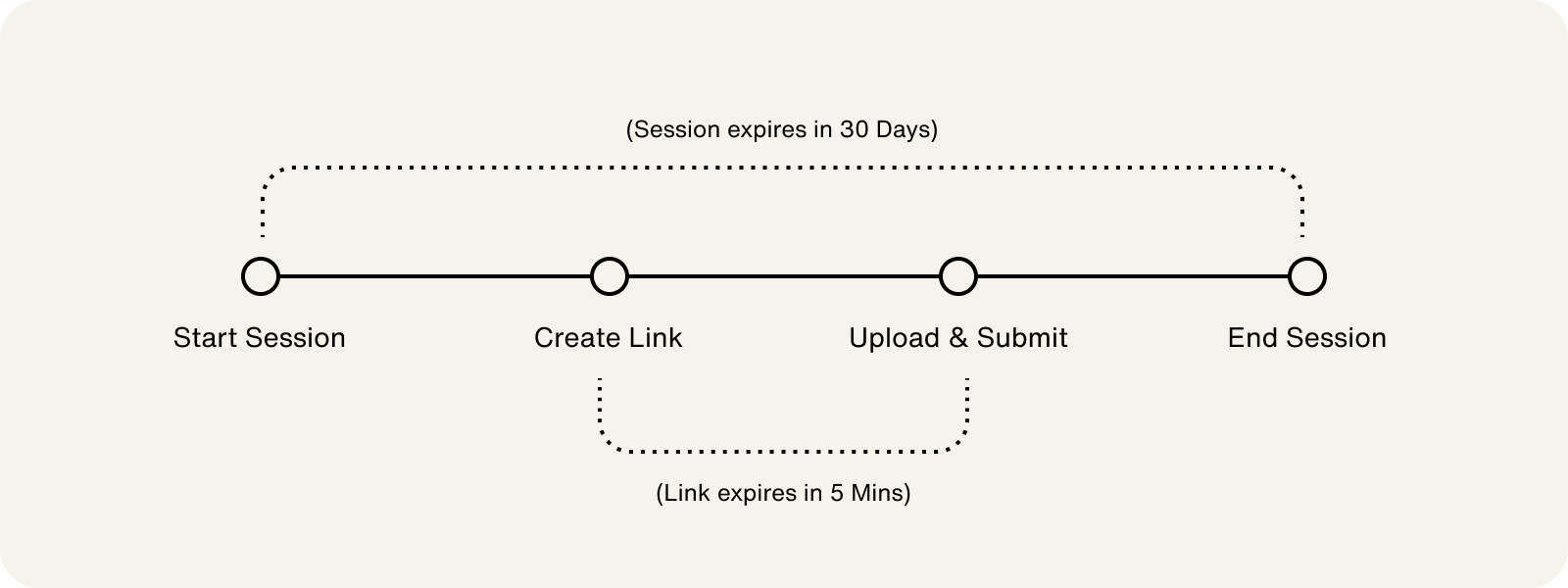
Start the document upload session to begin uploading files. Sessions expire 30 days from creation.
StartDocumentUploadSession
Query
mutation startDocumentUploadSession($input: StartDocumentUploadSessionInput!) {
  startDocumentUploadSession(input: $input) {
    __typename
    ... on Node {
      id
    }
    ... on USAccountHolderApplicationDocumentUploadSession {
      id
      status
      documents {
        id
        status
        uploadUrl
      }
      recommendedDocumentTypes
      documentContext {
        ... on AccountHolderApplicationDocumentUploadSessionContext {
          documentVerificationResultCodeContext {
            entries {
              document
              verificationResultCodes
            }
          }
          verificationResultCodeDocumentContext {
            entries {
              verificationResultCode
              documents
            }
          }
        }
      }
    }
  }
}
Variables
{
  "input": {
    "documentUploadSessionId": "<DOCUMENT_UPLOAD_SESSION_ID>"
  }
}
Result
{
  "data": {
    "node": {
      "__typename": "USAccountHolderApplicationDocumentUploadSession",
      "id": "<DOCUMENT_UPLOAD_SESSION_ID>",
      "status": "INITIATED",
      "documents": null,
      "recommendedDocumentTypes": [
        "DRIVERS_LICENSE"
      ],
      "documentContext": {
        "documentVerificationResultCodeContext": {
          "entries": [
            {
              "document": "DRIVERS_LICENSE",
              "verificationResultCodes": [
                "NAME_MISMATCH"
              ]
            },
            {
              "document": "PAY_STUB",
              "verificationResultCodes": [
                "NAME_MISMATCH"
              ]
            },
            {
              "document": "PASSPORT",
              "verificationResultCodes": [
                "NAME_MISMATCH"
              ]
            }
          ]
        },
        "verificationResultCodeDocumentContext": {
          "entries": [
            {
              "verificationResultCode": "NAME_MISMATCH",
              "documents": [
                "DRIVERS_LICENSE",
                "PAY_STUB",
                "PASSPORT"
              ]
            }
          ]
        }
      }
    }
  },
  "extensions": {
    "requestId": "<REQUEST_ID>",
    "rateLimit": {
      "cost": 7,
      "limit": 1000,
      "remaining": 993
    }
  }
}
Create upload link
Create a secure upload link for each document. Each link represents a single file upload. The uploadUrl field in the response is a direct storage upload target, not a web page, so your application must stream the document's bytes to it directly, or use the SDK, which does this for you.
CreateDocumentUploadLink
Query
mutation createDocumentUploadLink($input: CreateDocumentUploadLinkInput!) {
  createDocumentUploadLink(input: $input) {
    __typename
    ... on Node {
      id
    }
    ... on DocumentUploadLink {
      id
      documentUploadSession {
        id
        status
      }
      documentType
      documentCategoryType
      status
      uploadUrl
    }
  }
}
Variables
{
  "input": {
    "documentUploadSessionId": "<DOCUMENT_UPLOAD_SESSION_ID>",
    "documentType": "PASSPORT"
  }
}
Result
{
  "id": "<DOCUMENT_UPLOAD_LINK_ID>",
  "status": "PENDING",
  "documentUploadSession": {
    "id": "<DOCUMENT_UPLOAD_SESSION_ID>",
    "status": "IN_PROGRESS"
  },
  "documentType": "PASSPORT",
  "documentCategoryType": "PRIMARY_DOCUMENT_TYPE",
  "uploadUrl": "https://storage.googleapis.upload-to-bucket"
}
End session
After all documents are uploaded, end the session. The session status transitions to SUBMITTED and no further uploads are accepted.
EndDocumentUploadSession
Query
mutation endDocumentUploadSession($input: EndDocumentUploadSessionInput!) {
  endDocumentUploadSession(input: $input) {
    __typename
    ... on Node {
      id
    }
    ... on USAccountHolderApplicationDocumentUploadSession {
      id
      status
      documents {
        ... on DocumentUploadLink {
          id
          status
          documentType
          documentCategoryType
        }
      }
    }
  }
}
Variables
{
  "input": {
    "documentUploadSessionId": "<DOCUMENT_UPLOAD_SESSION_ID>"
  }
}
Result
{
  "id": "<DOCUMENT_UPLOAD_SESSION_ID>",
  "status": "SUBMITTED",
  "documents": [
    {
      "id": "<DOCUMENT_UPLOAD_LINK_ID>",
      "status": "UPLOADED",
      "documentType": "PASSPORT",
      "documentCategoryType": "PRIMARY_DOCUMENT_TYPE"
    }
  ]
}